
Scroller
Kinetic Scroll family — one shared gesture core, three components on top. This page is the scroller's full reference; siblings: Overview · List View · Carousel.
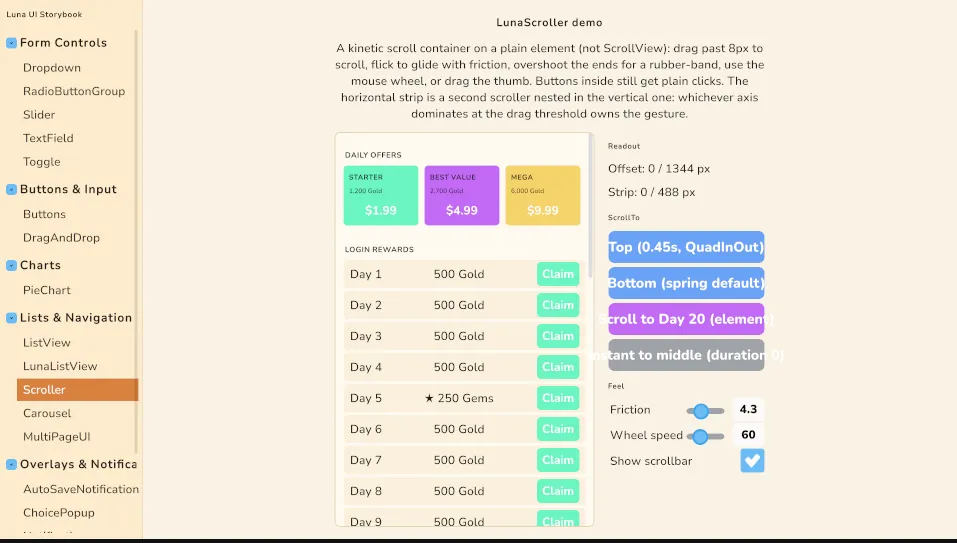
LunaScroller is a game-grade scroll container: drag past a threshold, flick into a momentum glide with tunable friction, rubber-banded ends with spring-back, mouse wheel, an optional styled scrollbar, and scroll-into-view on gamepad/keyboard focus change. It shares its gesture core with Carousel, so a horizontal offer strip composes inside a vertical scroller through axis-lock arbitration: whichever axis dominates at the drag threshold owns the gesture, and a lost gesture stays lost for that pointer.
Like the Carousel, it is deliberately not built on Unity's ScrollView — the component owns the whole gesture on a plain container, so the ScrollView elastic-offset clamp bug (long touch lists jumping near the tail) structurally cannot occur.
Upgrading to 2.1.3? The scroller's structural styles ship in the theme's new
LibScroller.uss(Carousel:LibCarousel.uss). If your project imports the theme (directly or through the Essentials sample copy), force-reimport your theme chain once: Unity does not rebuild derived ThemeStyleSheets on its own, and without the new sheet the content shrinks to min-content and nothing scrolls — every horizontal scroller reads as drag-dead.
Setup
Children become the scrolled content. The scroller needs a size from USS or layout; content overflows it and is clipped:
<ui:UXML xmlns:ui="UnityEngine.UIElements" xmlns:luna="CupkekGames.Luna">
    <luna:LunaScroller name="Shop" style="flex-grow: 1;">
        <ui:Label text="DAILY OFFERS" />
        <luna:Carousel name="Offers" page-width-percent="64">...</luna:Carousel>
        <ui:VisualElement name="RewardList">...</ui:VisualElement>
    </luna:LunaScroller>
</ui:UXML>
Attributes
| Attribute | Default | Meaning |
|---|---|---|
axis | Vertical | Scroll direction. Horizontal lays content out in a row. |
friction | 4 | Per-second exponential decay of the glide velocity. Higher stops sooner. |
wheel-speed | 60 | Pixels scrolled per mouse-wheel delta unit. |
show-scrollbar | true | Styled thumb; auto-hidden when the content fits. |
scroll-into-view | true | Scroll a newly focused descendant into view (deferred one frame so nav transitions land first). |
spring-duration | 0.2 | Settle time for spring-back, ScrollTo, and track clicks. |
API
LunaScroller scroller = root.Q<LunaScroller>("Shop");

scroller.ScrollOffset;          // px scrolled, 0 at the start edge (set = instant)
scroller.MaxScroll;             // content size minus viewport
scroller.ScrollTo(0f);                                  // default motion: spring-duration + ease-out
scroller.ScrollTo(0f, 0.45f, EasingType.QuadInOut);     // explicit duration + easing; duration 0 = instant
scroller.ScrollTo(element);                             // scroll-into-view; same overloads, no-op when visible
scroller.ScrollChanged += px => UpdateParallax(px);
The scrollbar thumb is draggable and the track click-jumps with a settle. Presses inside the content only become drags after 8px of travel, so buttons keep their plain clicks — past the threshold the scroller captures the pointer and the child press cancels.
Theming
.my-shop .luna-scroller__thumb { --luna-scroller-thumb: rgba(255, 255, 255, 0.25); }
.my-shop .luna-scroller__thumb:hover { --luna-scroller-thumb-hover: rgba(255, 255, 255, 0.5); }| Class | Element |
|---|---|
.luna-scroller / .luna-scroller--horizontal | Root (clips overflow). |
.luna-scroller__content | The moving content (translate transform; carries the load-bearing flex-shrink: 0). |
.luna-scroller__bar / .luna-scroller__thumb | Scrollbar track and thumb. |
LunaListView
LunaListView is the fixed-height virtualized list built on this scroller — MakeItem / BindItem / ItemsSource, RefreshItems() vs Rebuild(), single selection with the Unity-compatible event, ScrollToIndex with ScrollAlignment, and keyboard/gamepad row stepping. It has its own page: LunaListView.
Showcase
The Components showcase ships ScrollerShowcase.unity — a shop-style page with a horizontal Carousel offer strip inside the vertical scroller (the axis-lock composition), a reward track long enough to flick through, the offset readout, and a ScrollTo button.
The Storybook (Lists & Navigation → Scroller) shows the same composition compactly: a vertical feed with a horizontal scroller nested inside, live offset readouts for both, one button per ScrollTo overload, and friction / wheel-speed / scrollbar knobs you can change while flicking.
Settings
Theme
Light
Contrast
Material
Dark
Dim
Material Dark
System
Sidebar(Light & Contrast only)
Font Family
DM Sans
Wix
Inclusive Sans
AR One Sans
Direction