
Pagination
Pagination<T> and PaginationController<T> slice a list into pages and (optionally) render a button strip with prev / next / page-number controls. Use the data-only Pagination<T> if you want to drive your own UI; use PaginationController<T> when you also want Luna's button rendering.
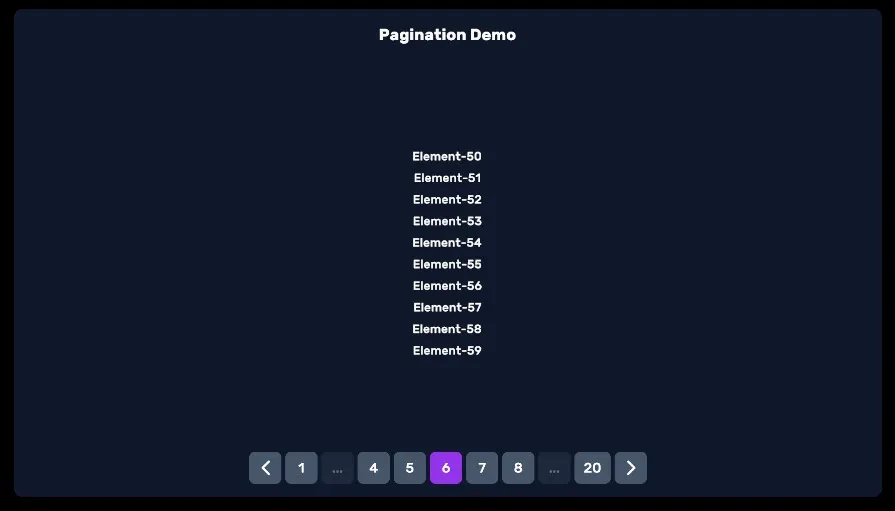
Quick start — paginate a list
The data-only Pagination<T> needs no UXML at all: give it a list and a page size, listen for OnPageChange, render however you like.
// Inside your PanelRenderer reload callback (PanelRenderer delivers the
// visual tree asynchronously — don't query in Awake/Start):
var pageContainer = root.Q<VisualElement>("PageContainer");

var items = new List<string> { "Sword", "Shield", "Potion", "Bow", "Helm" };
var pagination = new Pagination<string>(items, itemsPerPage: 2);

pagination.OnPageChange += page =>
{
    pageContainer.Clear();
    foreach (string item in pagination.GetCurrentPageElements())
        pageContainer.Add(new Label(item));
};

pagination.GoToPage(0);     // render the first page
pagination.NextPage();      // …later, from your own buttons
For Luna's rendered button strip, switch to PaginationController<T> and hand it a parent element containing these named children (all optional — only what it finds gets wired):
<ui:UXML xmlns:ui="UnityEngine.UIElements" xmlns:luna="CupkekGames.Luna">
    <ui:VisualElement name="Pagination" style="flex-direction: row; justify-content: center;">
        <ui:Button name="Previous" class="btn btn-solid" />
        <ui:VisualElement name="ButtonContainer" style="flex-direction: row; align-items: center;" />
        <ui:Button name="Next" class="btn btn-solid" />
    </ui:VisualElement>
</ui:UXML>| Child name | Role |
|---|---|
ButtonContainer | Page-number buttons are created here. |
Previous / Next | Wired to PreviousPage() / NextPage(); auto-disabled at the ends. |
PageLabel | Optional Label showing the current page number. |
These names are also exposed as constants —
PaginationElementNames.ButtonContainer/.Previous/.Next/.PageLabel— reference those from code instead of hard-coding the strings.SetUIqueries by exactly these names and silently skips any child that doesn't match.
var paginationElement = root.Q<VisualElement>("Pagination");
var pagination = new PaginationController<string>(
    items, 2, paginationElement,
    "scarlet",   // normal button color class (see Colors)
    "coral",     // active button color class
    maxButtonAmount: 5
);
Setup — reusable row elements
The recommended pattern reuses existing VisualElements instead of recreating them on each page change — fewer allocations, smoother updates.
LabelWithBinding
A tiny adapter that binds/unbinds a single Label to one row of data:
using UnityEngine.UIElements;

namespace CupkekGames.Luna.Sample.Showcase
{
    public class LabelWithBinding
    {
        private Label _label;

        public LabelWithBinding(Label label) { _label = label; }

        public void Bind(string data) { _label.text = data; }
        public void Unbind()           { _label.text = ""; }
    }
}
PaginationDemo
public class PaginationDemo : UIViewComponent
{
    [Header("Pagination Settings")]
    [SerializeField] private int _itemPerPage = 3;
    [SerializeField] private int _maxButtonAmount = 5;
    [SerializeField] private string _baseButtonColor   = "scarlet";
    [SerializeField] private string _activeButtonColor = "coral";
    [Header("Pagination Data")]
    [SerializeField] private int _dataAmount = 200;

    private PaginationController<string> _pagination;
    private List<string> _sourceList = new();
    private List<LabelWithBinding> _uiController = new();
    private VisualElement _container;

    protected override void Awake()
    {
        base.Awake();

        for (int i = 0; i < _dataAmount; i++)
            _sourceList.Add("Element-" + i);

        _container = ParentElement.Q<VisualElement>("PaginationElementsContainer");
        for (int i = 0; i < _itemPerPage; i++)
        {
            Label label = new Label();
            _container.Add(label);
            _uiController.Add(new LabelWithBinding(label));
        }

        VisualElement paginationElement = ParentElement.Q<VisualElement>("Pagination");
        _pagination = new(
            _sourceList, _itemPerPage, paginationElement,
            _baseButtonColor, _activeButtonColor, _maxButtonAmount
        );
    }

    private void OnEnable()  => _pagination.OnPageChange += OnPageChange;
    private void OnDisable() => _pagination.OnPageChange -= OnPageChange;

    protected virtual void Start() => _pagination.GoToPage(0);

    private void OnPageChange(int page)
    {
        List<string> currentPage = _pagination.GetCurrentPageElements();
        for (int i = 0; i < _pagination.ItemsPerPage; i++)
        {
            LabelWithBinding controller = _uiController[i];
            controller.Unbind();
            if (i >= currentPage.Count) continue;
            controller.Bind(currentPage[i]);
        }
    }
}
The full demo lives in the Showcase sample under Storybook/Components/Pagination/.
API — Pagination<T>
The data-only base class — no UI dependency.
Constructor
public Pagination(List<T> data, int itemsPerPage)Methods
| Method | Returns | Description |
|---|---|---|
NextPage() | bool | Advance one page. Returns true if the page actually changed. |
PreviousPage() | bool | Step back one page. |
GoToPage(int pageIndex) | bool | Jump to a specific page. |
GetCurrentPageElements() | List<T> | Items on the current page. |
GetStartIndex(int page) | int | First-element index of the given page in the source list. |
Events
public event Action<int> OnPageChange; // new page indexAPI — PaginationController<T>
Subclass of Pagination<T> that also renders a button strip.
Constructors
// Data-only; wire up UI later via SetUI.
public PaginationController(List<T> data, int itemsPerPage);

// Data + UI in one call. `normal` / `active` are palette color class
// names (e.g. "scarlet", "coral") applied to the generated buttons —
// see Colors for the available palette.
public PaginationController(
    List<T> data,
    int itemsPerPage,
    VisualElement parent,
    string normal,
    string active,
    int maxButtonAmount
);
Methods
| Method | Description |
|---|---|
SetUI(VisualElement parent, string normal, string active, int maxButtonAmount) | Attach (or re-attach) the button strip to a parent (queries the Previous/Next/ButtonContainer/PageLabel children by name). |
UpdateUI() | Rebuild the button strip — call after the data list changes length. |
SetAutoHideSinglePage(bool autoHide) | A pager showing "1" for a single page is almost never wanted, so the whole strip auto-hides when TotalPages <= 1 — default ON. Pass false for screens that rely on the fixed footprint. Re-evaluated on UpdateUI and every page change (data swaps route through GoToPage). |
Show() | Show the button strip. |
Hide() | Hide the button strip. |
See also
Settings
Theme
Light
Contrast
Material
Dark
Dim
Material Dark
System
Sidebar(Light & Contrast only)
Font Family
DM Sans
Wix
Inclusive Sans
AR One Sans
Direction