
Troubleshoot
Find your symptom, get the cause and the fix. Entries are ordered by how early they tend to bite — the first three cover almost every "it doesn't work out of the box" report.
The Showcase scene is blank or unstyled
Symptom: you open LunaShowcase.unity, press Play, and get an empty screen — or views render but look unthemed, with missing icons and sprites.
Cause: the Essentials sample isn't imported, or was imported after Showcase. Showcase references Essentials assets (theme, Panel Settings, nav config, UXML templates, sprites) via sibling-relative paths — without Essentials those references are broken; and if Showcase was imported first, its files resolved against targets that didn't exist yet and stay broken until reimported.
Fix:
- In
Window > Package Manager > In Project > LunaUI > Samples, import Essentials (or openTools > CupkekGames > LunaUI Paneland use its one-click import buttons). - If Showcase was already imported before Essentials: right-click
Assets/Samples/LunaUI/<version>/Showcasein the Project window and choose Reimport so its references re-resolve.
The Quick Start import order — Essentials first, Showcase second — avoids this entirely.
Input doesn't respond, or the loading screen won't skip
Symptom: demo scenes render but nothing reacts to clicks or keys; the boot loading screen sits there and can't be skipped.
Cause: Luna's demos read input through the Input System package's project-wide actions, and your project doesn't have the Luna action asset assigned there.
Fix: go to Project Settings > Input System Package and set Project-wide Actions to the Luna_InputSystem_Actions asset from the Essentials sample (Assets/Samples/LunaUI/<version>/Essentials/Input/Luna_InputSystem_Actions.inputactions).
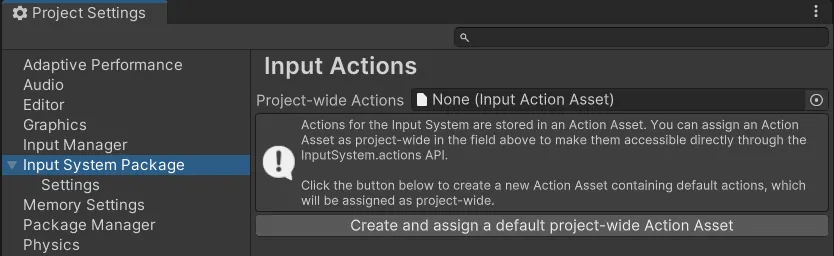
The LunaUI Panel (Tools > CupkekGames > LunaUI Panel) surfaces the same tip with an Open Input Settings button.
Element queries return null in Awake
Symptom: root.Q<Button>("...") (or any element lookup) returns null in Awake/OnEnable/Start, usually followed by a NullReferenceException.
Cause: Luna renders views through PanelRenderer (Unity 6.5's replacement for the deprecated UIDocument), and PanelRenderer delivers its visual tree asynchronously. At Awake time the tree simply doesn't exist yet — this is the single most common Luna scripting mistake.
Fix: in a UIViewComponent, query elements in the OnUILoaded override — it fires once the tree is mounted, with root already scoped to your view's subtree:
public class MyView : UIViewComponent
{
    private Button _playButton;

    protected override void OnUILoaded(VisualElement root)
    {
        _playButton = root.Q<Button>("play-button");
    }
}
From outside the component, use myView.WhenUILoaded(() => { ... }) — it runs immediately if the UI is already loaded, otherwise on the load event. You'll meet this pattern hands-on in First View.
Collection was modified after a view loads
Symptom: the Console shows InvalidOperationException: Collection was modified; enumeration operation may not execute, thrown from inside UI Toolkit's runtime panel update (PreUpdatePanelRenderers or a neighboring frame), on the frame after a view loads or a scene reveals. None of your scripts appear on the stack, so whatever else runs in that update pass tends to get blamed.
Cause: a load hook spawned, destroyed, or toggled a GameObject that carries a PanelRenderer while Unity was iterating the live panels. OnUILoaded, OnViewRootChanged, UILoaded, the deferred branch of WhenUILoaded, and PanelRendererBinder.OnPanelReady are all delivered from PanelRenderer's reload callback, which Unity runs from that same pass. Registering a new panel mid-iteration corrupts it; the exception surfaces one update later, from Unity's loop. Typical culprits: a world-space speech bubble prefab, a nested dialogue or visual-novel prefab, a popup instantiated as soon as its parent screen loads.
Fix: keep queries and subscriptions in the hook, and move the spawn one frame out. In a UIViewComponent, wrap it in DeferOneTick(() => ...); from a helper class or non-view MonoBehaviour, use LunaUIManager.Instance.DeferOneTick(() => ...). Re-check state at the top of the action, since a UI reload may already have spawned the thing. See Spawning other panels from a load hook.
Fades or transitions don't play on a view
Symptom: a view's fade-in/out or transition animations don't run — or only part of the view animates while sibling elements pop in instantly. The Console shows a [UIViewComponent] warning about top-level children.
Cause: your view's UXML has multiple root elements. With the Parent Name field empty, UIViewComponent auto-resolves its content root to the first top-level child of the UXML — any sibling roots stay in the tree but get no fade/transition wiring.
Fix: wrap your UXML content in a single outer VisualElement so the whole view animates as one unit — or set the component's Parent Name field to the element that should own the fade.
UI Effects don't render at all
Symptom: no glow/outline/gradient/shine on anything, and the Console warns [Luna] FilterFunctionDefinition not found.
Cause: the effects filter pipeline is uninitialised. LunaUIManager registers a UIEffectSettings asset as the global instance in its Awake — if your scene has no LunaUIManager, or its Effect Settings field is empty, no UIEffectElement can render.
Fix: drop the Essentials Prefabs/LunaUIManager.prefab into your scene — it ships pre-wired with Essentials/Effects/UIEffectSettings.asset (which references the LunaFilter definition). If you built your own manager, assign that asset to its Effect Settings field; for bootstrap code that runs without a manager, call UIEffectSettings.SetInstance(settings) yourself. For effects that render but look wrong (washed-out shadows, black glows), see the UI Effects troubleshooting table.
UI Effects look blurry or soft
Symptom: glows, outlines, and other shader effects render, but edges look soft or smeared instead of crisp.
Cause: your Panel Settings uses Scale With Screen Size at a non-integer effective scale — the panel's render output (including the custom-filter passes) gets resampled.
Fix: use Constant Pixel Size. Luna's shipped LunaPanelSettings.asset uses Constant Pixel Size with Scale = 1; if you need a larger UI, prefer an integer Scale (e.g. 2) over Scale With Screen Size. See Theme Stack for the Panel Settings rundown.
Compile errors right after import
Symptom: the Console fills with compile errors the moment Luna finishes importing.
Cause: your editor is older than Unity 6000.5. Luna 2.0 builds on Unity 6.5 APIs (PanelRenderer and the custom-filter pipeline); the package's package.json declares 6000.5 as the minimum, and older editors can't compile it.
Fix: upgrade the project to Unity 6000.5 or later, then reimport.
Compile errors right after importing the GameFull sample
Symptom: Luna itself works, but the Console fills with CS0246 errors the moment you import the GameFull sample. Tools installed afterwards (including the CupkekGames Package Manager window) never appear in the menus, and reopening the project offers Safe Mode.
Cause: GameFull's scripts compile against the CupkekGames sibling packages (gamesave, inventory, rpgstats, settings, resources, and more). Those are not bundled with Luna: they install through the Package Manager window's Install GameFull Packages button. Importing the sample before installing them leaves its assemblies uncompilable. Unity then refuses to load any newly compiled assembly while compile errors exist, so tooling added after the errors appeared stays invisible until they are gone.
Fix:
- Delete the imported sample folder
Assets/Samples/LunaUI/<version>/GameFull. The errors disappear immediately. - Follow the GameFull install order: install the Package Manager window via git URL, click Install GameFull Packages, then re-import Essentials and GameFull.
Styles are broken everywhere (USS failed to import)
Symptom: Luna UI renders with default-looking, unstyled controls in every scene, even though Essentials is imported and the theme chain is wired.
Cause: occasionally USS files fail to import correctly and need a manual reimport.
Fix: go to Packages > LunaUI > Runtime > USS and reimport the files in each subfolder (Components, Effects, Library, Unity): enter the folder, select all files (Ctrl+A), right-click > Reimport. Reimport the files, not the folder — and do not click "Reimport All".
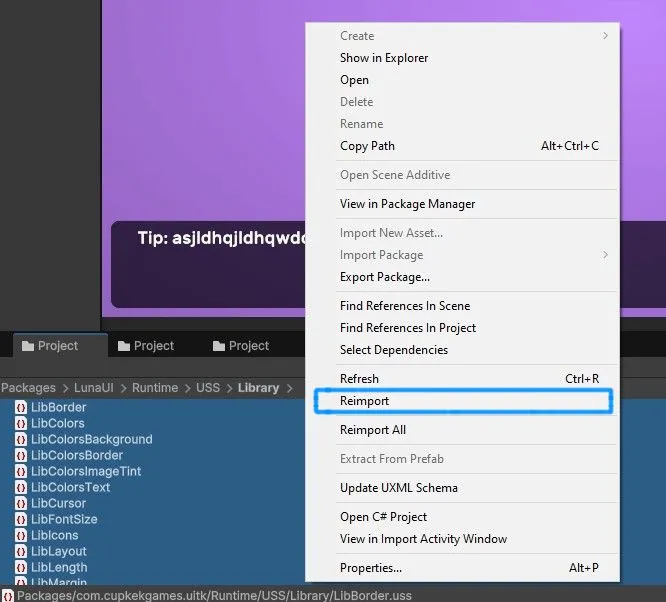
If styles still don't recover, also reimport Packages > LunaUI > Runtime > Setup > CupkekGamesMainTheme.
Luna styles don't show in UI Builder
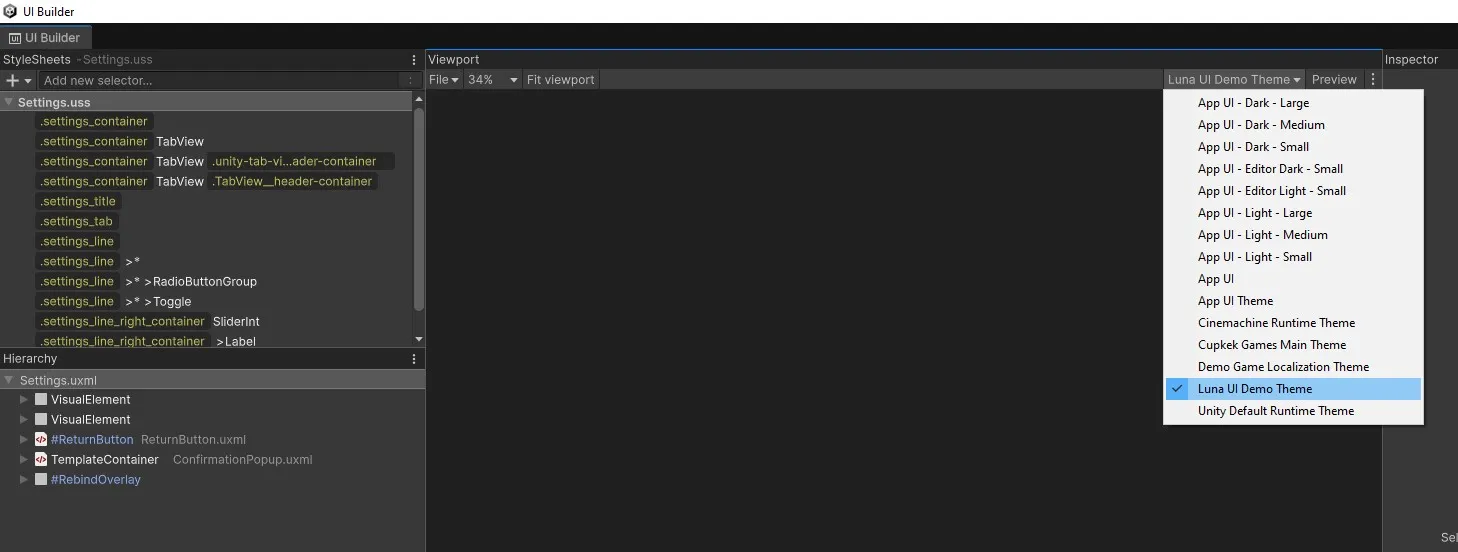
Symptom: your UXML looks right in Play mode but unstyled inside UI Builder.
Cause: UI Builder previews with its own active theme — it doesn't know about Luna's theme until you select it.
Fix: in the UI Builder viewport toolbar, switch the Theme dropdown to Luna's theme (LunaUIDemoTheme from the Essentials sample).
"Missing signature" / "Unsigned" warnings in the Package Manager
Symptom: on Unity 6.3 or newer, CupkekGames packages installed from the scoped registry show a signature warning in the Package Manager details pane.
Cause: Unity 6.3 introduced signature checks for every tarball-delivered package. Only Unity's own packages can carry a Full signature; third-party publishers can at best sign with their organization, which Unity labels Limited signature ("verify the source"). Unsigned releases show Unsigned. This is Unity's trust labeling, not an integrity failure: the registry serves the exact tarballs published to the CupkekGames GitHub releases, with npm shasum/integrity checksums on every download.
Fix: nothing is broken, so nothing to fix. Current CupkekGames releases are published unsigned, so Unsigned is the expected label for now; every download is still integrity-checked through the npm shasum/integrity checksums. One known Unity bug to rule out: 6.3 builds before 6000.3.5f2 can mislabel validly signed packages as Invalid — upgrade to 6000.3.5f2 or later if you see that status.
Data appears only on the second visit
Symptom: you push a detail screen or modal with args; the first open shows blank or stale content, the second open shows the right data.
Cause: the view reads its args in OnUILoaded (which fires once, at panel load) instead of on every fade-in. The first push often lands before or during load, so the one-time read misses or goes stale.
Fix: query elements in OnUILoaded, but consume GetArgs<T>() in a Fade.OnFadeInStart handler so every visit refreshes. The full pattern is on Typed Destinations.
A contained view never appears and boot seems stuck
Symptom: a drilldown or tab body destination never shows; sometimes the whole boot hold never releases (the loading screen stays up).
Cause: the view's Parent Name doesn't resolve to an element inside its parent view's subtree (a typo, or the named root was removed from the parent's UXML). The view never loads, never reports ready, and stalls the host's ready gate.
Fix: the console logs the exact error at play (component, destination id, the name searched, the scope searched). At author time the graph footer warns when the name isn't statically present in the panel owner's UXML. Fix the Parent Name to match a named element in the parent's UXML.
A view is visible but not clickable
Symptom: the screen renders correctly, but buttons don't react to pointer or touch.
Cause: one of three, in likelihood order: no active EventSystem in the scene; an invisible full-bleed element sitting above the content with picking-mode="Position" swallowing the hits; or another view with Disable Other Views On Fade In is currently active, so Luna has input-blocked this one on purpose.
Fix: in play mode, open the Graph Runtime Debugger: its Problems panel flags zero (or multiple) active EventSystems. For an overlay in the pick chain, set decorative elements to picking-mode="Ignore" or constrain their bounds. For the modal case, nothing is broken: close the blocking view.
A contained template flashes at boot or blocks clicks
Symptom: a drilldown or tab template that lives inside a shared shell's UXML appears for a frame at startup, or invisibly swallows clicks meant for the content under it, before its destination is ever pushed.
Cause: the child view is binding late. In the supported flow this window does not exist: a NavHost spawns a graph's views together, they register against the panel before its first tree clone, and each view's born visibility (hidden unless Start Visible) is applied synchronously in the same panel update that builds the tree, before the first paint. A visible flash means something deferred the child's spawn or bind until after the parent's panel had already painted: a custom spawner, a late activation, or an external flow layer instantiating views on demand.
Fix: fix the flow, not the template. Mount the graph through a NavHost so destinations pre-spawn and bind at boot, and keep the child prefab saved active (an inactive prefab is flagged by validation). If an external state machine drives your UI, defer your logic, not the view: gate FSM work on first show, but let views exist and bind at spawn. See External Flow Owners.
Back pops the wrong thing, or tabs forget their stacks
Symptom: Esc closes a whole section instead of the open drilldown, or switching tabs loses a tab's open detail view.
Cause: Stacked vs Switched semantics on the wrong node. A drilldown parent accidentally set to Switched turns the detail into a parallel channel; a tab container left Stacked makes tabs share one stack.
Fix: on the graph, tab containers carry the Tabs badge and their children the derived tab badge; drilldown chains carry neither. Check the parent node's Child Mode against the Navigation containment rules, and watch for the SwitchChannel "not a tab" console warning.
Not listed here?
- The Community FAQ covers install, packaging, and "do I need all 49 packages" questions.
- The Release Notes document behavior changes between versions — worth a scan after any upgrade.
- Discord is the fastest route to a human. Bring your Unity version, Luna version, and a Console screenshot.
Settings
Theme
Light
Contrast
Material
Dark
Dim
Material Dark
System
Sidebar(Light & Contrast only)
Font Family
DM Sans
Wix
Inclusive Sans
AR One Sans
Direction