
Navigation
Author your screen flow as a graph — and get a real back button (Esc / hardware back / controller B), tabs that remember their stacks, and awaitable modals for free. Navigate by string id from anywhere:
LunaNavigation.Push("shop.home");                                    // show a screen
var result = await LunaNavigation.PushAsync<bool>("confirm.delete"); // modal that returns a value
LunaNavigation.PopBackStack();                                       // back, from code
This is Luna's screen push / pop stack. Use it for any UI flow with back-button semantics — modals, drill-downs, tab switches, full-screen takeovers.
Not Focus Navigation. That page is about arrow-key focus within a panel. This page is about pushing whole screens.
The five pieces
Navigation is split into a small set of orthogonal assets/components. Author them once, then navigate by string id forever after.
| Piece | What it is | Type |
|---|---|---|
| Destination | One screen / modal / tab — its id + policy | NavNode (a node inside a graph) |
| Graph | The set of destinations + their containment | NavGraphSO asset |
| Catalog | Bakes id → NavNode for runtime id resolution | NavDestinationCatalog asset (optional — see below) |
| Host | Scene component that mounts a graph as a live UI layer | NavHost MonoBehaviour |
| Config | The PanelSettings (scale / theme / sort-order) a host applies | NavConfigSO asset |
The contract that ties it all together is the id. NavNode.Id ⇒ the catalog key ⇒ LunaNavigation.Push("that.id"). Keep ids flat, globally unique, and dotted by convention (shop.home, hero.detail, settings).
NavGraphSO (asset)                 NavHost (scene)  ──mounts──►  graph
 ├─ NavNode "shop.home"  ◄──┐         └─ NavConfigSO (PanelSettings)
 ├─ NavNode "shop.item"  ───┘ containment edge (parent → child)
 └─ NavNode "shop.tabs" (ChildMode = Switched)  ⇒ its children are tabs

LunaNavigation.Push("shop.home")  ──resolves off──►  the merged topology of all mounted hosts
Why the split:
- Graph ≠ layer. A graph is just the destination set + containment. Where/how it renders (PanelSettings, sort order, which scene) is the host + config — so one graph can be mounted by two hosts in two scenes with different configs.
- Containment is an edge, not a field. A destination's parent is a graph edge. Tab-ness and the owning channel are derived from containment by
NavTopologyat load — never stored on the node. - One id space across hosts. Every mounted host registers its graph's topology into one merged index, so a destination defined once (e.g. a global
settings) is reachable from every scene.
Scoped, not global. A graph is only "in" the id space while a live
NavHostmounts it: the host registers the graph's topology inAwakeand unregisters it inOnDestroy. Kill the host (scene unload,Destroy) and its ids stop resolving;Pushthen logsno destination for id. Two things follow:
- There is no project-wide runtime registry of graphs. "Global" destinations are just a normal graph on a host that never dies (see Global UI below).
- The Id dropdown in the Inspector is edit-time only: it lists ids from every graph asset in the project, including ones no host in your scene mounts. Picking an id there does not guarantee it resolves in play mode.
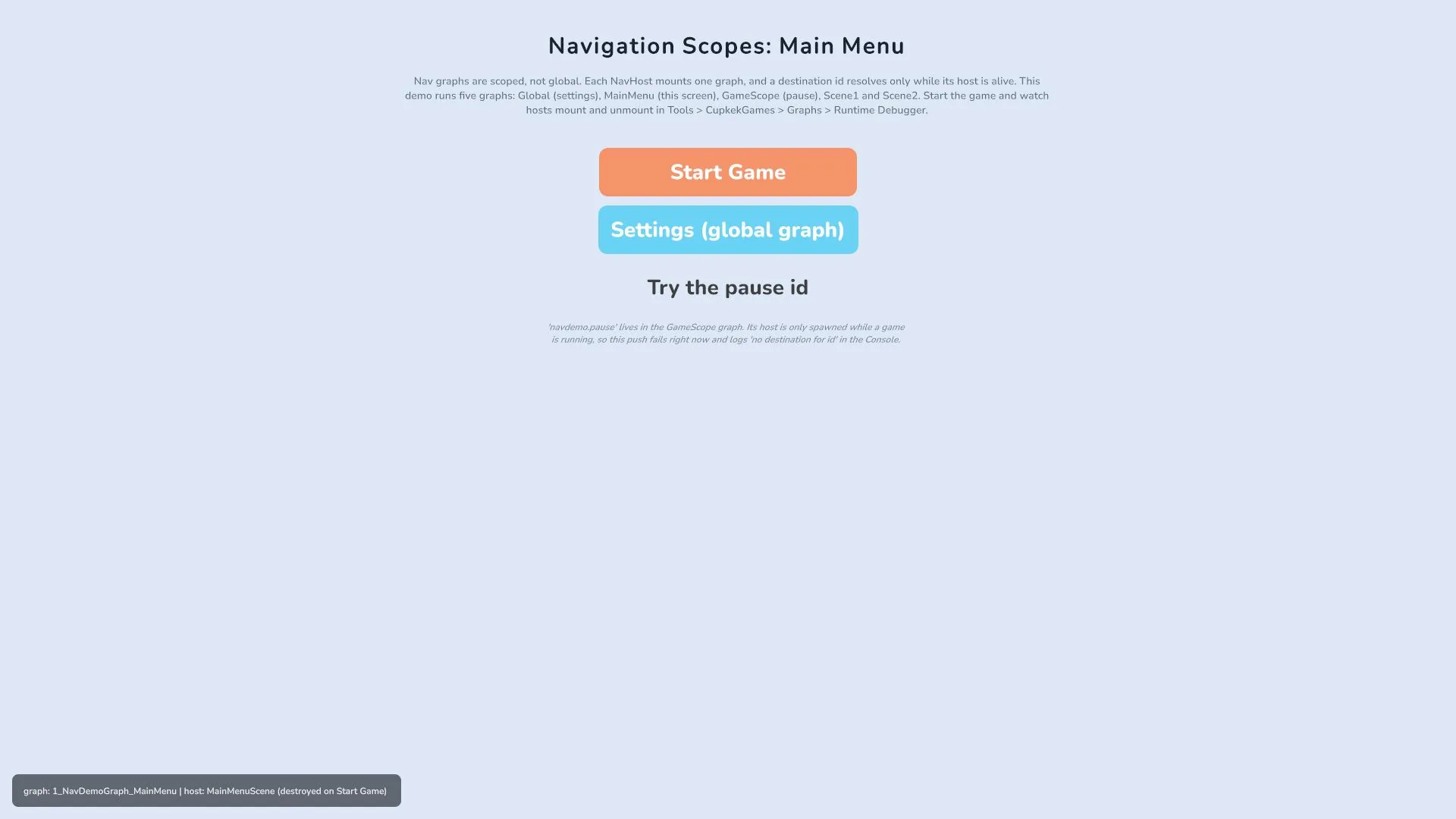
See it live: the Showcase sample's
Components/Navigation/NavigationDemo.unityruns five graphs on five hosts with different lifetimes (persistent global, main menu, a game-session pause scope, and two per-scene graphs), including buttons that deliberately push unmounted ids so you can watch the scope miss in the Console. Map: Showcase sample.
Dependencies (v2.0.0): the graph canvas comes from
com.cupkekgames.graphsand theCatalogKeymachinery fromcom.cupkekgames.data. Both are declared dependencies ofcom.cupkekgames.luna, so they arrive automatically when you install Luna — nothing extra to add.
Four meanings of "parent". Navigation prose uses the word for four different relationships; keep them apart when reading docs, inspectors, and code:
- Graph parent: the source of a containment edge in the NavGraph. Drives channels, tab-ness, and back behavior.
- Spawned GameObject parent: the host parents a child destination's instance under its graph parent's view transform.
- Panel owner: the
PanelRenderera view renders through. Contained children carry none of their own and inherit the parent view's renderer.- UXML mount ancestor: the element named by Parent Name, resolved inside the parent view's subtree, where a contained child's root lives.
Quick start
- Create → Luna → Nav → Nav Graph, double-click it to open the canvas, add a
NavNodeper destination, set each node's Id and Prefab, and wire containment edges. - Create → Luna → Nav → Nav Config, assign the
PanelSettingsthis layer renders with. - In the scene: add a
NavHostto a GameObject, assign the graph + config. Make sure aLunaUIManageris in the scene. - Push from anywhere:
using CupkekGames.Data;
using CupkekGames.Luna.Navigation;

[CatalogKeyConstraint(NavConstants.NavDestinationCatalogId)]
[SerializeField] private CatalogKey _heroDetail;   // validated id dropdown

void OnRosterRowClicked(Hero hero)
{
    LunaNavigation.Push(_heroDetail, new HeroDetailArgs { Hero = hero });
    // or, by raw id:  LunaNavigation.Push("hero.detail", new HeroDetailArgs { Hero = hero });
}
Pop with Esc / back-button / backdrop click, or programmatically with LunaNavigation.PopBackStack().
Authoring the graph
Create with Project → Create → Luna → Nav → Nav Graph (one graph per feature/scene, e.g. RootNav, ShopNav). Double-click the asset to open the canvas (also reachable via Window → CupkekGames → Graphs → Graph Editor).
- Add a
NavNodeper destination. Select a node to edit its fields in the docked inspector. The node's Id is thePushid / catalog key — the field autocompletes existing ids across every graph as you type, and double-clicking the node header renames it (which writes the id). - Containment edges — drag from a parent's children-out port (right edge) to a child's parent-in port (left edge). The chevron points parent → child.
- A node with no inbound edge is a forest root — global modals, the shell, a tab bar. That's legal; a graph is a forest.
- A node has at most one parent, and the canvas rejects edges that would create a cycle.
- Tabs — set a container node's Child Mode = Switched. Its children become tabs (each owns its own parallel stack). Everything else stays Stacked (children share the parent's stack — drill-downs and overlays).
- The graph footer flags missing id (warning), duplicate id (error), and more than one parent (error) live — the duplicate-id and multi-parent checks also run in
NavTopology.Buildat load.
The canvas badges policy at a glance: Tabs on a Switched container, seed for Start Visible, replace / opaque for non-default occlusion, backdrop, multi for multi-instance — plus a derived tab badge and a per-channel accent tint once the topology resolves.
NavNode field reference
Identity
- Id — stable id for code / deep-link nav.
Push("<id>")resolves to this destination. Flat, globally unique, dotted by convention. Required to be reachable by id.
Spawn
- Prefab — the view prefab the host spawns. The root must carry a
UIViewComponent(see prefab rules). - Start Visible —
true⇒ bornopacity:1 / display:flexand the host auto-pushes it at boot (sibling-order).false(default) ⇒ born hidden, off-stack until pushed. - Is Multi Instance —
false(default): re-push reuses the existing frame.true: each push spawns a fresh copy (notifications, side-by-side dialogs). - Sort Order Override —
−1(default): the host assignsPanelRenderer.sortingOrderautomatically (spawn order × 10, plus the host's Sort Order Base).≥ 0: replaces the automatic within-host value — for the rare view that must break spawn-order stacking (always-on-top debug overlay, under-everything HUD). See Scene host setup.
Behavior
- Occlusion — when on top, what happens to the views beneath it in its own stack? Overlay (default — modals/overlays/toasts) keeps them visible; Replace (screen-replaces-screen) hides the one below; Overlay Opaque stops rendering everything beneath (
display:none) once this view is fully shown — a render optimization for destinations whose solid background fully covers the screen. Ignored for tabs. Full semantics, scope rules, and when not to use Overlay Opaque: Occlusion. - Sequential Replace — Replace only. Screen follows screen instead of cross-fading: the view beneath finishes its fade-out before this destination fades in, and on close this destination finishes its fade-out before the view beneath fades back in. Off (default) fades both at once. Use it when the two screens share the same region and a cross-fade would show them on top of each other (a hub swapping to a sibling area screen); leave it off when the incoming view is a cover. See Occlusion.
- Sequential Gap — Sequential Replace only. Seconds of nothing between the outgoing fade-out finishing and this destination fading in; on close, the same pause before the view beneath fades back in.
0(default) runs the two fades back to back. A short gap (0.3 to 0.5s) lets a camera move or scene change read before the next screen arrives. - Dismiss Mode — reaction to Esc / hardware back / controller B / backdrop click. Pop (default) closes it; Block consumes the intent and does nothing (no fall-through); PassThrough registers no handler so input flows to whatever is below.
- Reset State On Reopen — fire
OnStateReset(args)before each reopen (2nd+ push). For confirm dialogs / compose forms that should look fresh every open. - Destroy On Pop — destroy the view's GameObject when closed. For loader-spawned ephemerals. Leave
falsefor host-spawned views (the host-preloaded instance is always preserved regardless). - Disable Other Views On Fade In — block pointer + keyboard on other views while this is visible (default
true). Keeps keyboard/gamepad focus from wandering behind a modal. - Hidden While Open — node ids whose open frames hide (a nav-owned fade) while this destination is open, restored when it closes. For modals that need HUD/menu layers out of the way — a full-screen flow lists its scene's shell and side-menu nodes here and carries zero hide/restore code. The hide fires when this view's fade settles and the restore on its fade-out start (or teardown, whichever comes first); ids without an open frame at that moment are skipped. This is the sanctioned way to hide other destinations: calling
Hide()on a nav-owned view yourself reads as an external dismissal and cascades its whole frame subtree closed (see the warning under External closes).
Containment
- Child Mode — how this node's children attach. Stacked (default): children share this node's stack. Switched: each child owns its own parallel stack — this node is a tab container; its children are tabs.
Backdrop
- Backdrop — element inserted behind the view: None (default), Dim (semi-transparent black; click pops the view when Dismiss Mode = Pop), or Custom.
- Custom Backdrop Asset —
VisualTreeAssetcloned as backdrop content when Backdrop = Custom.
Catalog — id dropdowns and co-mount checks
Reference destinations from inspectors with the house CatalogKey pattern:
[CatalogKeyConstraint(NavConstants.NavDestinationCatalogId)]
[SerializeField] private CatalogKey _settingsDest;
In the editor this works with zero setup. NavDestinationAutoCatalog (editor-only, auto-registered) scans every NavGraphSO in the project and surfaces every NavNode.Id to those dropdowns — no catalog asset, no ServiceRegistrySO wiring. It is never live during play: runtime navigation resolves ids off the mounted hosts' merged NavTopology, not a catalog.
A NavDestinationCatalog asset is optional and authoring-only. Runtime code never reads it: Push(id) and CatalogKey navigation resolve off the mounted hosts' merged topology whether or not any catalog exists. Its one job is declaring a set of graphs you expect to co-mount, so the Graph Runtime Debugger's Problems panel can flag duplicate node ids across them at author time (co-mounted duplicates resolve first-wins with a logged runtime error). Create it with Project → Create → Luna → Nav → Destination Catalog and add those graphs to its Graphs list.
An unset CatalogKey has an empty Key; the nav verbs no-op on an unknown id (with a logged warning), so guard optional slots with !key.IsEmpty if you want them silently skipped.
Scene host setup
- Create → Luna → Nav → Nav Config. Assign the Panel Settings every view on this layer renders with (scale mode, theme, sorting order / z). The config is the single owner of physical render config — view prefabs must not carry their own
PanelSettings. - Add a
NavHostcomponent to a scene GameObject and assign:- Graph — the
NavGraphSOto mount. - Nav Config — the
NavConfigSOfrom step 1. - Gates All Ready — leave on (default) so a boot loading screen waits for this host via
LunaLayers.AllReady. Turn off for hosts that load lazily (e.g. a HUD spawned after boot) so they don't hold the loader open; they still participate inPlayAll/HideAll. - Persist Across Scenes —
DontDestroyOnLoads the host (and its views). Use for a global UI graph. - Boot —
On Awake(default) spawns views inAwake.Manualstill registers the host atAwake(so it counts towardLunaLayers.AllReady) but defers spawning until a sequencer node callsBoot()— used by the sequencer-driven loading screen so hosts spawn only after their services exist.
- Graph — the
- Ensure a
LunaUIManageris in the scene — dragAssets/Samples/LunaUI/<version>/Essentials/Prefabs/LunaUIManager.prefabin (it comes pre-wired with the effect settings, icon database, and audio), or add theLunaUIManagercomponent to a GameObject manually — its requiredUIInteractableAudioHandleris added automatically via[RequireComponent]. It builds the nav stack inAwakeat execution order −3000, before any host (default order 0). If you use a boot loading screen,LoadingScreensits between them at −2000. - Ensure an EventSystem exists in the scene (GameObject > UI > Event System), and assign a
PlayerInput(orPlayerInputManager) onLunaUIManagerfor Esc / controller-B — the Essentials prefab ships that field empty (the EssentialsLuna_InputSystem_Actionsasset works as its Actions; the manager logs a one-time warning at startup if it's missing).
⚠️ No EventSystem, no clicks. UI Toolkit pointer dispatch needs an EventSystem in the scene — without one, clicks (including backdrop-click dismissal) never reach the views. Esc / controller-B go through the Input System instead, so they additionally need a
PlayerInput(orPlayerInputManager) assigned onLunaUIManager— the Essentials prefab ships that field empty.
On play, the host: registers with LunaLayers → builds + registers its NavTopology into the merged index → spawns each node's prefab (parents before children, siblings in edge order, children parented under their spawned parent's GameObject) → applies the config's PanelSettings to every spawned view's PanelRenderer → load-gates on every view's panel → seeds the Start Visible nodes onto their stacks → reports ready.
Z-order is automatic — never author
sortingOrderon view prefabs. At spawn the host sets every view'sPanelRenderer.sortingOrdertospawn order × 10, where spawn order is the parent-first graph walk: children render above their parent, and a later-listed root renders above an earlier root's entire subtree — so a pushed window always covers the home tree, tab pages included. Sibling order is connection order where edges exist and the graph's node-list order otherwise — in a flat graph (no edges), the order nodes appear in the asset is the z order, so to raise a view, move its node later in the graph. Whatever the prefab carries is overwritten. Two knobs exist when you need them: a node's Sort Order Override (−1 = automatic; ≥ 0 replaces the within-host value) for the odd always-on-top overlay, and the host's Sort Order Base, added to every view it spawns — use bases to band multiple hosts that share onePanelSettings(e.g. scene UI 0, game-scope pause 100, global overlays 1000). Hosts with differentPanelSettingsassets layer byPanelSettings.sortingOrderinstead, as before.
NavHost API surface:
public bool IsReady { get; }                          // every view loaded + seed done
public event Action OnReady;                          // fires once
public IReadOnlyList<UIViewComponent> Views { get; }  // spawn order
public UIViewComponent GetView(string id);            // spawned view for a node id
public void WhenReady(Action action);                 // now-or-later convenience
public bool IsBooted { get; }                         // views spawned (Boot ran)
public void Boot();                                   // spawn views now — Manual boot mode
public void PlayAll();                                // push every owned node
public void HideAll();                                // close every owned node
LunaLayers is the static facade over every live host: All, AllReady, OnAllReady (rising-edge), WhenAllReady(Action), BootDeferred() (boots every Manual host), PlayAll(), HideAll().
Global UI (reachable from every scene)
Put always-available destinations (Settings, confirm modals, toasts) in their own NavGraph as forest roots, mounted on a NavHost with Persist Across Scenes = on (or placed in a boot scene). Each host registers its topology into the shared union, so Push("settings") resolves from any scene. There is no "global destination" type — it's a normal graph on a persistent host.
Multi-host merge
Every mounted host's topology is unioned into one id index; hosts unregister on destroy (scene unload). Ids must be unique across mounted graphs: a duplicate id logs an error and the first registration wins. Within one graph the canvas footer flags duplicates; across graphs the Problems panel of the Graph Runtime Debugger catches them at author time.
Prefab rules
Every destination prefab the host spawns must:
- Have a
UIViewComponent(or subclass) on its root. The host wires the node at spawn viaUIViewComponent.SetNode— there is no destination field to assign on the prefab. - Match containment to panel ownership. The host parents a child node's GameObject under its spawned parent's GameObject — so author a containment edge only when the child renders inside the parent's panel: no
PanelRendererof its own, bound to a named element via Parent Name (the Storybook entries are this shape). A view with its own UXML +PanelRenderermust be a forest root — a containment edge would nest onePanelRendererunder another and break its layout. - Carry no
PanelSettingsof its own. The host applies theNavConfigSO's settings to each spawned view'sPanelRenderer. A stray PanelSettings is the usual cause of a view rendering at the wrong scale/sort. - Be saved active. The panel-reload callback only fires while the component is active — an inactive prefab never reports loaded and stalls the host's ready gate.
Popup & modal recipes
A popup or modal is always its own prefab with its own nav node. Never build one as hand-toggled elements inside a page's controller: the graph is what gives it push/pop lifecycle, backdrop, dismiss handling (Esc / back / B / backdrop click), and awaitable results. The only real decision is where it renders, and that follows one question:
Will this popup ever be used on more than one page?
| A. Page-local popup (used by exactly one page) | B. Reusable modal (used from multiple pages) | |
|---|---|---|
| Graph shape | Containment child of the page's node | Forest root (own root node; for app-wide modals, a root in the global graph) |
| Prefab | UIViewComponent on root, no PanelRenderer | UIViewComponent on root, own PanelRenderer + UXML |
| UXML | The popup's markup lives in the page's UXML as a named slot; the prefab's Parent Name points at that slot (the TabView shell shape, minus the tabs) | Self-contained UXML on the prefab |
| Renders | Inside the page's panel, above the page content by element order | On its own panel; spawn order puts it above every earlier root automatically |
| Backdrop | Covers only the page's panel area — fine for inline info cards, wrong for screen-dimming modals | Covers the full screen; this is the shape backdrop-using nodes should have |
| Opening | Push("page.popup") — the containment edge scopes its element lookup to the page's subtree | Push("confirm") from anywhere; per-push args + PushAsync<T> for results |
| Examples | Storybook entry popups; NavDemo's chest and map popups | ConfirmModal, InputModal, and every Modals/ prefab in the Showcase |
Rules of thumb on top of the table:
- In doubt, pick B. A reusable modal costs one extra prefab-side PanelRenderer and works everywhere; a page-local popup that later needs a second call site has to be converted.
- Backdrop or input-blocking wanted? Pick B. A shared-panel popup's backdrop can only cover its page's panel, and elements outside that panel stay clickable (see Dismissal & backdrops).
- Tabs inside a popup work in both shapes. Put a
TabViewin the popup's UXML: Panels mode (local display toggling) covers the usual "info popup with a few tabs" case with zero graph work. Reach for Channels mode + channel-root children only if each tab needs its own back-stack (drill-down inside the popup) — that composes with shape B, where the popup node's children become the channels. - The popup's node authors the behavior:
Backdrop(Dim / Custom),Dismiss Mode(Pop for dismissable, Block for must-choose),Reset State On Reopenfor fresh-every-open forms.
Full-screen flow over a HUD: Hidden While Open
The other recurring shape is not a popup at all: a full-screen flow (a scout report, an inventory, a season pass) pushed on top of a scene that still has its HUD, shell, or side menu open in other stacks, often on other panels or hosts. Everything under it should go away while it is open and come back the moment it closes, and none of that belongs in the flow's controller.
That is what the node's Hidden While Open list is for. List the ids of the destinations that must vanish; nav hides their frames when your view's fade-in settles and shows them again the instant your view starts fading out (or when it is torn down, whichever comes first). The frames stay open — their stacks, tab state, and scroll positions are untouched, and hidden containers cascade to their active channel — they simply stop rendering. Ids without an open frame at that moment are skipped.
combat.scoutinfo            (own PanelRenderer, Overlay Opaque, Dismiss = Pop)
  Hidden While Open:  base.shell, base.overview
The graph node wears a hides badge, and the scout controller carries zero HUD code: push it and the base HUD is gone; pop it and the HUD is back. Two things make this the sanctioned way rather than a convenience:
- Nav owns the hide. Calling
Hide()on a nav-owned view yourself reads as an external dismissal — the frame closes and everything stacked above it cascades closed with it (External closes). Hidden While Open goes through the sameHideFrame/ShowFramepath nav uses for channel switches, so nothing is misread. - It composes. Two open frames may list the same target (a full-screen view pushed from another full-screen view, both hiding the shell): the target comes back only when the last holder closes.
Contrast with the two neighbours: Occlusion governs what happens beneath a view in its own stack (Overlay Opaque stops rendering the frames below it — same stack only), and SetRenderOccluded is a render-only toggle for a view you own outright. Hidden While Open reaches across stacks, hosts and panels by id. In the Showcase sample every full-screen root (hero.detail, inventory, journeypass, mailbox, profile, chat) lists home, so the tab shell stops rendering underneath them and fades back in on close.
Authoring cheat sheet
The recurring shapes across the Showcase, GameFull, and shipped-game graphs. Every row is a proven field combo: start from the row that matches your view, then deviate knowingly.
Node shapes
| View kind | Start Visible | Dismiss Mode | Occlusion | Backdrop | Notes |
|---|---|---|---|---|---|
| Scene base shell (main menu, HUD, area shell) | ✔ | PassThrough | Overlay | None | Seeds itself at host boot with no Push; Esc falls through to the pause trigger instead of popping the shell. |
| Dismissible modal (confirm, detail, event popup) | ✘ | Pop | Overlay | Dim | The most common node in every project. Content beneath stays live. |
| Fullscreen deep screen (inventory, settings, profile) | ✘ | Pop | Overlay Opaque | None | Fully covering solid screens should stop rendering what's beneath. Use Replace instead when the screen substitutes a sibling rather than stacking over a hub. |
| Must-answer screen (day-end results, flow terminal) | ✘ | Block | Overlay | Dim | Esc is consumed; the only way forward is a button. Await it when the flow continues after: await PushAsync<object>("modal.dayend"). |
| Tab container | per parent | (parent's) | Overlay | None | Child Mode = Switched. Children: Stacked, PassThrough, no backdrop, exactly one child Start Visible = true (the default tab). Switch with SwitchChannel. |
Two fields you will rarely touch: Is Multi Instance and Sort Order Override appear nowhere in the samples or the shipped game. If a row above covers your case, you don't need them.
Host tiers
The proven stack is four hosts, one merged id space (callers never know which host owns an id):
| Tier | Lives where | Persist Across Scenes | Gates All Ready | Sort Order Base |
|---|---|---|---|---|
| Global (settings, confirm, notifications) | Boot/dependencies prefab | ✔ | ✘ | 1000 |
| Game scope (pause, in-game overlays) | Game-session prefab, alive across scene swaps | ✔ | ✘ | 100 |
| Main menu | Menu scene | ✘ | ✔ | 0 |
| Per-scene | Each game scene | ✘ | ✔ | 0 |
Rules that fall out of it:
- Persistent hosts never gate
AllReady— the scene's loading screen should wait for the scene's own UI, not for DDOL hosts that outlive it. - Boot mode:
On Awakeis fine when views have no service dependencies (the demos). In a real game, set scene hosts toManualand callBoot()from your init sequence after services register, then reveal the loading screen onLunaLayers.AllReady— views must notAwakebefore the data they read exists. - Split graphs by scene, not by theme. A host pre-spawns every node in its graph, so a scene-specific view parked in a scope-level graph spawns in scenes where its dependencies don't exist. Move nodes to the graph of the scene that pushes them; the merged id space means zero call-site changes.
- Flat graphs are normal. Most real graphs have no containment edges at all: forest-root views with their own
PanelRendererneed none. Edges exist only for shared-panel children (tab bodies, page-local popups).
Code idioms
-
One global
confirmnode, args per call. Author a single choice-popup destination in the global graph and push it with per-call content; index 0 is the affirmative by convention:csharpvar result = await LunaNavigation.PushAsync<int>("confirm", new ChoicePopupArgs { Header = "Quit game?", Body = "Unsaved progress will be lost.", }); if (!result.IsDismissed && result.Value == 0) Quit(); -
Typed args per data-carrying destination. Give each parameterized view its own small args class (
HeroDetailArgs,MailDetailModalArgs) and pass it at the push site:Push("hero.detail", new HeroDetailArgs { HeroId = id }), orPushAsync<T>when a value comes back. The view stays stateless between pushes. -
Id literals vs
NavDestinationfields. Both work: a serializedNavDestinationfield gives you a validated dropdown and survives renames; a string literal (Push("town.building")) is lighter at scale but depends on the id staying stable and the catalog asset existing. Pick one style per project and stay consistent. -
Self-closing views use
PopSelf, neverPopBackStack. A credits roll that pops when the scroll ends, a toast that closes on a timer, a form that closes when its save lands: by the time that fires, the top of the stack may be a different destination the player just opened.PopSelf()(onUIViewComponent, orLunaNavigation.PopSelf(id)) closes only if this view is still current and returnsfalseotherwise — the Showcase credits used to pop a stranger's frame this way.
Drive it from code
All verbs live on the static LunaNavigation facade and take the destination's stable string id. Exact signatures:
public static class LunaNavigation
{
    public static LunaNavigationStack Instance { get; }   // LunaUIManager.Instance.Navigation

    public static void Push(string id, object args = null);
    public static void Push<TArgs>(string id, TArgs args) where TArgs : class;
    public static void ReplaceTop(string id, object args = null);
    public static void PopUpTo(string id, bool inclusive = false);
    public static void ClearStackAndPush(string id, object args = null);
    public static void PopBackStack();
    public static void Close(string id);
    public static void SwitchChannel(string channelId);
    public static Task<PushResult<T>> PushAsync<T>(string id, object args = null);

    // CatalogKey overloads — each forwards its Key to the string verb above.
    public static void Push(CatalogKey key, object args = null);
    public static void Push<TArgs>(CatalogKey key, TArgs args) where TArgs : class;
    public static void ReplaceTop(CatalogKey key, object args = null);
    public static void PopUpTo(CatalogKey key, bool inclusive = false);
    public static void ClearStackAndPush(CatalogKey key, object args = null);
    public static void Close(CatalogKey key);
    public static void SwitchChannel(CatalogKey key);
    public static Task<PushResult<T>> PushAsync<T>(CatalogKey key, object args = null);

    public static void Pop<T>(T result);          // resolves the top frame's awaiter
    public static bool PopSelf(string id);        // close THIS destination, only while it is current
    public static bool PopSelf(CatalogKey key);

    public static void AddGuard(NavGuard guard);
    public static void RemoveGuard(NavGuard guard);

    // Boot hold (initial-load preloader pattern — see Loading-screen section)
    public static bool IsBootHeld { get; }
    public static void HoldBoot();
    public static void ReleaseBoot();
}| Verb | Effect |
|---|---|
Push(id, args) | Push the destination onto its stack (auto-switches channel if it's tab-bound). Unknown id → warning + no-op. |
Push<TArgs>(id, args) | Typed push — TArgs inferred from the call site (Push("hero.detail", new HeroDetailArgs(hero))). |
ReplaceTop(id, args) | Pop the top of the visible stack, then push. |
PopBackStack() | Pop the top of the active visible stack (bubble-up rules). |
Pop() | Alias of PopBackStack() — the no-result close. Pop<T>(value) is only for resolving a PushAsync<T> awaiter; a habit-formed Pop(true) reads like a flag but resolves the awaiter with true (and, under a non-bool PushAsync, resolves it as dismissed). |
PopSelf(id) | Close this destination, and only while it is the current one; returns false (an ordinary state, not an error) otherwise. The close a view must use when something finishes on its own schedule — a timer, a scroll-to-end, an async result — because PopBackStack() pops whatever happens to be on top, which by then may be someone else. Also on the view: UIViewComponent.PopSelf(). |
PopUpTo(id, inclusive) | Pop the visible stack down to a destination. |
ClearStackAndPush(id, args) | Drain the visible stack, then push. |
Close(id) | Force-close a specific destination wherever it is (cascade-closes its descendants). |
SwitchChannel(channelId) | Switch the active tab. The id must be a tab (a Switched container's child). |
await PushAsync<T>(id, args) | Push a modal and await its result; Pop<T>(value) resolves it. |
State reads live on the instance (LunaNavigation.Instance) and are mirrored on the static facade — LunaNavigation.StackDepth, LunaNavigation.IsInStack(id), and so on all compile. Events are instance-only:
public NavNode CurrentNode { get; }                    // topmost visible destination
public string CurrentId { get; }                       // its id
public string CurrentChannelId { get; }                // deepest active channel id (null = root only)
public NavNode CurrentChannel { get; }
public IReadOnlyList<string> ActiveChannelPath { get; } // outermost → innermost
public int StackDepth { get; }                         // root + active path ("show back button when > 1")
public bool IsInStack(string id);                      // any live frame holds this destination
public object CurrentArgs { get; }
public T GetArgs<T>() where T : class;

public event Action<NavNode> DestinationChanged;
public event Action<NavNode> ChannelChanged;
public event Action<NavEvent> OnPushed;    // payload: Node, Args, ChannelId
public event Action<NavEvent> OnPopped;    // fires on every removal (pop, cascade, scene unload)
IsInStackcovers restorable inactive channel stacks too, and exists for diagnostics and the rare view its pusher cannot parameterize. When a shared view should behave differently per origin (a settings screen showing extra rows in-level), pass push args from the pusher instead: it is explicit, and it does not couple the view to another node's id. Full frame detail isCaptureSnapshot().
Push routing
- Resolve the node's owning channel (nearest tab ancestor, derived from containment). Null = the root stack, which is always layered above channel content — use it for global modals.
- If the node is channel-bound and that channel isn't active,
SwitchChannelfires first. - Single-instance node already on a stack → the existing frame is kept, descendants above it cascade-close, args update, and
OnStateResetfires if authored. - Multi-instance node → a free instance is reused or a fresh copy spawns from the prefab.
- The frame lands on its stack and the view fades in.
Per-push args — typed POCOs
Define your own args class; no dictionary, no string keys.
public class HeroDetailArgs
{
    public Hero Hero;
    public string Origin;
}

LunaNavigation.Push("hero.detail", new HeroDetailArgs { Hero = h, Origin = "leaderboard" });
The view reads its args off its own UIViewComponent. Remember the panel arrives asynchronously — do element queries in the OnUILoaded override (or via WhenUILoaded), and per-push refresh in a fade hook:
public class HeroDetailScreen : UIViewComponent
{
    protected override void OnUILoaded(VisualElement root)
    {
        // Element queries are safe here: root is this view's subtree.
        UIView.Fade.OnFadeInStart += OnFadeInStart;
    }

    void OnFadeInStart()
    {
        var args = GetArgs<HeroDetailArgs>();
        if (args != null) BindHero(args.Hero);
    }
}
GetArgs<T>() returns null when args weren't set or aren't of type T. The same handler covers both.
Awaitable push
var result = await LunaNavigation.PushAsync<int>("shop.quantityPicker");
if (result.IsDismissed) return;
ApplyQuantity(result.Value);
The modal's confirm button calls LunaNavigation.Pop<int>(amount); any other close path (Esc / cascade / scene unload / re-push) resolves the awaiter with IsDismissed = true. A type mismatch between PushAsync<T> and Pop<T> logs a warning and resolves as dismissed.
Guards
Pre-push interceptors. Guards are synchronous predicates by design — the delegate is NavGuardResult NavGuard(NavGuardContext context). They fire before every push in registration order; the first Block wins; a guard that throws is logged and treated as Allow.
LunaNavigation.AddGuard(ctx =>
{
    if (ctx.Node.Id == "account.delete" && !FeatureFlags.AllowDestructive)
        return NavGuardResult.Block;
    return NavGuardResult.Allow;
});
For an async confirm flow (e.g. an "unsaved changes" modal), don't gate it in a guard — await at the call site and push conditionally:
if (await ConfirmDiscard()) LunaNavigation.Push("editor.next");Channels (tabs + nesting)
A channel is a routing scope with its own back stack. You don't author channels directly — they're derived from graph shape: set a container node's Child Mode = Switched and each of its children becomes a tab that owns its own parallel stack. A destination's owning channel is its nearest tab ancestor (including itself).
shop.tabs (ChildMode = Switched)        ← tab container
├── shop.home   ← a tab (owns a stack)
│   └── shop.item     (lives on shop.home's stack)
└── shop.cart   ← a tab (owns a stack)
    └── shop.checkout (lives on shop.cart's stack)
Switching:
LunaNavigation.SwitchChannel("shop.home");
LunaNavigation.SwitchChannel("shop.cart");   // cross-fade; shop.home's stack is preserved
SwitchChannel walks the target's containment chain to build the new active path. Channels leaving the path hide their tops; channels entering show their tops (auto-pushing the tab itself as the base frame when their stack is empty). Dormant channels keep their stacks — switching back restores the drill-down exactly where the user left it.
The luna:TabView UXML element automates this: enter the tab node ids into its Destinations attribute (List<string>, in tab-button DOM order) and it calls SwitchChannel for you. See its Channels mode.
Bubble-up Pop
PopBackStack (and Esc) pops the deepest non-empty stack:
- Root stack first (global modals are layered above channels).
- Then the deepest active channel; if empty, walk up the active path.
- If popping empties a channel, that channel leaves the active path — its parent becomes the new deepest, and the next Esc bubbles there.
Multi-instance destinations
Set Is Multi Instance on the node. Each Push reuses a free live instance or spawns a fresh copy from the node's prefab; Pop destroys the copies (the host-preloaded original is always kept).
LunaNavigation.Push("toast", new ToastArgs { Text = "Saved", Tone = ToastTone.Success });
LunaNavigation.Push("toast", new ToastArgs { Text = "Auto-synced", Tone = ToastTone.Info });
// Two independent toasts visible at once.
This is also the dynamic screens pattern: one archetype node ("toast", "dialog.generic") + per-push args that drive the content. There's no per-push node creation — the node is the archetype, the args are the instance data.
UIPrefabLoader stays for one-off VFX (damage numbers, screen-shake) that aren't stack frames — use it for fire-and-forget effects, the nav stack for anything with back-button semantics.
Dismissal & backdrops
All dismiss intents — Esc, hardware back, controller B, backdrop click — are governed uniformly by the node's Dismiss Mode:
| Mode | Esc / back / B | Backdrop click |
|---|---|---|
| Pop (default) | Pops this destination | Pops this destination |
| Block | Consumed, does nothing; does not fall through | Suppressed |
| PassThrough | No handler registered — input flows to whatever is below (parent frame, game-level shortcut) | Suppressed |
Programmatic PopBackStack() / Close(id) always work regardless of mode.
Backdrops are inserted as the first child of the view's root when the node authors one: Dim is a semi-transparent black layer; Custom clones the node's VisualTreeAsset. The element carries the USS class luna-nav-backdrop for styling overrides. Authoring contract: backdrop-using destinations need a panel-filling view root so the backdrop covers the screen — wrap centered-window modals in a panel-filling outer VisualElement.
External closes
The stack watches every nav-owned view's fade. A fade-out that nav did not start — code calling Hide() / Fade.FadeOut() on a UIViewComponent that has a node — is treated as a dismissal of that destination: its frame closes, and because frames stack, every frame pushed above it cascades closed too. This keeps the model honest when legacy code fades screens directly, but it means "I'll just hide the HUD under my modal" tears the modal down with it.
Nav logs a loud warning when this fires, naming the externally faded node and the number of frames closed above it. If you meant to hide a destination rather than close it:
- list it in your node's Hidden While Open (declarative, restored automatically), or
- use
SetRenderOccludedfor a render-only toggle that nav ignores.
Views without a node (plain UIViewComponents outside any graph) are unaffected — hide them however you like.
State preservation
Host-spawned view GameObjects live for the host's lifetime. Push shows / Pop hides the visual state — the MonoBehaviour stays alive across cycles, so TextField text, ScrollView positions, and Animator states all persist between push and pop. Dormant tab channels likewise preserve their whole stack.
If a view should reset on every visit, enable Reset State On Reopen on the node and override OnStateReset(object args) in the view to clear + re-seed. It fires before each reopen (the 2nd and later pushes); the first push doesn't fire it — the view's state is fresh by construction.
Per-push lifecycle hooks come from FadeUIElement events on UIView.Fade:
| Event | Fires when | Use for |
|---|---|---|
OnFadeInStart | Fade-in begins | Per-push refresh — read args, update labels, repopulate lists. |
OnFadeIn | Fade-in completes | Focus an element, fire analytics. |
OnFadeOutStart | Fade-out begins | Unhook external subscriptions. |
OnFadeOut | Fade-out completes | Final cleanup. |
Loading-screen pattern (boot hold)
The boot loader is not a nav destination. LoadingScreen is authored as a scene-root GameObject with its own PanelRenderer + high-sort-order PanelSettings — putting it in a graph would entangle it with channel routing and push/pop lifecycles that don't belong to a boot overlay (it would also be load-gated by the very host it must wait on). It has two reveal paths, and only the first uses the boot hold.
Auto-reveal (single-scene boot). Enable the loader's Auto-reveal (boot loader, no sequencer) option (_autoRevealOnAllReady). The flow:
LoadingScreen.Awake(execution order −2000, afterLunaUIManagerat −3000, before everyNavHostat 0) callsLunaNavigation.HoldBoot()— from then on every push (host Start-Visible seeds,TabViewauto-select, consumer code) queues instead of executing.- Each
NavHostspawns its views and load-gates; the loader sits on top by sorting order. - The loader subscribes
LunaLayers.WhenAllReady— when every gating host reports ready (and the configurable minimum visible time has elapsed), it fades itself out. - After the fade completes, it calls
LunaNavigation.ReleaseBoot()— the queued pushes drain in arrival order and run their full lifecycle (fade-in animations,OnFadeInStarthandlers) after the loader is gone.
Sequencer-driven (scene loads / multi-scene boot). The loader is shown by a scene transition and hidden by a sequencer node — it does not hold boot. Author the hosts as NavHostBoot.Manual (they register at Awake so they count toward readiness, but defer spawning), then run BootNavGraphsNodeSO (→ LunaLayers.BootDeferred()) to boot them once services exist, followed by RevealLoadingScreenNodeSO to fade the loader out once LunaLayers.AllReady.
See Loading for both paths end to end.
Hosts that shouldn't hold the loader open (a lazily-spawned HUD) set Gates All Ready = off.
PushAsync awaiters created during the hold resolve as dismissed — don't await boot pushes.
Debugging
- Canvas runtime overlay — keep the NavGraph canvas open during play. Nodes paint live: active (green, filled — the visible top), dormant (amber — an open tab whose stack is preserved but hidden), stacked ×N (dim — on a stack, covered by N frames), nothing — off every stack. Edges along the live path light up green.
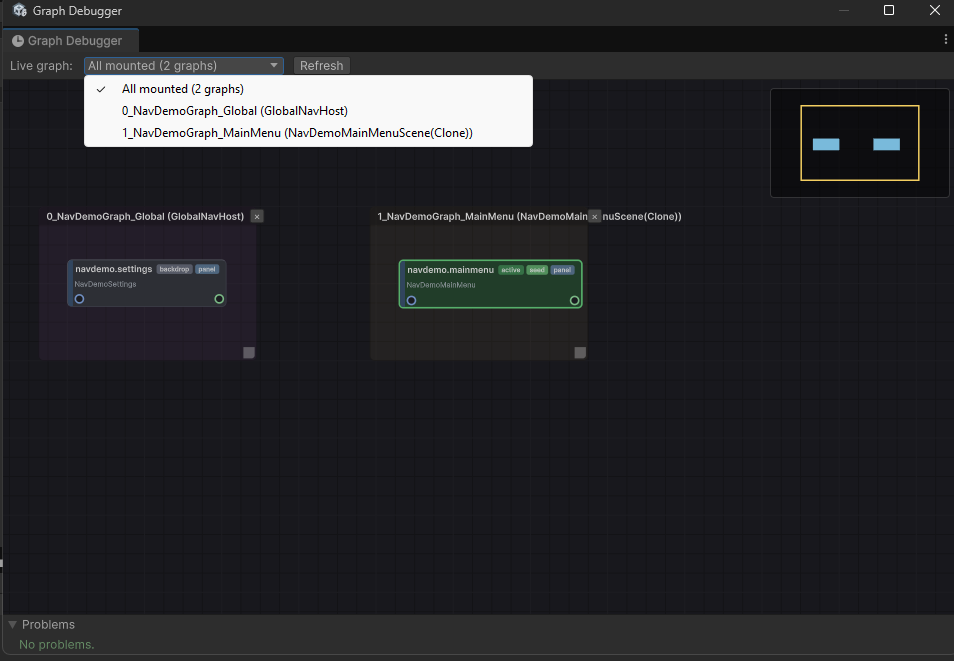
- Graph Runtime Debugger — Tools → CupkekGames → Graphs → Runtime Debugger (from
com.cupkekgames.graphs). Every mountedNavHostregisters its graph there. During play the picker defaults to All mounted: one canvas holding every mounted graph side by side, each cluster framed and titled with its graph and host. Hosts register inAwakeand unregister inOnDestroy, so frames appear and vanish live as scenes load and scopes die, and badges and channel tints are computed over the union, matching the runtime's merged id space (this is the debugger view of the scoping model described at the top of this page). Individual graphs stay pickable in the same dropdown. The window's Problems panel also surfaces nav's cross-cutting checks: duplicate ids across aNavDestinationCatalog's graphs at author time, duplicate ids across the mounted graphs during play (first mount wins), and a play-mode input check (zero or more than one active EventSystem); in the merged view each mounted graph validates under its own header. Selecting a node during play opens a Selected pane: stack status, the mounted view, panel ownership, resolved root, and the current args type.
- Per-graph authoring checks run in the canvas footer, on node chips, and in the Problems panel's "Selected" group: duplicate or missing id, multi-parent, prefab saved inactive, prefab root without a
UIViewComponent, a contained child whose prefab carries aPanelRenderer,Replaceocclusion on a contained drilldown, and a Parent Name that does not statically resolve in the panel owner's UXML. - Node cards carry derived badges beyond the authored ones:
tab(child of a Switched container),panel(the prefab owns aPanelRenderer, a forest root), and@<mount>orauto-rootfor contained children, so panel ownership is visible on the graph itself. - Author-time graph errors (duplicate id, multi-parent, containment cycle) log from
NavTopology.Buildat the host'sAwake; missing ids are flagged only in the graph footer (warning) — at load such nodes are silently unaddressable.
Limits — know before you build
- No serializable back stack. The stack model is in-memory only; nav state is not saved/restored across sessions. Re-seed your UI on load.
- No compile-time safety. Ids are strings (typos resolve at runtime as a logged warning + no-op) and args are
object(a wrong-type read viaGetArgs<T>()returns null). - Guards are sync-only. No awaiting inside a guard — await at the call site instead.
- One graph per host. Cross-graph composition (sub-graph reference nodes) is deferred; keep a feature's destinations in one graph and reach across hosts via the merged id space, not edges.
PopUpTo/ReplaceTop/ClearStackAndPushoperate on the visible stack only (root if non-empty, else the active channel). Cross-channel batch pops are out of scope — sequence per-channel verbs explicitly.
Common gotchas
- "No UIView registered for destination 'X'" — no mounted
NavHostowns that node (its graph isn't mounted in this scene, or the host hasn't awakened), or the node's Prefab is null. Global destinations belong on a Persist Across Scenes host. - "Push: no destination for id 'X'" — the id isn't in any mounted graph's topology. Check the spelling against the node's Id and that the owning host is in the scene.
- Wrong scale / sort order — the prefab carries its own
PanelSettings. Remove it; the host'sNavConfigSOis the single owner. - "Duplicate destination id ... — first wins" — the same id exists in two mounted graphs. Rename one; the Graph Runtime Debugger's Problems panel catches this at author time.
SwitchChannelwarns "not a tab" — the target id's parent isn't aSwitchedcontainer. Tab-ness is derived from the parent's Child Mode, never set on the tab itself.- Esc closes my base view — set the node's Dismiss Mode to Block (consume) or PassThrough (defer to the handler below). Programmatic pops still work.
- CatalogKey dropdown shows a yellow warning — the id isn't in any graph (or the picked id was renamed). Re-pick from the dropdown.
- A contained view never appears and boot seems stuck — its Parent Name doesn't resolve inside the parent view's subtree, so the view never loads and the host's ready gate never drains. The console logs the exact error at play, and the graph footer warns at author time when the name isn't in the panel owner's UXML. Fix the name against the parent's UXML.
See also
- Luna UI Manager — owns the navigation stack
- Occlusion — what renders beneath the top view (Overlay / Replace / Overlay Opaque)
- UIViewComponent — the per-view component (
OnUILoaded,WhenUILoaded,GetArgs<T>) - Focus Navigation — arrow-key focus traversal
- UI Actions — Esc-only modal flows that don't need a stack
- Source:
Runtime/Scripts/Navigation/in the Luna package
Reading along without the package? The nav system ships with everything else in Luna — get it on the Asset Store.
Settings
Theme
Light
Contrast
Material
Dark
Dim
Material Dark
System
Sidebar(Light & Contrast only)
Font Family
DM Sans
Wix
Inclusive Sans
AR One Sans
Direction