
Button
USS-styled variant of the built-in UnityEngine.UIElements.Button — no custom subclass. The classes are layered: btn carries only the interaction feel (press/hover scale, transition, cursor), and btn-solid opts into Luna's design-system look. Combine size, color, and visual-style classes freely on top.
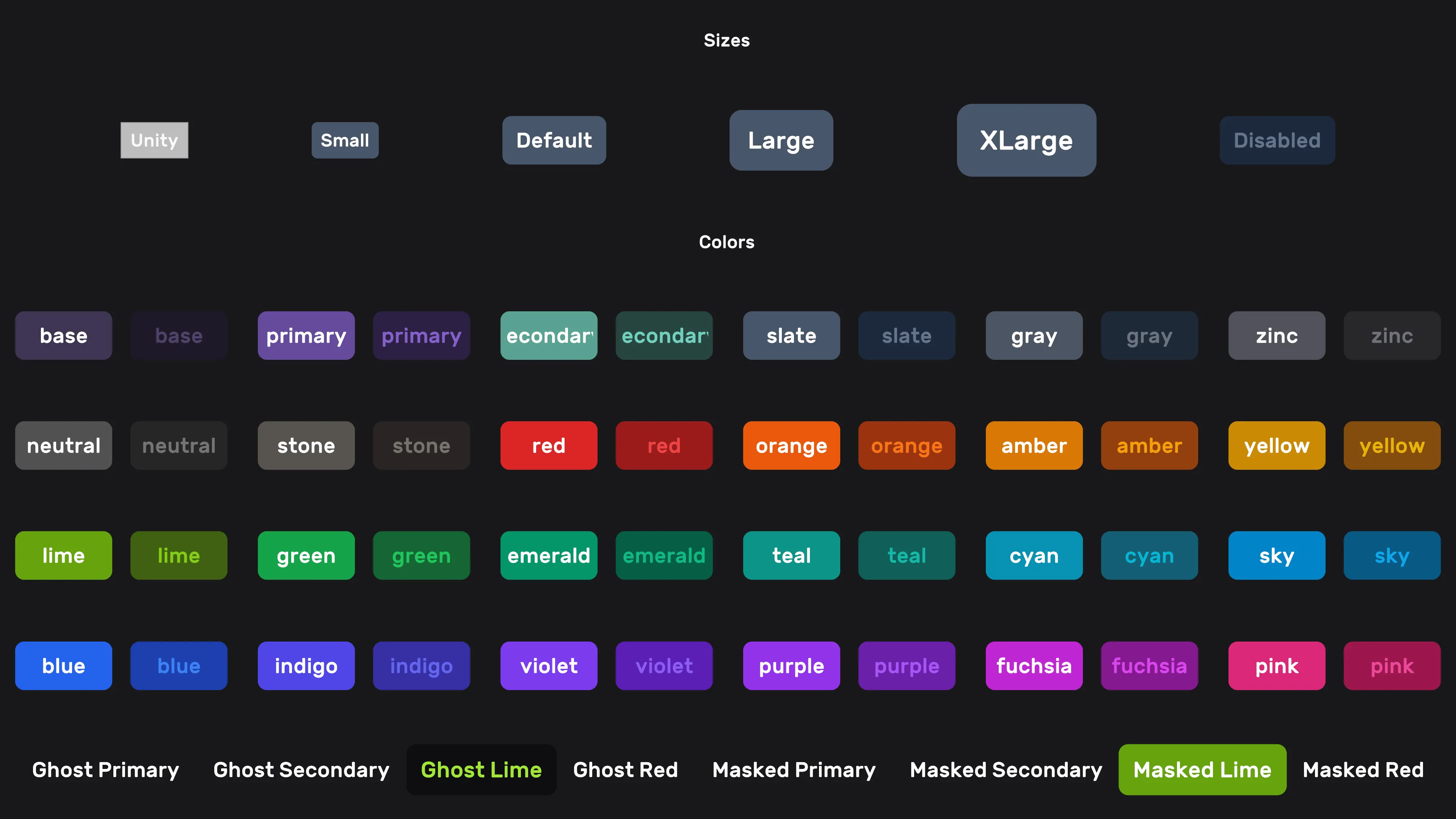
Setup
<ui:UXML xmlns:ui="UnityEngine.UIElements">
    <ui:Button class="btn btn-solid" />
    <ui:Button class="btn btn-solid btn-lg" />
    <ui:Button class="btn btn-solid red" />
    <ui:Button class="btn btn-solid btn-xl violet" />
    <ui:Button class="btn btn-solid btn-xl violet ghost" />
    <ui:Button class="btn btn-solid btn-xl violet masked" />
    <ui:Button class="btn btn-solid btn-xl violet outline" />
</ui:UXML>
Layering: feel vs. look
btn alone applies no visuals: no background, no 9-slice, no sizing clamp, no font, and it neutralizes Unity's default .unity-button chrome (gray fill, 1px border, 3px radius, padding) so nothing renders under your art. That makes it the right base for art-skinned buttons, where the old bundled skin used to shred sprites (slice settings) and clamp sizes (a 200x200 circular sprite button was clamped to 64px tall):
<!-- Sprite-skinned button: art untouched, Luna press/hover feel -->
<ui:Button class="btn" style="background-image: url('...'); width: 200px; height: 200px;" />

<!-- Default design-system button -->
<ui:Button class="btn btn-solid" />
btn-solid carries the default look: slices and slice-scale, min/max sizing, padding, border radius, typography, and the solid background colors. It is named after the component-library convention for the default filled variant (Chakra, DaisyUI, Radix all call it solid).
Migration (breaking). Before this split,
btnalone carried the full look. The migration is mechanical:class="btn"becomesclass="btn btn-solid"wherever the default look is wanted, including buttons usingghost/outline/ color modifiers, which inherit their sizing and typography from the solid skin. The new pair resolves identically to the old single class. Buttons that carry their own sprite art can drop to barebtnand lose the slice/size mangling.
CSS classes
Base
| Class | Description |
|---|---|
btn | Interaction feel only: press/hover scale, transition, cursor. Required base class. |
btn-solid | The default look: slices, sizing, padding, radius, typography, solid colors. |
Size
| Class | Description |
|---|---|
btn-sm | Small |
btn-lg | Large |
btn-xl | Extra-large |
Color
Add a color name as a class (no value). Available palette: see colors.
<ui:Button class="btn btn-solid teal" />Visual style
| Class | Description |
|---|---|
ghost | Transparent background, text/icon in the button-color. Hover/focus: text/icon shift to the hover tone — the background stays transparent. |
masked | Transparent background. Hover/focus: button-color class becomes the background; text color stays. |
outline | Border in the button-color class; text color matches the border. |
Visual-style classes pair with btn btn-solid: they override the solid background and colors while inheriting its sizing and typography.
Animation
Buttons scale to 1.08 on hover and 0.92 on press, with a 0.16s ease-out transition (hover only, not focus: a UITK Button keeps :focus after a tap, so scaling on focus would leave tapped buttons resting oversized). To opt out without changing any other styling, add no-scale.
| Class | Description |
|---|---|
no-scale | Disables the hover/press scale animation. |
<ui:Button class="btn btn-solid violet no-scale" />See also
- UI Effects — glow, shine, and clay depth on buttons via the
luna-fxclasses (e.g.class="luna-fx luna-fx-btn luna-fx-clay yellow") - Input Prompt —
Buttonsubclass with input-icon support - Colors — full color palette
Settings
Theme
Light
Contrast
Material
Dark
Dim
Material Dark
System
Sidebar(Light & Contrast only)
Font Family
DM Sans
Wix
Inclusive Sans
AR One Sans
Direction