
Showcase sample
Want to browse every Luna component in five minutes? Open LunaStorybook.unity — one sidebar-driven scene that previews each component live: pick on the left, play with it on the right, no scene-flipping. It ships in the Showcase sample (Samples~/Showcase/ in com.cupkekgames.luna), the pure-UI half of Luna's demo content; the same sample also holds the flagship LunaShowcase shell and the specials scenes below.
Showcase requires only Luna's bundled deps (data, graphs, services, singletons, pool, fadeables, keyvaluedatabases, prefabloaders, assetfinder, editorui, editorinspector, input) — all installed transitively when you import Luna. data and graphs are declared Luna dependencies as of 2.0.0; they power the catalog-keyed nav-graph navigation the shell runs on. No game-systems packages needed — for those, see GameFull.
❗ Import Essentials alongside. Showcase references theme/UXML/sprites/audio in the Essentials sample via sibling-relative paths (
../../../../Essentials/...). Without Essentials imported, scenes load with broken images and styles.
The setup tutorial covers the install and the import order on video:
Four entry points
LunaShowcase.unity
A complete game-style UI shell with tabs (Home, Heroes, Quests, Shop, Leaderboard), modals, overlays, and responsive layout switching. The driving controller is LunaShowcase (Flagship/Scripts/Screens/LunaShowcase.cs); the UXML it loads keeps its legacy GameUiHub.uxml filename (Flagship/UXML/Screens/GameUiHub.uxml).
The scene root hosts a NavHost that mounts Flagship/Navigation/ShowcaseNavGraphSO.asset and spawns every tab body / detail / modal prefab from it. Worth peeking at the wiring:
- The bottom tab bar is a
luna:TabViewwhosedestinationsUXML attribute carries the channel-root node ids in tab-button order —home.tab.home,home.tab.heroes,home.tab.quests,home.tab.shop,home.tab.leaderboard(Flagship/UXML/Components/Molecules/TabBar.uxml). Tab routing is owned by that attribute; the controller only plays the icon bounce. - The Shop tab nests its own channel-routing
TabView(ShopTabsinFlagship/UXML/Screens/Tabs/ShopTab.uxml) with sub-channel destinationshome.tab.shop.bundle,home.tab.shop.gold,home.tab.shop.items. - The gear menu's Log Out flow shows a typed modal result:
await LunaNavigation.PushAsync<bool>(_confirmModalDest, new ConfirmModalArgs { ... }), then checksresult.IsDismissed/result.Value. Destinations on the controller areCatalogKeyfields constrained with[CatalogKeyConstraint(NavConstants.NavDestinationCatalogId)].
Open LunaShowcase.unity for the headline demo. Hit Play, click around the tabs, open modals.
LunaStorybook.unity
A single sidebar-driven scene that consolidates the simple per-component showcases (Toggle, Slider, Buttons, ListView, etc.) — no more flipping through 25 separate scenes. Pick a component on the left to preview it on the right.
Since 2.1.3 the Lists & Navigation group also carries the kinetic family: LunaListView (a 2,000-row virtualized leaderboard — selection, keyboard/gamepad stepping, every ScrollAlignment, RefreshItems on a growing/shrinking source vs Rebuild), Scroller (a vertical feed with a horizontal scroller nested inside, every ScrollTo overload, live friction/wheel/scrollbar knobs) and Carousel (peek pager and shelf side by side). The plain ListView entry stays: it styles Unity's own ListView/ScrollView.
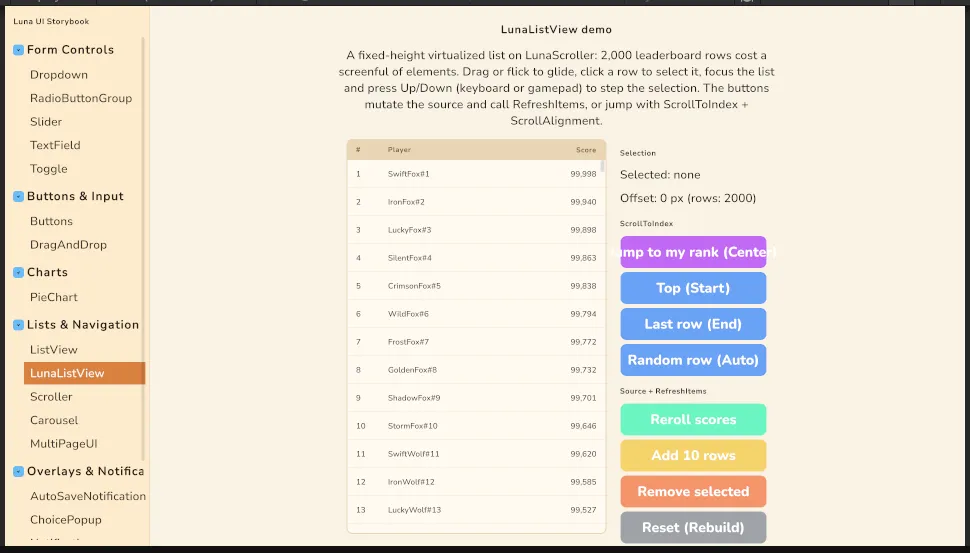
Open LunaStorybook.unity. The recommended browse-it-fast entry point for new users.
See Samples~/Showcase/LunaStorybook/README.md (in the imported Showcase sample) for the underlying view code and how to add a new entry.
EsportLobby.unity
A competitive-shooter lobby experience (EsportLobby/): a tabbed shell (Home, Play, Battlepass) on its own nav graph, plus a full match flow. START on the Play tab pushes an operative select where an OrbitView previews the pick's signature weapon in live 3D and a countdown auto-locks the pick; LOCK IN raises the loading screen over the transition bus, then swaps to an in-match HUD whose health/armor vitals run on a CellBar with an esl-skinned feel asset. The Battlepass tab swaps reward items (knife, pistol, rifle prefabs under EsportLobby/3DModels/) into another OrbitView with per-item start angles.
Open EsportLobby.unity to see OrbitView, CellBar, navigation channels, and the loading screen working together in one cohesive skin.
Components/
Specials-only — distinctive variants and feature demos that need their own scene because they show scene-level wiring (camera, multiple inputs, layout responsiveness, composite demos). Flat layout — no cluster prefixes. Every row links the docs page that explains how to replicate what the scene shows; all scenes need only Luna + Essentials unless the row says otherwise.
| Folder | Scenes | Feature docs |
|---|---|---|
Burn/ | BurnDemo (card burn/dissolve + re-form) | UI Effects |
Carousel/ | CarouselShowcase (IAP-style offer strip: page peek, indicator dots, snap + flick) | Carousel |
DragAndDrop/ | DragAndDropDemoWorldSpace | Drag & Drop |
Effects/ | EffectsPlayground, EffectsPresets, EffectsProgression, EffectsShowcase (+ shared EffectsFlair.uxml used by Storybook) | UI Effects |
GridView/{GridViewListView,GridViewPagination}/ | GridViewListResponsiveDemo, GridViewPaginationResponsiveDemo | GridView, Responsive |
InputPrompt/ | InputPromptLocalMultiplayer | Input Prompt |
Juice/{ProgressBarJuice,UICue}/ | ProgressBarJuiceDemo (bar/tooltip/tab/cooldown juice + interaction-juice profiles), UICueDemo (UI Cue binder: profile button feel, ValueChanged gates, ScreenEnter stagger, custom cue + UIRender burst) | Interaction Juice, UI Cue |
LoadingScreen/ | LoadingScreen | Loading |
LoadingTransitionMasking/ | LoadingTransitionMasking | Loading, Masking |
Navigation/ | NavigationDemo (nav graphs are scoped, not global: five graphs on five hosts with different lifetimes; a persistent global settings graph, a main-menu graph, a game-session pause scope, and per-scene graphs for two simulated scenes, plus deliberate pushes to unmounted ids so you can watch a scope miss in the Console) | Navigation |
Occlusion/ | OcclusionDemo (multi-depth Overlay Opaque: stacked fullscreen layers, live timers + state widgets proving covered screens stay alive) | Occlusion |
Pagination/ | PaginationDemo | Pagination |
ProgressBar/{CellBarLab,Moba,MultiPass,HeroShooter}/ | CellBarLab (ammo grid, mirrored versus split, combo meter, cell-size extremes), ProgressBarMoba, ProgressBarMultiPassDemo, ProgressBarHeroShooter, ProgressBarHeroShooterCelled | Progress Bar, Cell Bar |
RadialProgressBar/ | RadialProgressBarMultiSegmentDemo, RadialProgressBarHeroShooter, RadialProgressBarHeroShooterNoCells, RadialProgressBarSweepAngleDemo | Radial Progress Bar |
ResponsiveDemo/ | ResponsiveDemo | Responsive |
RPGDemo/ | RPGDemo — requires Unity's UGUI Shader Samples (Window > Package Manager > Unity UI > Samples > Import), or materials render pink/solid | RPG Demo |
Scroller/ | ScrollerShowcase (shop page: vertical glide + rubber-band, horizontal Carousel composed inside via axis-lock, ScrollTo tween, offset readout) | Scroller |
Spotlight/ | SpotlightFocus (feature tour: hole focus, dim-only + Elevate, rect focus, content-layer captions), SpotlightTour | Spotlight |
Tooltip/ | TooltipDemoWorldSpace, TooltipNestedDemo, TooltipUpdateDemo | Tooltip |
TransitionAnimation/ | TransitionPresetGallery | Transition Animation |
UIAttractor/ | UIAttractorDemo | UI Attractor |
UIRender/ | UIRenderDemoCharacters, UIRenderDemoHero (animated 3D hero inline in UI), UIRenderDemoOverlay, UIRenderDemoSnapshot (24-cell roster grid; toggle between a live camera per cell and Snapshot mode, with a live readout of slots in use, pending captures and cached snapshots) | UI Render |
Note: no
LocalizationDemoscene ships in the Showcase sample. Luna's only bundled locale artifact isEssentials/Theme/LocalizedStyles.uss(a.locale-jablock that repoints the--font-*tokens to the Japanese SDF font bundled atEssentials/Theme/Fonts/dela-gothic-one/). At runtimeLocalizationViewStyleSwitcherapplies alocale-<code>USS class to every UIView when the active locale changes — a per-locale style/font swap, not Unity Localization string-table data. Wiring actual Unity Localization (Locale list, String Tables,LocalizedStringbindings) is your job.
Refer to the Components section in the sidebar for per-component API documentation.
Companion: Essentials sample
Shared theme tokens, fonts, panel settings, UXML primitives, sprites, audio, demo prefabs, and helper scripts live in the Essentials sample (Samples~/Essentials/):
Essentials/
├── README.md                  ← Start-here landing page
├── Audio/                     — shared demo audio (clicks, mixer)
├── Effects/                   — Luna filter shader assets
├── Input/                     — input action map + Luna icon database
├── Navigation/                — LunaNavConfigSO.asset + LunaNavConfigSOWorldSpace.asset (render configs NavHost applies to spawned views)
├── Prefabs/                   — LunaUIManager.prefab (the bootstrap manager)
├── ScriptableObjects/         — transition presets
├── Scripts/                   — shared demo helpers (TooltipDatabaseExample)
├── Sprites/socials/           — Community / wishlist button icon (used by the GameFull main menu)
├── Theme/                     — design system: fonts, colors, panel settings, USS tokens
└── UXML/
    ├── Components/            — reusable UXML primitives (ChoicePopup, Tooltip, Pagination, Notification, SaveLoad, ReturnButton)
    └── Modal.uss              — shared modal stylesheet
These are also referenced by the GameFull sample via sibling-relative paths. When all samples are imported they live as siblings under Assets/Samples/LunaUI/<version>/ and the relative refs resolve cleanly.
Settings
Theme
Light
Contrast
Material
Dark
Dim
Material Dark
System
Sidebar(Light & Contrast only)
Font Family
DM Sans
Wix
Inclusive Sans
AR One Sans
Direction