
Architecture & Distribution
💡 TL;DR — most users only need Luna.
If you just want the UI Toolkit component library, install
com.cupkekgames.lunafrom the Asset Store. Done. Luna ships with its deps inside its own folder: the foundation primitives plusdataandgraphs, which power Luna's catalog-keyed nav-graph navigation. The gameplay domain packages (rpgstats, inventory, gamesave, etc.) are still not required.Gameplay domain sibling packages are only required by the GameFull sample (and by you, if you want to build a full game on top of the same systems Luna ships with). They're entirely optional.
This page documents the full CupkekGames ecosystem — 49 packages organized into three tiers (foundation primitives, direct foundation dependents, domain layer), the dep graph between them, and the editor windows that automate sibling-package installs.
Distribution at a glance
| What you want | What you install |
|---|---|
| Luna UI Toolkit component library only | com.cupkekgames.luna from Asset Store. That's it. |
| Run the GameFull sample | Luna from source (not the Asset Store package, since 2.1.5) + click Install GameFull Packages in Tools > CupkekGames > Package Manager (writes the CupkekGames UPM scoped registry to your manifest, then installs the domain sibling packages atomically) |
| Full CupkekGames ecosystem for your own game | Same as above — Luna + the domain sibling packages |
Luna's package.json > dependencies declares the foundation primitives it needs plus data and graphs (as of 2.0.0). The Asset Store build folds that whole closure into Luna's own folder, at Packages/com.cupkekgames.luna/Dependencies/<package id>/, and drops the declarations, so installing Luna is one package in Packages/. The folders keep every file's GUID and are listed in Dependencies/bundle.json. The Asset Store package is Luna on its own: it ships no GameFull sample, and CupkekGames registry packages aren't supported next to it (they would add second copies of the bundled packages). Implementation: Editor/LunaBundle.cs.
Foundation primitives
Single-concern, (near-)leaf packages. These were extracted from the former core package. Three declare small internal deps: keyvaluedatabases → editorui, packagemanager → editorui, input → keyvaluedatabases (+ com.unity.inputsystem).
| Package | Provides |
|---|---|
com.cupkekgames.singletons | Singleton<T> MonoBehaviour base |
com.cupkekgames.pool | IObjectPool<T>, GameObjectPool*, ObjectPoolBase, ObjectPoolSO + Factory pattern |
com.cupkekgames.fadeables | Fadeable, FadeableMono, FadeableColor/Position/Scale, EasingType |
com.cupkekgames.keyvaluedatabases | Serializable Dictionary-like database + drawer |
com.cupkekgames.editorui | Reusable editor widgets (IMGUI / UIElements) |
com.cupkekgames.editorinspector | MultiLineHeaderAttribute, FolderReference + drawers |
com.cupkekgames.packagemanager | Tools > CupkekGames > Package Manager window + scoped-registry installer |
com.cupkekgames.input | Unity Input System integration (InputDeviceManager, InputIcons, EscapeAction) |
Direct foundation dependents
| Package | Direct deps | Provides |
|---|---|---|
com.cupkekgames.prefabloaders | keyvaluedatabases | IPrefabLoader, PrefabLoader<TKey>, PrefabLoaderString |
com.cupkekgames.assetfinder | keyvaluedatabases, editorui | [AssetFinder] attribute + populator toolbar |
com.cupkekgames.services | assetfinder, editorui, editorinspector | ServiceRegistry / ServiceProvider — DI pattern |
Domain layer
| Package | Direct deps | Provides |
|---|---|---|
com.cupkekgames.luna | data, graphs, services, singletons, pool, fadeables, keyvaluedatabases, prefabloaders, assetfinder, editorui, editorinspector, input | UI Toolkit component library + nav-graph navigation + UIPrefabLoader binding |
com.cupkekgames.data | keyvaluedatabases, editorui, assetfinder, services | IData / DataSO / asset catalog / DropTable / Primitives |
com.cupkekgames.graphs | data, editorui | Node-graph framework — GraphAssetSO base, graph editor window, runtime debug registry |
com.cupkekgames.gamesave | data | GameSaveManager<TData,TMeta> |
com.cupkekgames.newtonsoft | data, services, addressableassets, scenemanagement, sequencer, settings, gamesave, com.unity.nuget.newtonsoft-json | Newtonsoft adapter for data |
com.cupkekgames.scenemanagement | singletons, keyvaluedatabases, editorinspector | SceneSO + SceneLoader (versionDefine: addressables) |
com.cupkekgames.rpgstats | luna, data, services | character stats / attributes / modifiers |
com.cupkekgames.inventory | luna, data, services, rpgstats, singletons | items + equipment + drag/drop |
com.cupkekgames.addressableassets | pool, keyvaluedatabases, prefabloaders, luna, com.unity.addressables | Addressables wrapper + addressables-flavored PrefabLoader variants |
com.cupkekgames.sequencer | scenemanagement, services, singletons, keyvaluedatabases | Boot sequencer + bridges |
com.cupkekgames.settings | singletons, keyvaluedatabases, editorinspector, input, luna, data, sequencer, services, addressableassets, scenemanagement, gamesave, com.unity.localization, com.unity.inputsystem, com.unity.render-pipelines.universal | SettingsSystem + UI.Settings panel |
com.cupkekgames.inkbridge | keyvaluedatabases, luna | Ink narrative engine integration (Ink Unity Integration is installed separately — not a declared dep) |
Luna-free packages: all foundation primitives, foundation dependents (prefabloaders, assetfinder, services), plus data, graphs, gamesave, scenemanagement. The rest depend on luna (directly or transitively — newtonsoft pulls it via addressableassets/settings).
Transitives note: because Luna depends on
dataandgraphs, installing Luna also pulls their own deps —databringsassetfinder+services, andgraphssits ondata+editorui. The whole chain ships inside the Asset Store package.
Distribution model
- Asset Store ships only
com.cupkekgames.luna. Its deps (foundation primitives +data+graphs) ship inside it, inDependencies/. - CupkekGames UPM scoped registry at
https://www.docs.cupkek.games/upmserves all 49 packages. Tarballs live in each repo's GitHub Releases under theCupkek-GamesGitHub org; the registry is a dynamic Next.js route handler that reads them at request time and returns npm-compatible packument JSON. Updates surface natively in Unity's Package Manager UI. On Unity 6.3+ the Package Manager also labels each package's signature status; see the troubleshoot note for what the labels mean on third-party registry packages.
End-users don't manage manifest entries by hand. They use the editor window described below.
Package Manager window
Tools > CupkekGames > Package Manager — the dedicated editor window for the sibling-package install flow. Lives in com.cupkekgames.packagemanager (the bootstrap package — install it first via git URL or local file: path, then it writes the scoped registry into your Packages/manifest.json so the rest resolve via the registry).
- Compact one-line rows: status icon + display name + package id + tag chips + version (when installed) + Install button (when missing).
- Header toolbar:
<installed>/<total> installedcount badge + Refresh + Install GameFull Packages (N). - One-click bulk install. Writes the CupkekGames scoped-registry block to your
Packages/manifest.json(idempotent — checked first, only written if missing) then issues a singleUnityEditor.PackageManager.Client.AddAndRemovefor all package ids. Unity resolves the whole graph atomically — one manifest write, one domain reload. - Last-error footer shows the reason if an install fails.
- Auto-opens once on first project load when any GameFull-tagged packages are missing (gated by
EditorPrefsso it doesn't nag every reload).
The package list lives in com.cupkekgames.packagemanager/Editor/CupkekGamesPackageRegistry.cs (each entry has PackageId, DisplayName, Tags). The installer wraps Client.AddAndRemove + manifest-bootstrap in Editor/CupkekGamesPackageInstaller.cs.
LunaUI Panel
Tools > CupkekGames > LunaUI Panel is the asset's intro screen, distinct from the Package Manager window. It is the only window that auto-opens in a clean project (on first install, and again when a new sample import is detected, via [InitializeOnLoadMethod] + EditorPrefs), so it doubles as the guided setup: a single page where only actionable things render, finished steps collapse, and health warnings appear only when something is actually broken.
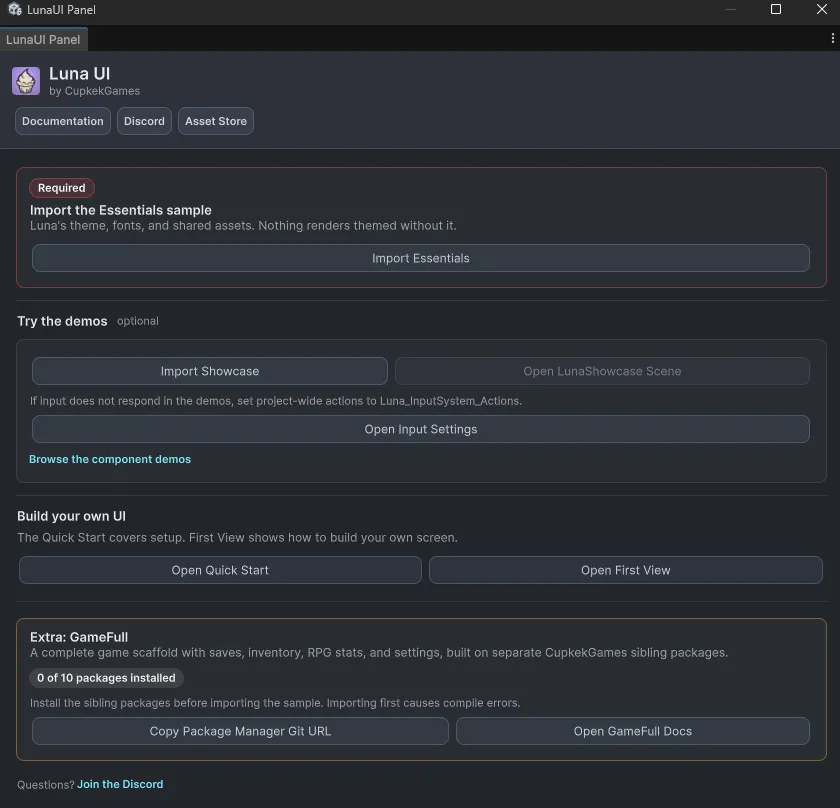
- Broken-install alert: renders only if any of Luna's 8 foundation dependency packages is missing, as its own package or inside Luna's
Dependencies/folder (a red alert with the count and a package list). A healthy install shows nothing. A 2.1.4-or-earlier install updated in place shows a Move Into Luna alert instead: it moves the old dependency folders' code intoDependencies/and removes the folders. - Essentials: the one required step. A "Required" card with a one-click Import Essentials button; after import it collapses to a slim "Essentials imported" line with a Theme Stack docs link.
- Try the demos (optional): Import Showcase (imports Essentials first automatically), Open LunaShowcase Scene, an input-actions hint with an Open Input Settings shortcut, and a link to the component demos.
- Build your own UI: Quick Start and First View doc links.
- Extra: GameFull: an amber card that keeps the separate GameFull journey in one place: a live "N of 10 packages installed" count over the sibling packages, a copy button for the Package Manager git URL, docs links, a warning when the sample was imported before its packages, and Add/Remove Build Settings buttons for the demo scenes once the sample and all packages are present. Hidden in the Asset Store package, which has no GameFull sample.
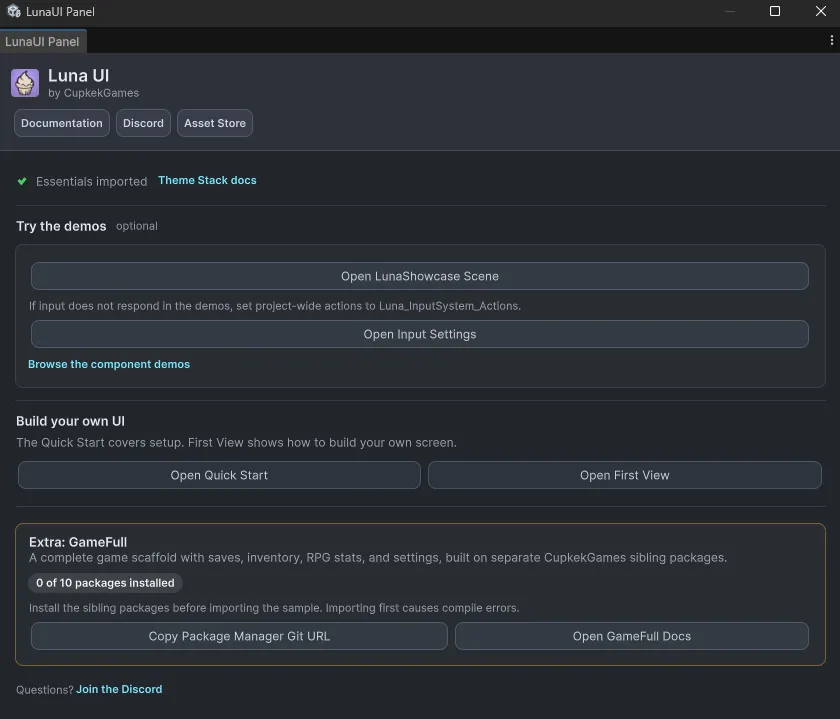
Implementation: Editor/LunaUIWindow.cs (in the installed Luna package).
Settings
Theme
Light
Contrast
Material
Dark
Dim
Material Dark
System
Sidebar(Light & Contrast only)
Font Family
DM Sans
Wix
Inclusive Sans
AR One Sans
Direction