
Quick Start
⚠️ Requires Unity 6000.5 or later. Luna's
package.jsondeclares this version; Unity will refuse to import on older editors.
Five minutes to your first Play, ten with the anatomy tour: install, play the flagship demo, then tour the pieces that make it work — the theme stack, what ships in Essentials, and what ships in Showcase. By the end you'll know which file does what and where to look when you start authoring your own UI.
Prefer video? The setup tutorial walks the same steps:
1. Install + import
com.cupkekgames.luna — one Asset Store package. All declared dependencies (data, graphs, services, singletons, pool, fadeables, keyvaluedatabases, prefabloaders, assetfinder, editorui, editorinspector, input) come bundled. No scoped registries, no manifest edits.
After install, open Window > Package Manager > In Project > LunaUI. Under the Samples tab, import in this order:
- Essentials — Luna's design system: theme, fonts, Panel Settings, USS effects, the bootstrap prefab, shared UXML primitives. Always first. Every other sample references its assets, so nothing renders correctly without it.
- Showcase — every Luna component plus the flagship game-style UI shell. Import it only after Essentials is in (scenes come up blank or unstyled otherwise; the fix is a reimport).
(Skip the GameFull entry for now — it's a separate, larger journey covered on its own page.)

Both land as siblings under Assets/Samples/LunaUI/<version>/.
Already have a project? Minimal install. You don't need the demos to use Luna in an existing project: import the package from the Asset Store, import only the Essentials sample (the design system + bootstrap kit), drag
Assets/Samples/LunaUI/<version>/Essentials/Prefabs/LunaUIManager.prefabinto your scene, and make sure an EventSystem exists (GameObject > UI > Event System — UI Toolkit input dispatch requires it). That's the whole footprint — though if you want Esc / controller-B dismissal, also assign aPlayerInputin the manager's Input Settings (clicks and your first view work without it). Showcase and GameFull are demo content — useful to learn from, never required at runtime. From there, First View walks you through authoring your own themed view in that same minimal scene.
2. Press Play on the Showcase
Open Showcase/LunaShowcase.unity — the flagship demo, a complete game-style UI shell with tabs, modals, overlays, and responsive layout switching. Press Play. The Luna theme renders automatically, Panel Settings is pre-wired, scripts run, audio plays.
⚠️ Input dead? Assign the project-wide actions. If clicks are ignored or the loading screen won't skip, set Project Settings > Input System Package > Project-wide Actions to the Essentials
Luna_InputSystem_Actionsasset — see Troubleshoot.

Also worth opening once:
Showcase/LunaStorybook.unity— sidebar-driven per-component browser. Flip through Toggle, Slider, Buttons, ListView, etc. in a single scene.
3. Anatomy of a Luna scene
You don't need to understand navigation yet — First View works without any of it. This tour is just so the names mean something when you meet them later.
With LunaShowcase still open, peek at the wiring. There is no UIDocument anywhere in the scene — views arrive at runtime as prefabs rendered through PanelRenderer. The scene itself holds just the host and two asset references:
LunaShowcase (scene root GameObject)
   │
   └─→ NavHost (component)
          ├─→ Graph → ShowcaseNavGraphSO.asset        (which views exist + how they nest)
          └─→ Nav Config → LunaNavConfigSO.asset      (physical render config)
                 │
                 └─→ Panel Settings → LunaPanelSettings.asset
                        │
                        └─→ Theme Style Sheet → LunaUIDemoTheme.tss
                               │
                               └─→ @import chain
                                   • Color tokens
                                   • Size tokens
                                   • Component styles
• Layout utilities- In the Hierarchy, click the
LunaShowcaseroot GameObject (the other roots —FullUiDemoDependencies,LoadingUI,UIRenderManager— hold shared deps, the boot loading screen, and the UIRender manager). Its Inspector has a NavHost component with two fields: Graph points atShowcase/Flagship/Navigation/ShowcaseNavGraphSO.asset— the nav graph whose nodes list every view prefab the shell spawns — and Nav Config points atEssentials/Navigation/LunaNavConfigSO.asset. - Select
LunaNavConfigSO.assetin the Project window. Its Panel Settings field points atEssentials/Theme/LunaPanelSettings.asset. - Select that Panel Settings asset. Its Inspector has a Theme Style Sheet field pointing at
Essentials/Theme/LunaUIDemoTheme.tss. - Double-click the TSS to open it in your editor. It's a USS file using
@importto layer Luna's design tokens (colors, sizes, components, layout, text) into one root theme.
At Play time, NavHost spawns each graph node's view prefab. Every view prefab carries a PanelRenderer (Unity 6.5's replacement for the deprecated UIDocument), and the host assigns its Nav Config's Panel Settings to each spawned renderer — the prefabs themselves never hard-code a Panel Settings reference.
That's the chain. Swap the one Panel Settings reference on the NavConfigSO and the entire UI re-themes. Override the TSS variables in your own USS to re-skin without touching component selectors. See Theme Stack for the full story.
Why this matters for your own UI: any UXML rendered through a
PanelRendererwhose Panel Settings isLunaPanelSettingsinherits the full Luna theme for free. Standard UITK controls (<Button>,<Slider>,<Toggle>,<TextField>) auto-style with no extra USS. One thing to remember:PanelRendererdelivers its visual tree asynchronously — in aUIViewComponent, query elements in theOnUILoaded(VisualElement root)override (or viaWhenUILoaded(...)), never inAwake. You'll see this happen yourself on the First View page.
4. What's in Essentials
Essentials is the genuinely reusable kit — import it standalone if you only want the design system + bootstrap setup. Folder by folder:
| Folder | What's in it |
|---|---|
Theme/ | The design system root: LunaUIDemoTheme.tss, LunaPanelSettings.asset (screen-space) and LunaPanelSettingsWorldSpace.asset (world-space), UITextSettings.asset (SDF font fallback chain), Font/LocalizedStyles/UIEffect_Flair USS files |
Effects/ | Luna's filter shader assets (LunaFilter, UIEffectSettings) — power the glow/outline/shadow/gradient UI Effects |
Input/ | Input action map + Luna's icon database (the keyboard/gamepad glyphs used by InputPrompt) |
Navigation/ | LunaNavConfigSO.asset (screen-space) + LunaNavConfigSOWorldSpace.asset (world-space) — the physical render configs a NavHost applies to every spawned view's PanelRenderer |
UXML/Components/ | Reusable UXML primitives — ChoicePopup, Tooltip variants, Pagination, Notification, SaveLoad, ReturnButton |
UXML/Modal.uss | Shared modal stylesheet |
Prefabs/LunaUIManager.prefab | The bootstrap manager — instantiate once per session; persists across scenes; every view subscribes to it for focus + input |
Audio/ | Starter UI sounds (click, hover) + an audio mixer |
Sprites/socials/ | Community / wishlist button icon (used by the GameFull main menu) |
ScriptableObjects/TransitionPresets/ | Reusable transition-animation preset assets (Attention, Base, Feedback, Loading, Modals, Notifications, Transitions) |
Scripts/UI/TooltipDatabaseExample.cs | Singleton tooltip database referenced by Showcase + GameFull demos |
5. What's in Showcase
Showcase is two scenes plus a folder of single-feature specials.
| Scene / folder | What it demonstrates |
|---|---|
LunaShowcase.unity | Flagship game-style UI shell — tabs (Home, Heroes, Quests, Shop, Leaderboard), modals, overlays, responsive layout switching. The headline scene; the one you just played |
LunaStorybook.unity | Sidebar-driven per-component browser. Toggle, Slider, Buttons, ListView, etc. in one scene — flip through every basic component without opening 25 separate scenes |
Components/ | Single-feature scenes that need specific setup — DragAndDrop (world-space), InputPrompt (local multiplayer), brand-variant ProgressBars (Moba / MultiPass / HeroShooter), RadialProgressBar variants, GridView (ListView + Pagination responsive demos), Tooltip variants, Effects (Playground / Presets / Showcase), LoadingScreen, LoadingTransitionMasking, TransitionAnimation, ResponsiveDemo, UIAttractor, UIRender, RPGDemo |
The Samples page catalogues every component scene with deep-links.
Optional dependencies
-
Unity Localization — optional. No
LocalizationDemoscene and no GameFull localization data ship. The only localization artifact Luna bundles is the Essentials theme's.locale-jafont hook inEssentials/Theme/LocalizedStyles.ussplus the Japanese SDF font it points at (Essentials/Theme/Fonts/dela-gothic-one/static/DelaGothicOne-RegularSDF.asset). At runtime,LocalizationViewStyleSwitchersubscribes toLocalizationSettings.SelectedLocaleChangedand applies alocale-<code>USS class to every UIView, so the JP font swaps in for thejalocale. Wiring the actual Unity Localization data (Locale list, String Tables,LocalizedStringbindings) is up to you — after installing the package, set active locale settings inProject Settings > Localization.
-
Ink Unity Integration — required by the Ink Visual Novel demo (in the
com.cupkekgames.inkbridgesibling package, not Luna). Install separately from Inkle's GitHub release.
The two editor windows
- Package Manager (
Tools > CupkekGames > Package Manager) — for installing CupkekGames sibling packages from the UPM scoped registry. It is a separate bootstrap package (com.cupkekgames.packagemanager), not bundled with Luna — you add it via git URL when you need it. Not needed for the Showcase workflow above; only matters for GameFull and standalone sibling packages, and the GameFull page walks through installing it. - LunaUI Panel (
Tools > CupkekGames > LunaUI Panel): the intro screen. Auto-opens on first install and after sample imports. One page: the required Essentials import (collapses to a done line once imported), the optional Showcase import + open-scene shortcut, Quick Start / First View links, and an amber "Extra: GameFull" card with a live sibling-package count. Health warnings render only when something is broken.
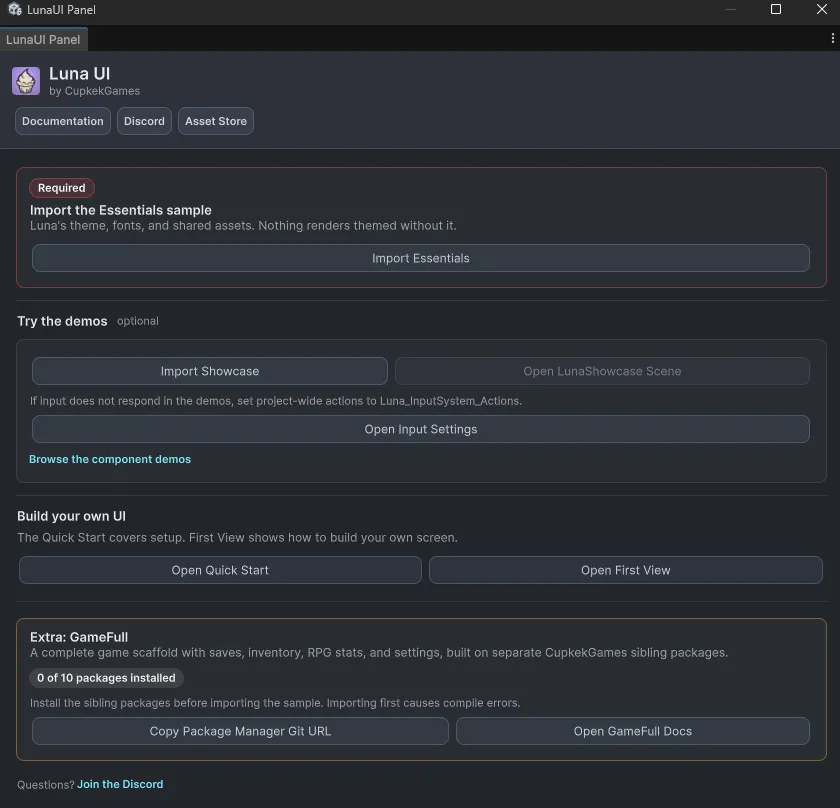
See Architecture & Distribution for the package map.
Where next
- First View — author your own
UIViewComponentand watch the theme apply itself to your standard UITK controls. The natural next step. - Components — the drop-in widgets Luna ships (Button, Slider, ProgressBar, Tabview, Tooltip, …). Browse before you build.
- Views — complete pre-built screens (Main Menu, Pause, Settings, Save & Load, Credits). Often you can extend a Luna view instead of writing your own.
- GameFull sample — the separate journey: installs the domain sibling packages (gamesave, rpgstats, inventory, settings, resources, …) and ships a complete game shell — save-aware main menu, reactive in-game HUD, session-scoped pause menu, save/load, a two-area scene loop, and a tabbed settings panel.
Settings
Theme
Light
Contrast
Material
Dark
Dim
Material Dark
System
Sidebar(Light & Contrast only)
Font Family
DM Sans
Wix
Inclusive Sans
AR One Sans
Direction