
UIViewComponent
Attach on a GameObject with a PanelRenderer component (or under one — see auto-fetch below). Creates a UIView for the panel's visual tree.
PanelRenderer delivers its visual tree asynchronously via a reload callback — there is no root element to grab in Awake(). UIViewComponent registers that callback for you in its Awake() and constructs the UIView when the first reload fires. Until then, UIView (and everything that forwards to it: ParentElement, Fade, LunaUIManager) is null.
Inspector View
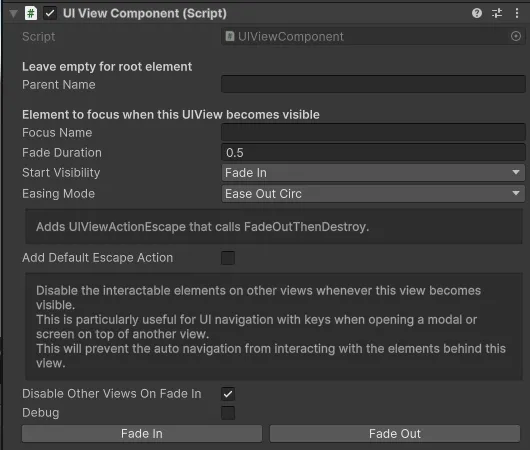
| Field | Type | Description |
|---|---|---|
| Panel Renderer | PanelRenderer | PanelRenderer hosting this view. Leave empty for the common cases — see auto-fetch. |
| Parent Name | string | Optional name of a child element to treat as this view's root. Empty = auto-resolve — see view root resolution. |
| Focus Name | string | Element to focus when this UIView becomes visible. Empty = the view root itself. |
| Fade Duration | float | Duration of the fade transition, in seconds. Default 0.5. |
| Fade In Delay | float | Delay before the fade-in animation starts, in seconds. Default 0. |
| Fade Out Delay | float | Delay before the fade-out animation starts, in seconds. Default 0. |
| Easing Mode | EasingMode | Easing applied during fade transitions. Default EaseOutCirc. |
| Transition Animations | List<UIViewTransitionEntry> | Per-fade-event animations. Each entry targets one or more elements via ElementSelector and plays its TransitionSequenceAsset with optional StepMs between matches. See UIView — Transition Animations. |
| Debug | bool | Logs PanelRenderer auto-fetch resolution at Awake, plus fade transitions and enable/disable events. |
The async load model
⚠️ Query in
OnUILoaded, notAwake. The visual tree arrives asynchronously, so element queries can't live inAwake()/OnEnable()— the root isn't there yet. Use one of the members below instead.
Use one of these:
| Member | Description |
|---|---|
bool IsUILoaded | True once the first reload callback has fired and UIView has been constructed. |
event Action UILoaded | Fires exactly once, when UIView becomes available. |
void WhenUILoaded(Action action) | Runs action immediately if the UI is already loaded, otherwise on the next UILoaded emission. Saves the "if/else subscribe" pattern at every call site. |
protected virtual void OnUILoaded(VisualElement root) | Subclass hook, fired exactly once on the first reload, after UIView is constructed and the start-visibility snap is applied. root is the view's mount root (UIView.ParentElement), so queries scope to the view's own subtree. |
protected virtual void OnViewRootChanged(VisualElement root) | Subclass hook, fired on subsequent reloads whose resolved view root differs from the current one — i.e. the tree was rebuilt (in-play UXML live reload). The base has already re-parented the UIView and re-applied styling; override this to re-query elements and re-attach handlers, because everything wired in OnUILoaded died with the old tree. Default is a no-op. |
protected void DeferOneTick(Action action) | Runs action on the next frame, outside the panel-update callback. Use it from OnUILoaded / OnViewRootChanged / WhenUILoaded for anything that instantiates, destroys, or toggles another PanelRenderer-bearing GameObject. Dropped if the view is destroyed first. See Spawning other panels from a load hook. |
Subclass pattern — wire in OnUILoaded, re-wire in OnViewRootChanged:
public class MyView : UIViewComponent
{
    private Button _button;

    protected override void OnUILoaded(VisualElement root)      => Wire(root);
    protected override void OnViewRootChanged(VisualElement root) => Wire(root);

    private void Wire(VisualElement root)
    {
        _button = root.Q<Button>("my-button");
        _button.clicked += OnClick;   // fresh element each tree — no -= needed
    }
}
Skipping OnViewRootChanged is fine for production views (player builds never live-reload UXML) — but with it, your view also survives UXML hot-editing in Play Mode. Keep state in fields (it survives the rewire) and keep Wire scoped to tree-bound things; subscriptions to persistent objects (game data, managers) belong in OnEnable/OnDisable with the unsubscribe-before-subscribe idiom instead.
From outside the component — WhenUILoaded:
myView.WhenUILoaded(() =>
{
    myView.UIView.AddAction(new UIViewActionEscape(Close));
});
Note: when the PanelRenderer is already mounted at the time the component awakes (e.g. a prefab instantiated under a shell whose panel has loaded), the reload callback — and therefore
OnUILoaded— fires synchronously duringAwake(). Code should not rely on either timing;WhenUILoaded/OnUILoadedhandle both.
Spawning other panels from a load hook
PanelRenderer invokes its reload callback from Unity's runtime panel update, the pass that builds and repaints every runtime panel. OnUILoaded, OnViewRootChanged, UILoaded, and the deferred branch of WhenUILoaded all run synchronously inside it, and that pass is iterating the list of live panels at the time. Instantiating a prefab that carries a PanelRenderer, destroying one, or toggling its GameObject registers or unregisters a panel with that same list, mid-iteration.
The failure is deceptive: nothing throws at the spawn site. The next panel update throws InvalidOperationException: Collection was modified, from Unity's own loop, with your hook nowhere on the stack.
Route those spawns through DeferOneTick:
protected override void OnUILoaded(VisualElement root)
{
    _list = root.Q<ListView>("heroes");      // queries and subscriptions: fine here

    DeferOneTick(() =>
    {
        if (_bubbles.Count > 0) return;      // a UI reload may already have run this
        SpawnSpeechBubbles();                // instantiates world-space PanelRenderer prefabs
    });
}
One frame is enough: the panel list is only iterated during the update pass, and the next frame's pass starts from a consistent list. The action is dropped if the view is destroyed before it runs; it still runs if the view was merely hidden, so re-check state at the top of the action. Code that is not a view (a helper class constructed inside OnUILoaded, a non-view MonoBehaviour) uses LunaUIManager.Instance.DeferOneTick(action), which rides on the manager and survives the caller. View Lifecycle shows where this sits in the timeline.
What does not need deferring: element queries, RegisterCallback, clicked +=, class and style changes, Fade subscriptions, anything on this view's own tree.
PanelRenderer auto-fetch
Leave the Panel Renderer field empty for the common cases:
- Standalone prefab — auto-fetches a
PanelRendereron the same GameObject. - Tab body in a shell — auto-fetches a
PanelRendereron a parent GameObject (the shell). Pair with Parent Name to point at a named slot in the shell's UXML.
At Awake() the component walks its own GameObject and then every parent until it finds a PanelRenderer. Set the field explicitly only when neither the view's own GameObject nor any parent has the PanelRenderer you want. Enable Debug to log how the auto-fetch resolved.
View root resolution
The Parent Name field decides which VisualElement becomes the view's root (UIView.ParentElement):
- Empty (default) — auto-resolves to the first child of the PanelRenderer's generated wrapper element. That child is virtually always your UXML's outer
VisualElement. The wrapper itself is unsafe to animate against — PanelSettings shuffles it during first-attach, which kills any in-progress CSS transition. - Set — looks up the named element, preferring a non-Button match. A tab strip commonly names a button the same as its content panel; skipping Buttons makes the lookup resolve to the content element regardless of how the buttons are named.
⚠️ Multi-root UXML. If your UXML has more than one top-level element, the auto-fallback picks the first one and logs a warning — fade/transition wiring won't touch the other siblings. Set Parent Name explicitly, or wrap the UXML in a single outer
VisualElement.
When the view is a navigation destination nested under a parent destination, the name lookup is scoped to the parent view's subtree — so two sibling tabs can each have their own "DetailContainer" without cross-matching.
Public Properties
| Name | Type | Description |
|---|---|---|
| UIView | UIView | The UIView constructed at the first PanelRenderer reload. null until then. |
| PanelRenderer | PanelRenderer | The PanelRenderer hosting this view (assigned or auto-fetched). |
| ParentElement | VisualElement | The view's root element. Forwards to UIView.ParentElement; null before the first reload. |
| LunaUIManager | Luna UI Manager | Forwards to UIView.LunaUIManager; null before the first reload. |
| Fade | FadeUIElement | Manage fade transitions of the UIView. Forwards to UIView.Fade; null before the first reload. |
| IsUILoaded | bool | True once UIView has been constructed. |
| PushArgs | object | Per-push args set by navigation right before fade-in. See Push args. |
| Node | NavNode | The navigation node this view represents, or null when the view isn't a nav destination. See Navigation integration. |
| IsLayerPreloaded | bool | True for the single Layer-preloaded instance per node; false for multi-instance copies spawned by nav's Push path. Set by NavHost — do not mutate from consumer code. |
Public Methods
Show
Start the fade-in animation. When called before UIView exists (a nav Push can land before the PanelRenderer's first reload), the fade-in is queued and runs as soon as the tree arrives.
public void Show()Hide
Start the fade-out animation. The fade pipeline applies display: none + opacity: 0 at the element level; the GameObject stays active. No-op when UIView isn't constructed yet.
public void Hide()WhenUILoaded
Run an action as soon as the UI is loaded — synchronously if it already is.
public void WhenUILoaded(Action action)Push args
When a view is opened through navigation, Push(id, args) hands the view a per-push args object right before fade-in:
public object PushArgs { get; }              // null when pushed without args
public T GetArgs<T>() where T : class        // typed read; null on mismatch
public void SetPushArgs(object args)         // called by nav; also usable from test/storybook code
The canonical owner of the args is UIView.PushArgs; the component forwards to it, and stashes args set before the first reload in a pending slot that drains into the UIView when it's constructed. Read args in your OnFadeInStart-driven logic or in OnUILoaded:
protected override void OnUILoaded(VisualElement root)
{
    var args = GetArgs<MyDialogArgs>();
}
State reset on reopen
Destinations authored with ResetStateOnReopen = true ask the view to clear and re-seed its state before each reopen. Override the hook:
protected virtual void OnStateReset(object args)args is the new push args for the upcoming push. First-time push doesn't fire this — the view's state is fresh by construction.
Navigation integration
UIViewComponent implements INavView, so it can be a navigation destination. The link is runtime-only — whoever spawns the view (the layer host, or your own code) calls:
public void SetNode(NavNode node)right after Instantiate. Setting a node registers the view with the nav system, applies node-authored state (StartVisible, DisableOtherViewsOnFadeIn, backdrop), and wires external-close detection so a direct Hide() still notifies nav. Passing null clears the node and unregisters.
Views without a node (shells, HUD overlays, UIPrefabLoader-spawned ephemerals) default to born visible and don't block input on other views.
See Navigation for the node graph, layers, channels, and push/pop semantics — this page only covers the view-side surface.
Lifecycle
- Awake — auto-fetches the PanelRenderer and registers the reload callback. The
UIViewis not built here. - First reload — resolves the view root, constructs
UIView, applies fade config + transitions, applies start visibility, then callsOnUILoaded(root)and raisesUILoaded. - Subsequent reloads — PanelRenderer rebuilds its tree on enable cycles and property changes; the component re-resolves the view root, swaps it into the existing
UIView(UIView.SetParentElement), re-applies styling, then callsOnViewRootChanged(root)so subclasses can re-wire against the fresh tree. - OnDestroy — unregisters the reload callback and disposes the
UIView(which releases page registrations, input-block state, and the global registry entry).
Subclassing note:
AwakeandOnDestroyareprotected virtual— callbase.Awake()/base.OnDestroy()when you override them. The component deliberately does not useOnEnable/OnDisablefor its own registration, so your subclass is free to declare them.
Per-open lifecycle: OnViewShown / OnViewHiding
Unity's OnEnable/OnDisable do not track opens: for host-preloaded views the GameObject stays active across close/reopen, so they fire once per scene. The view-lifecycle pair fires every cycle:
protected override void OnViewShown()   // this view's fade settled (or it was already visible at hook time)
    => RefreshFromLiveData();

protected override void OnViewHiding()  // this view's fade-out started
    => CancelPendingRequests();
Wire per-open state here — data refreshes, subscriptions that must pair with visibility, HUD coordination. Both are no-ops by default.
⚠️ Never
Hide()another nav-owned view from these hooks (or anywhere else). Nav reads an external fade-out as a dismissal and cascades that destination's frame subtree closed — see External closes. Use the node's Hidden While Open list orSetRenderOccludedinstead.
Closing yourself: PopSelf()
When the view finishes on its own schedule — a credits roll reaching the end, a toast timing out, an async result landing — close through PopSelf(), not LunaNavigation.PopBackStack(). PopBackStack pops whatever is on top, and by the time a timer fires that may be a different destination the player just opened. PopSelf() closes this view's destination only while it is the current one and returns false otherwise (an ordinary state, not an error).
protected override void OnViewShown()
    => _roll = StartCoroutine(RollCredits());

protected override void OnViewHiding()
    => StopRoll();

void OnRollFinished()
{
    if (!PopSelf()) return;   // no longer current: someone pushed over us — leave their frame alone
}
The static form is LunaNavigation.PopSelf(id) for code that closes a destination on its behalf. See Navigation.
PanelRendererBinder — the lightweight sibling
Not everything on a panel is a view. HUD binders, tooltip hosts, and panel hooks just need elements from the tree and an event subscription — no fades, no navigation, no UIView. For those, subclass PanelRendererBinder instead: it owns the same async-delivery timing (register in Awake, wait for the first reload, retro-fire enable logic if the tree arrived late) and exposes it as three hooks:
[RequireComponent(typeof(PanelRenderer))]
public class GoldChipBinder : PanelRendererBinder
{
    private Label _gold;

    protected override void OnPanelReady(VisualElement root)   // fires once, tree guaranteed live
        => _gold = root.Q<Label>("GoldAmount");

    protected override void OnPanelEnable()                    // never fires before OnPanelReady
        => _wallet.OnChanged += OnWalletChanged;

    protected override void OnPanelDisable()
        => _wallet.OnChanged -= OnWalletChanged;
}| Member | Description |
|---|---|
OnPanelReady(root) | Abstract; fires exactly once, on the first tree delivery. Do element queries here. |
OnPanelEnable() / OnPanelDisable() | Subscribe / unsubscribe here. Guaranteed to fire only while the tree exists, as a balanced pair — including the retro-fire when the tree arrives after Unity's OnEnable already ran. |
OnPanelReload(root, version) | Optional; fires on every delivery (editor live-reload re-init). |
PanelRoot / IsPanelReady | The delivered root; null / false until the first delivery. |
⚠️ Do not declare
OnEnable/OnDisablein aPanelRendererBindersubclass — Unity dispatches magic messages to the most-derived declaration only, which would silently disconnect the base. Use theOnPanelEnable/OnPanelDisablehooks;Awake/OnDestroyare virtual with abasecall.
The same dispatch context applies here:
OnPanelReady,OnPanelReload, and the retro-firedOnPanelEnablerun inside the reload callback. Spawn other panels throughLunaUIManager.Instance.DeferOneTick; see Spawning other panels from a load hook.
The PanelRenderer is auto-fetched from the same GameObject only (no parent walk — pair with [RequireComponent(typeof(PanelRenderer))]), or wire it explicitly in the inspector. Luna's own TooltipController is built on this base.
Rule of thumb: something the player opens/closes (fade, focus, nav destination) → UIViewComponent. Something that rides along on an existing panel and binds data → PanelRendererBinder.
Settings
Theme
Light
Contrast
Material
Dark
Dim
Material Dark
System
Sidebar(Light & Contrast only)
Font Family
DM Sans
Wix
Inclusive Sans
AR One Sans
Direction