
Inventory
The Inventory view is a concrete subclass of GridView wired up against the Inventory package — drag-and-drop slots, equipment loadouts, stat-modifier tooltips, and category filters. Reach for it when you want a working inventory UI without rebuilding the whole grid layer.
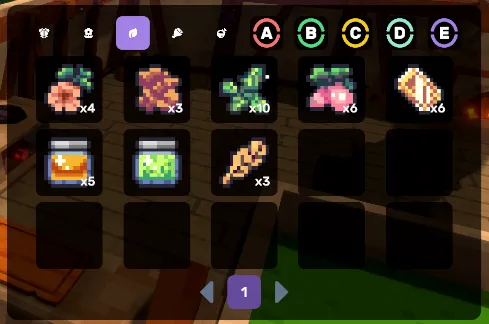
Where to look: the Inventory package is the canonical reference for the view classes. For a complete working example, the GameFull sample wires an
InventoryViewPaginationgrid + anEquipmentRackControllerrack against its save (EquipmentViewPagination— drag-drop equip, live Attack/Health/Defense comparison, feature tooltips,LunaInventoryDragDefaults/LunaInventoryTooltipHelpersglue), reachable from the HUD, plus a drop-table loot loop that flies currency into the HUD chips.
How it composes
GridViewBase<TItem>                  ← grid + filter + selection plumbing (see GridView page)
  ├─ GridViewPagination<TItem>       ← page-button strip
  │    └─ InventoryViewPagination    ← from com.cupkekgames.inventory
  └─ GridViewList<TItem>             ← virtualized ListView scrolling
       └─ InventoryViewList          ← from com.cupkekgames.inventory
Both concrete views implement IInventoryItemSlotGridView and bind item icon, name, and stats against InventoryItem.
Subclassing pattern is identical to GridView's example — override BindItem, UnbindItem, OnItemCreate, plus Select / Deselect for click-to-select.
See also
- GridView — the base class for paginated, filterable grids
- Inventory package — data model
- RPG Stats package — stat-modifier integration
- Tooltip — item compare tooltips
Settings
Theme
Light
Contrast
Material
Dark
Dim
Material Dark
System
Sidebar(Light & Contrast only)
Font Family
DM Sans
Wix
Inclusive Sans
AR One Sans
Direction