
List View
Kinetic Scroll family — one shared gesture core, three components on top.
This page is LunaListView's full reference; siblings: Overview · Scroller · Carousel.
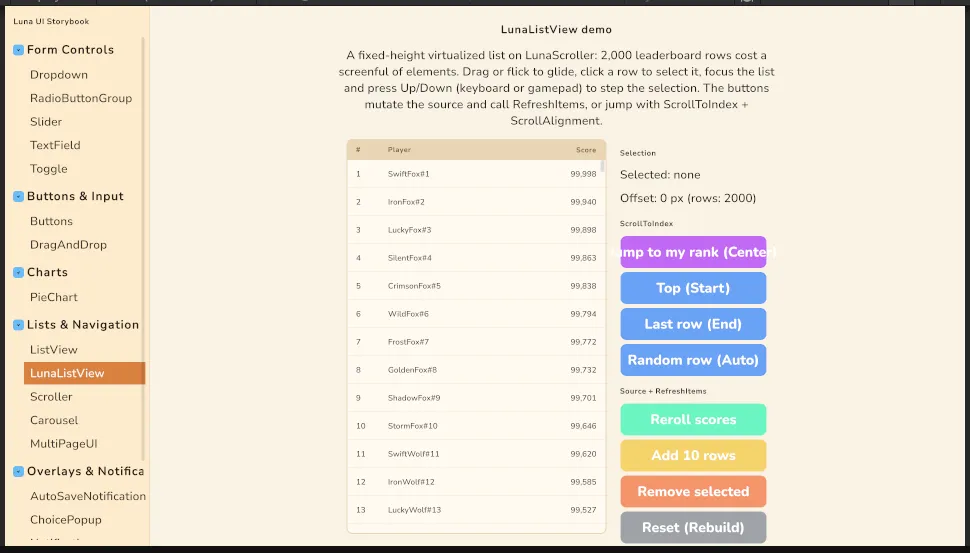
LunaListView is a fixed-height virtualized list built on LunaScroller: rows outside the viewport (plus a 2-row overscan band) are recycled through a pool, so a 10,000-entry inventory or a 2,000-row leaderboard costs a screenful of elements. It inherits every scroller behavior — momentum glide, rubber-banded ends, mouse wheel, styled scrollbar, axis-lock with a nested Carousel — and adds the list contract: MakeItem / BindItem against any IList, single selection with the Unity-compatible event signature, ScrollToIndex with alignment, and keyboard/gamepad row stepping.
It is deliberately not Unity's editor ListView: no multi-select, reorder, tree view, or dynamic heights — those arrive demand-driven (drag-reorder is next in the queue). Vertical only. GridViewList renders through it, and so do the bundled notification history and the GameFull save/load list.
Upgrading to 2.1.3? The list's structural styles ship in the theme's new
LibScroller.uss. If your project imports the theme (directly or through the Essentials sample copy), force-reimport your theme chain once: Unity does not rebuild derived ThemeStyleSheets on its own, and without the new sheet the content shrinks to min-content and nothing scrolls.
Setup
Declare it in UXML (fixed-item-height is required — rows are absolute-positioned by that pitch) or build it in code, then hand it a source plus the two builders:
<ui:UXML xmlns:ui="UnityEngine.UIElements" xmlns:luna="CupkekGames.Luna">
    <luna:LunaListView name="Leaderboard" fixed-item-height="56" selection-type="Single" style="flex-grow: 1;" />
</ui:UXML>LunaListView list = root.Q<LunaListView>("Leaderboard");
list.MakeItem = () => new RewardRow(); // one per pooled row
list.BindItem = (element, index) => ((RewardRow)element).Bind(_rewards[index]);
list.UnbindItem = (element, index) => ((RewardRow)element).Clear(); // optional; fires on recycle
list.ItemsSource = _rewards; // any IListThe list needs a size from USS or layout (flex-grow: 1 inside a sized parent, or an explicit height); content overflows it and is clipped. Rows carry .luna-listview__row, are absolute-positioned, and receive the row height — put your own layout on the row's content, not on the row itself.
Attributes
| Attribute | Default | Meaning |
|---|---|---|
fixed-item-height | 30 | Row pitch in px. Changing it triggers a Rebuild(). |
max-visible-rows | 0 | When above 0 the list sizes itself to that many rows (fewer when the source is shorter, counting its own vertical padding) and scrolls the rest. 0 leaves the height to layout. Code: MaxVisibleRows. |
selection-type | None | None or Single. Multiple warns and falls back to Single. |
plus every LunaScroller attribute | friction, wheel-speed, show-scrollbar, scroll-into-view, spring-duration. axis is ignored — the list is vertical. |
Data changes
Two verbs, chosen by what changed:
list.RefreshItems();   // the DATA changed: re-bind the realized rows in place.
                       // Follows the source size — rows past a shrunk source are
                       // recycled, a grown source realizes rows into the viewport.
list.Rebuild();        // the row SHAPE changed: drop every row AND the pool, re-realize.
list.ItemsSource = other;   // new source: clears the selection silently, resets height.
Reach for RefreshItems after mutating the list you already handed over — scores rerolled, an entry removed, ten appended. Reach for Rebuild when what a row is changed (a grid recomputed its columns, a template swapped): pooling stale-shaped rows would otherwise render only their first slot.
Selection
Single selection ships with the Unity-compatible event signature, so handlers written for ListView.selectionChanged plug straight in:
list.SelectionType = SelectionType.Single;
list.SelectionChanged += items => Show(items.FirstOrDefault());   // IEnumerable<object>
list.SelectedIndex = 3;                          // -1 clears; out-of-range clears
object current = list.SelectedItem;
list.SetSelectionWithoutNotify(3);
Clicking a row selects it; clicking the selected row notifies again (toggle-deselect patterns rely on that), while setting SelectedIndex to its current value stays silent. A drag never selects — past the 8px threshold the scroller owns the pointer. Assigning a new ItemsSource clears the selection silently. The selected row carries .luna-listview__row--selected, themed via --luna-listview-selected.
ScrollToIndex
list.ScrollToIndex(40);                                    // Auto: minimal scroll into view; no-op when visible
list.ScrollToIndex(0, ScrollAlignment.Start, 0.35f);       // pin the row to the top edge
list.ScrollToIndex(400, ScrollAlignment.Center, 0.42f);    // "jump to my rank": centred with neighbours
list.ScrollToIndex(last, ScrollAlignment.End, 0.35f);      // pin to the bottom edge
list.ScrollToIndex(i, ScrollAlignment.Start, 0f);          // duration 0 = instant
ScrollAlignment is Auto (minimal, the default), Start, Center, or End. Explicit alignments always scroll, so a "jump to me" button works even when the row is already on screen. Animated jumps longer than two viewports teleport most of the distance and ease only the tail: it still reads as a scroll, but the virtualizer binds about a screen of rows instead of every row in between. Duration and easing default to the scroller's spring settings.
Keyboard and gamepad
The list itself is focusable; rows are pooled and never are. With focus on the list:
- Selection lists (
Single): Up/Down (or Next/Previous) move the selection cursor one row and follow it withScrollToIndex. At the first or last row the event is left alone, so default navigation exits to the adjacent focusable (a Return button, a tab bar). - Selection-less lists (
None): Up/Down scroll one row pitch, and again exit at the boundary.
This replaces the old ListViewWrapper; nothing to wire.
Theming
.my-list .luna-listview__row--selected { --luna-listview-selected: rgba(255, 255, 255, 0.12); }
.my-list .luna-scroller__thumb { --luna-scroller-thumb: rgba(255, 255, 255, 0.25); }| Class | Element |
|---|---|
.luna-listview | The root (also carries every .luna-scroller class). |
.luna-listview__row | Every realized row: absolute, top = index × pitch, height = pitch. |
.luna-listview__row--selected | The selected row. |
.luna-scroller__content / __bar / __thumb | Inherited scroller parts. |
Virtualized rows are absolute and ignore the content's padding — inset rows with left/right on .luna-listview__row (or a wrapper class), not with padding on the list.
Showcase
- Storybook → Lists & Navigation → LunaListView: a 2,000-row leaderboard with selection, keyboard/gamepad stepping, one button per
ScrollAlignment, and reroll / add / remove / reset buttons that exerciseRefreshItemsagainst a growing and shrinking source versusRebuild. Components/GridView/GridViewListView/renders a responsive grid through it viaGridViewList.
See also
- Scroller — the kinetic container underneath, its gesture and
ScrollTo - Carousel — the horizontal sibling on the same gesture core
- GridView — multi-column grids over this list
- List & ScrollView — styling Unity's own
ListView/ScrollViewwhen you deliberately use them
Settings
Theme
Light
Contrast
Material
Dark
Dim
Material Dark
System
Sidebar(Light & Contrast only)
Font Family
DM Sans
Wix
Inclusive Sans
AR One Sans
Direction