
Settings
The Settings view set is built from three abstractions: a SettingsDataSO bundling many SettingsDataSections (model), and a SettingsMenuView hosting many SettingsMenuViewSections (view). Each pair handles a category — Graphics, Audio, Localization, etc. The GameFull sample ships a complete working example you can fork.
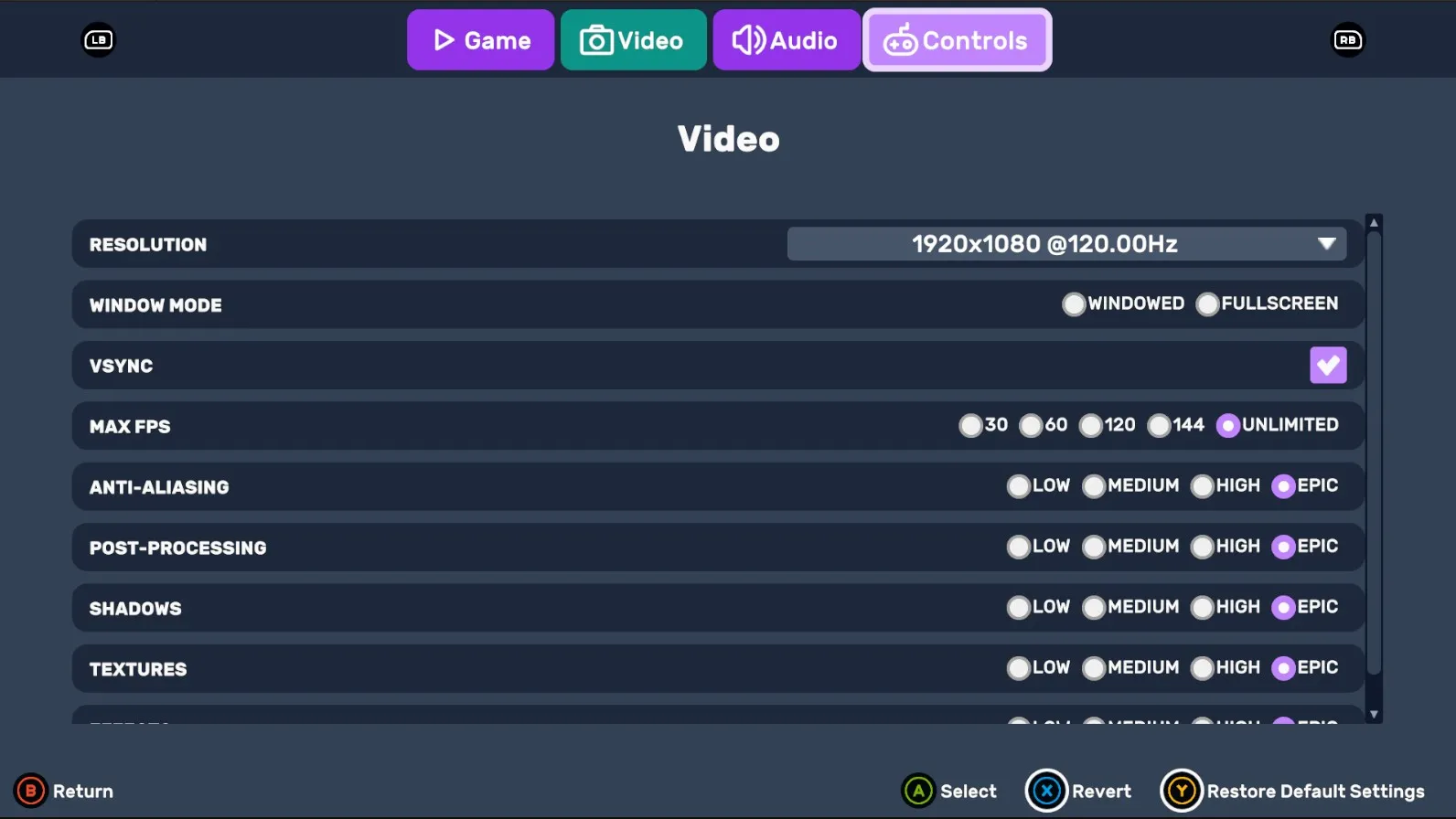
Architecture

| Layer | Class | Purpose |
|---|---|---|
| Model — bundle | SettingsDataSO | ScriptableObject holding a dictionary of SettingsDataSections. |
| Model — section | SettingsDataSection | Abstract SO. One per category; loads/saves to PlayerPrefs and applies values at runtime. |
| View — root | SettingsMenuView | The host UIViewComponent. References its sections via a serialized array. |
| View — section | SettingsMenuViewSection | Abstract MonoBehaviour. One per category; binds UXML controls to its model section. |
SettingsDataSO
Holds the full settings model — a KeyValueDatabaseSO<string, SettingsDataSection> whose keys identify each section (e.g. "audio", "graphics").
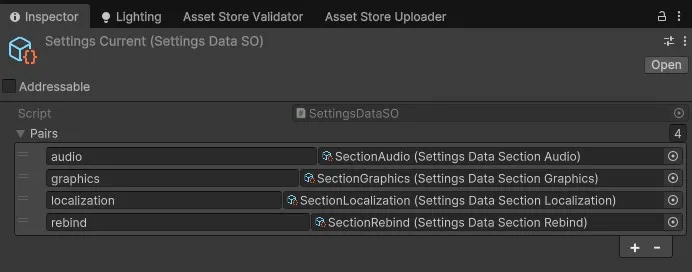
SettingsDataSection
Abstract ScriptableObject. One subclass per category. You override:
| Method | Purpose |
|---|---|
SaveToPlayerPrefs(string key) | Write each field with a per-section key prefix. |
LoadFromPlayerPrefs(string key) | Read each field back. |
CopyValuesFrom(SettingsDataSection) | Deep-copy fields from another instance (used for "discard changes"). |
ApplySettings(SettingsDataSection) | Push values from another instance into the live game (e.g. update audio mixer, locale). |
Equals(object) / GetHashCode() | Power the "settings changed?" diff that gates the Apply button. |
Example
[CreateAssetMenu(fileName = "SectionGameplay", menuName = "CupkekGames/Settings/Section/Gameplay")]
public class SettingsDataSectionGameplay : SettingsDataSection
{
    [SerializeField] private float _cursorSensitivity;

    public float CursorSensitivity
    {
        get => _cursorSensitivity;
        set
        {
            _cursorSensitivity = value;
            // Apply at runtime: e.g. Cursor.sensitivity = value;
        }
    }

    public override bool Equals(object obj)
        => obj is SettingsDataSectionGameplay b && _cursorSensitivity == b._cursorSensitivity;
    public override int GetHashCode() => _cursorSensitivity.GetHashCode();

    public override void SaveToPlayerPrefs(string key)
    {
        PlayerPrefs.SetFloat($"{key}_CursorSensitivity", _cursorSensitivity);
        PlayerPrefs.Save();
    }

    public override void LoadFromPlayerPrefs(string key)
    {
        if (PlayerPrefs.HasKey($"{key}_CursorSensitivity"))
            _cursorSensitivity = PlayerPrefs.GetFloat($"{key}_CursorSensitivity");
    }

    public override void CopyValuesFrom(SettingsDataSection section)
    {
        if (section is SettingsDataSectionGameplay copy)
            _cursorSensitivity = copy._cursorSensitivity;
    }

    public override void ApplySettings(SettingsDataSection section)
    {
        if (section is SettingsDataSectionGameplay copy)
            CursorSensitivity = copy._cursorSensitivity;
    }
}
SettingsMenuView
Root host — a UIViewComponent (CupkekGames.Settings.UI). It resolves its TabView, ReturnButton, Revert, and Default controls in OnUILoaded(root) (PanelRenderer delivers the visual tree asynchronously), creates a working-copy SettingsDataSO (_changedSettings), and calls Initialize(_changedSettings) on each section. Escape saves and exits via a UIViewActionEscape; exit goes through LunaNavigation.PopBackStack().
Assign your SettingsMenuViewSection components to the serialized _sections array — the order must match the tab order in the TabView.
SettingsMenuViewSection
Abstract MonoBehaviour. One subclass per category. The host calls Initialize(SettingsDataSO changedSettings) once the UI is loaded; that resolves the parent UIViewComponent and then calls your overrides:
| Member | Purpose |
|---|---|
Initialize() | Resolve UXML controls — query against Root (the parent view's mount root) — and register change callbacks. |
ApplySettingsToUI() | Push current _changedSettings values into the UI controls. |
OnTabSelected() | Virtual. Called when this section's tab activates — focus your first control. |
| Per-control change handlers | Push UI changes back into the section from _changedSettings.GetValue(<key>). |
Example
using UnityEngine.UIElements;
using CupkekGames.Settings;
using CupkekGames.Settings.UI;

public class SettingsMenuViewAudioExample : SettingsMenuViewSection
{
    private SliderInt _sliderMasterVolume;

    protected override void Initialize()
    {
        VisualElement masterContainer = Root.Q<VisualElement>("AudioMaster");
        _sliderMasterVolume = masterContainer.Q<SliderInt>();

        _sliderMasterVolume.RegisterValueChangedCallback(OnMasterChanged);
    }

    public void OnDisable()
        => _sliderMasterVolume.UnregisterValueChangedCallback(OnMasterChanged);

    public override void OnTabSelected()
        => _sliderMasterVolume.Focus();

    public override void ApplySettingsToUI()
    {
        var audio = (SettingsDataSectionAudio)_changedSettings.GetValue("audio");
        _sliderMasterVolume.value = (int)(audio.MasterVolume * 100f);
    }

    private void OnMasterChanged(ChangeEvent<int> evt)
    {
        var audio = (SettingsDataSectionAudio)_changedSettings.GetValue("audio");
        audio.MasterVolume = evt.newValue / 100f;
    }
}
See also
- Settings package overview
- Pause Menu — typical entry point
- Main Menu — pre-game entry point
Settings
Theme
Light
Contrast
Material
Dark
Dim
Material Dark
System
Sidebar(Light & Contrast only)
Font Family
DM Sans
Wix
Inclusive Sans
AR One Sans
Direction