
Responsive
Luna ships one responsive model, no fork. Drop in your UI, reference the theme, and it scales smoothly from a small phone up through tablets to an 8K desktop — with zero per-screen config on the default path. Underneath, adaptivity is split into two independent axes, the same split modern web and native frameworks make:
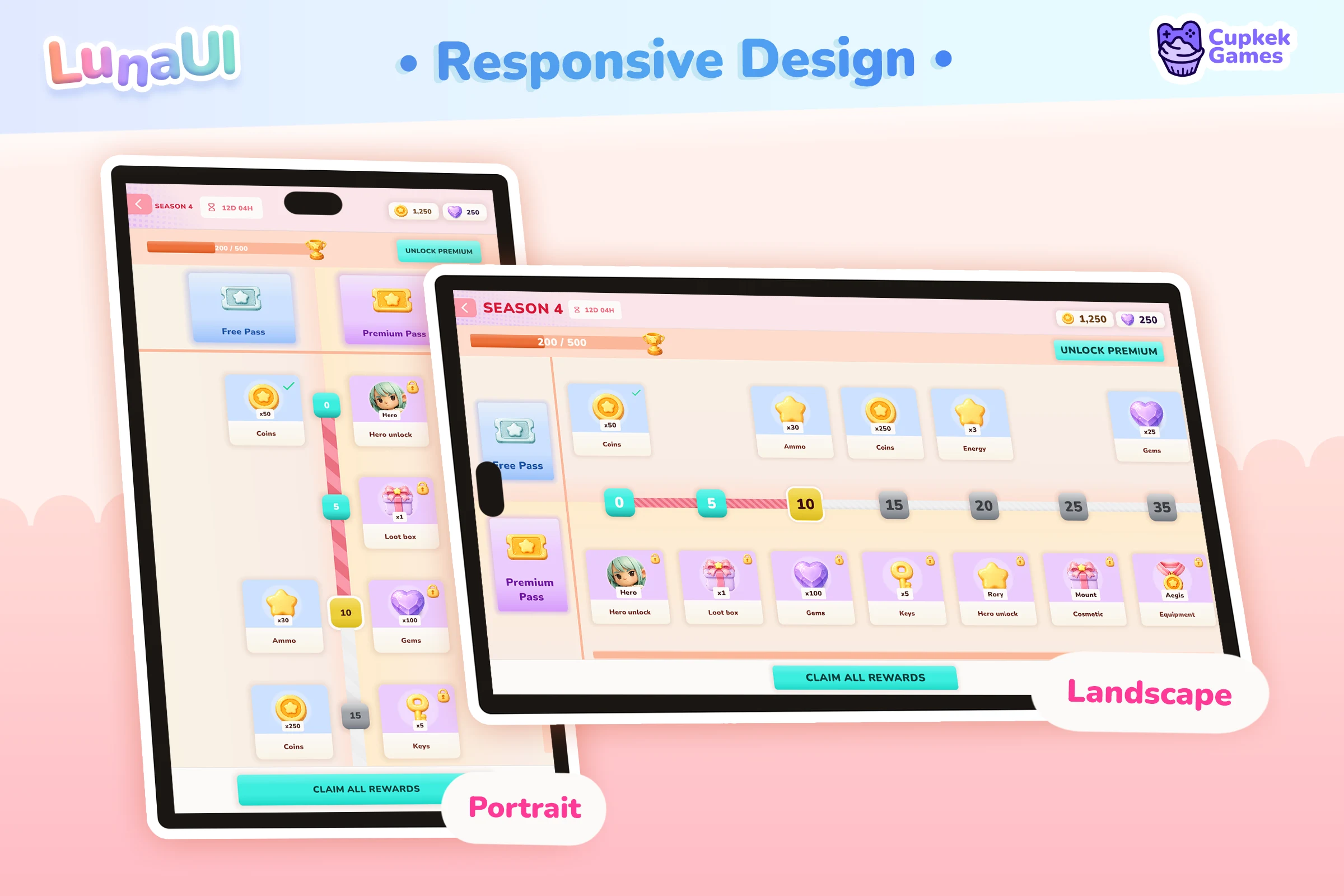
- Layout — which arrangement (columns, stacking, what hides). Handled by breakpoints (a USS class), resolved on the viewport's logical width.
- Scaling — how physically big everything is. Handled by automatic per-device scaling plus an optional player UI-Scale.
Keeping them separate is the whole trick: a breakpoint never resizes anything, and the scaler never changes the layout. A third axis, the safe area, keeps content clear of device chrome (notch, home indicator).
One unit, one signal. Luna pins a single unit — 1 Luna px = 1 dp (density-independent pixel, 1/160″, ≈ a web CSS pixel) — and drives everything from one number, the logical width (
Screen.width ÷ FinalScale): the width the layout actually experiences after scaling. Breakpoints key off it, on every platform, so a phone lands onsm, a tablet onmd/lg, and a desktop onlgby their real usable width — no platform sniffing in the layout path.
Layout — the breakpoint axis
Luna keeps exactly one breakpoint class on the root of every registered UIView (including ones that load later), chosen by the current logical width against a small ladder. The shipped ladder:
| Breakpoint | Logical width | Typical devices |
|---|---|---|
.breakpoint-sm | < 600 | phones (portrait), narrow windows, foldable cover screens |
.breakpoint-md | 600 – 1023 | tablets (portrait), phones (landscape), small desktop windows |
.breakpoint-lg | ≥ 1024 | tablets (landscape), desktop, large monitors |
Resolution is single-active: the entry with the largest minimum ≤ the logical width wins, and only its class is on the root. Base (unprefixed) USS rules are the desktop/lg layout; you author .breakpoint-sm { … } (and optionally .breakpoint-md { … }) to reflow down.
.my-card                  { width: 24%; }    /* base = desktop / lg */
.breakpoint-sm .my-card   { width: 100%; }   /* phone override, down */
md and lg need no new tokens to start. The Essentials theme authors only .breakpoint-sm overrides; md and lg simply inherit the base (desktop) tokens. Because those tokens are already correct at density scale, a tablet renders the desktop arrangement at a comfortable physical size with zero extra authoring — the tablet case is handled for free. Add .breakpoint-md rules only where a tablet genuinely wants something between phone and desktop.
Real reflows from the flagship sample. Each pairs the base desktop rule with its .breakpoint-sm override:
/* Tab bar — fixed-width pills on desktop become equal-flex items on phone (TabBar.uss) */
.tab-bar__item                { flex-basis: auto; width: 168px; margin: 0 var(--space-xs); }
.breakpoint-sm .tab-bar__item { flex-basis: 0; width: auto; margin: 0; }   /* share the row evenly */
.tab-bar__icon                { width: 96px; height: 96px; }
.breakpoint-sm .tab-bar__icon { width: 52px; height: 52px; }               /* shrink to fit 5 tabs */

/* Home tab — the CTA row is right-anchored on desktop, re-centered on phone (HomeTab.uss) */
.home-tab__play-row                { position: absolute; right: var(--space-3xl); bottom: var(--space-xl); }
.breakpoint-sm .home-tab__play-row { right: auto; left: 50%; translate: -50% 0; bottom: var(--space-3xl); }

/* Hero detail — a fixed 440px side column stretches full-width on phone (HeroDetail.uss) */
.hero-detail__tabs-column                { width: 440px; max-width: 440px; }
.breakpoint-sm .hero-detail__tabs-column { width: 100%; max-width: 480px; }
Why logical width and not raw pixels or platform? A breakpoint should react to how much room the layout has, which is neither the raw pixel count (a dense phone has more pixels than a laptop but far less room) nor the platform flag (a landscape phone and a foldable have real desktop-ish width). Dividing the physical width by the scale collapses all of that into one honest number, so the same threshold means the same thing in the editor, on device, and on desktop. A landscape phone crossing 600 logical px correctly gets the wider md arrangement; a desktop window dragged below 600 correctly gets sm. That's the web container-width model, and it's what makes tablets Just Work.
Live. The active class re-resolves automatically on resize, rotation, or a Device-Simulator swap, via a throttled (~5 Hz) screen check — you never drive it by hand. Screen metrics are read through UnityEngine.Device.Screen, so the editor Device Simulator feeds real per-device values (and exercises the mobile scaling path).
Tune the ladder on the Responsive Settings asset: it's a name → minimum-logical-width map. Add tiers (e.g. an xl at 1600) and author matching .breakpoint-xl USS, or collapse to just sm/lg if you don't want a mid tier — the runtime resolves whatever you configure.
WebGL / size-policy override. The layout ladder is always width-based, but the size policy (mobile density vs desktop fit, below) is chosen by device class, and Application.isMobilePlatform is false inside a mobile browser. For a mobile web build, force the mobile size policy so a phone browser gets density scaling instead of desktop fit:
LunaUIManager.Instance.SetDeviceClassMode(DeviceClassMode.ForceMobile); // Auto | ForceMobile | ForceDesktopOrientation. Alongside the width class, Luna keeps one orientation class — .orientation-portrait / .orientation-landscape — on every view root (the USS analog of @media (orientation: …); square counts as landscape). Width breakpoints already cover most rotation effects, since rotating changes the logical width, so reach for orientation only when a rule is genuinely about orientation rather than room — e.g. pinning a HUD rail to the long edge. It compounds with the ladder:
.hud-rail                                { flex-direction: row; }     /* landscape: along the top */
.orientation-portrait .hud-rail          { flex-direction: column; } /* portrait: down the side */
.breakpoint-sm.orientation-landscape ... { ... }                     /* phone AND landscape */
Scaling — the size axis
A breakpoint chooses the arrangement; the scaler (LunaUIScaler) chooses the size and writes it to PanelSettings.scale. Unity hands you raw physical pixels (unlike the browser/OS, which give you a pre-scaled logical pixel), so Luna reconstructs the right per-device scale — and is the single scale authority (see the panel note below).
- Mobile — density scaling, pinned.
scale = dpi ÷ 160. The160is the unit contract (1 px = 1 dp), not a tunable knob — every token and utility is authored against it, so it's aconst, not a serialized field. Overall-size taste lives in the token values and the player UI-Scale, never here.- Reliable density. On Android,
Screen.dpiis often mis-reported, so Luna readsDisplayMetrics.densityDpivia JNI (the value every native app sizes with); iOS and the editor Simulator useScreen.dpidirectly; WebGL already reportsdevicePixelRatio × 96. - Safe fallback. If a device reports no usable dpi (outside
[50, 700]), Luna assumes a ~400 dp short side (scale = shortSidePx ÷ 400, clamped1–3.5) instead of a fixed dpi — accurate within ~±15% for nearly every phone, and it can never collapse the UI to a fraction of its size on a misreporting device. - Density sanity: form factor beats a lying dpi. A dpi that is readable can still be wrong: Android OEM misreports, and simulator device definitions with copy-pasted values (Unity ships the entire iPhone 12 family at the iPhone 11's 326 dpi). If the reported density would give a phone-shaped screen (aspect under 0.6) a logical short side wider than any real phone (
MaxPhoneLogicalWidthDp, 500 dp; flagships are ~430), the density and the form factor contradict each other, and the density loses: the dpi is rejected and the short-side fallback drives the scale, so the phone stays on the phone breakpoint instead of rendering a shrunken tablet layout. Genuinely low-density phones keep their dpi (an iPhone SE at 326 dpi resolves 368 dp, which is phone-plausible). The check is orientation-agnostic on mobile platforms, so landscape-locked games on misreporting devices are covered too. - Fit floor. On a screen too narrow to hold the minimum authored width, the UI scales down just enough to keep
MobileMinLogicalWidth(default 360 dp) across — so a foldable's cover screen still fits. Only ever shrinks.
- Reliable density. On Android,
- Desktop — Scale to window (the default).
scale = clamp( min(width ÷ 1920, height ÷ 1080), 0.75, 2.0 )against a 1920×1080 reference. It's a FIT: the constrained axis binds, so the reference never overflows; an ultrawide gets extra live canvas on the long axis rather than letterbox bars.0.75is the legibility floor — below it the UI stops shrinking and the layout reflows instead (the logical viewport grows past the reference, dropping the window intomd/sm), so a small window stays readable rather than turning tiny.2.0caps huge monitors (reached around 2× reference, i.e. 4K).
Desktop mode is a single Advanced enum (DesktopUIScaleMode), not a per-screen choice:
| Mode | Behavior |
|---|---|
| Scale to window (default) | Window-FIT proportional scaling, clamped 0.75–2.0, as above. |
| Constant | Fixed design size (1×); pair with breakpoint reflow for a fixed-size, reflowing desktop UI. |
| Match DPI | Follows the OS display scale: dpi ÷ 96, quantized to quarter steps (100 % / 125 % / 150 % / …) and never below 1×. Falls back to 1× when dpi is unreadable. |
Device class gates size, not layout.
DeviceClassMode(Auto=Application.isMobilePlatform) picks only the size policy — mobile density vs desktop fit. A Retina / 4K-laptop desktop (~220–280 dpi) stays desktop and takes the fit path; it's never mistaken for a phone. Layout is always the width ladder.
Automakes one promotion: a phone-shaped viewport on a desktop platform (portrait, width under 0.6 of the height: an editor Game view set to a phone resolution, or a desktop window dragged tall and narrow) takes the mobile size policy, with the monitor dpi ignored because it says nothing about the device such a viewport simulates. That is what makes a plain 1080×2400 Game view scale and break like the phone it stands in for, with zero configuration. The detector is deliberately portrait-only, since a 16:9 landscape desktop window shares its aspect ratio with a portrait phone.ForceMobile/ForceDesktopremain absolute.
Which panels get scaled? All on-screen ones, automatically. Luna auto-discovers the PanelSettings from your UIViews as they register and drives every one (dedup'd), including per-layer panels. World-space panels (renderMode == WorldSpace) and render-texture panels (targetTexture != null) are skipped — those size in world units or into a fixed texture, and device density must never resize them.
⚠️ Panels must be Constant Pixel Size
Luna writes
PanelSettings.scaleat runtime, and Unity applies that multiplier on top of the panel's ownScale Mode. If the panel is Scale With Screen Size or Constant Physical Size, Unity's factor multiplies with Luna's and the two compound — the classic "UI right on one device, way off on another." Only Constant Pixel Size makes Unity's factor1.0, leaving Luna the single authority.Luna enforces this: at runtime it warns once and force-corrects any driven screen-space panel that isn't Constant Pixel Size, and the debug window's Validate Panels button (also
Tools ▸ CupkekGames ▸ Luna ▸ Validate Panels) fixes the assets themselves. World-space / render-texture panels keep their own mode untouched.
Player UI-Scale:
LunaUIManager.Instance.SetUserUIScale(1.25f);                  // clamped 0.5–2.0, persisted (PlayerPrefs "Luna.UIScale.v2")
LunaUIManager.Instance.SetUserUIScale(1.25f, persist: false);  // session-only: demo sliders, previews
LunaUIManager.Instance.ResetUserUIScale();                     // back to 1.0 and clears the pref
Wire your settings-screen slider to this; the final scale is baseScale × userScale, so it multiplies on top of the per-device base in every mode. This is the one place overall size is a matter of taste. The pref is project-global: every Luna scene reloads it on boot, and since the breakpoint ladder resolves on the final scale it can even change which breakpoint a scene lands on. So pass persist: false for any demo or debug slider that should not leave a scale behind (Tools ▸ CupkekGames ▸ Luna ▸ Reset User UI Scale Pref clears a stuck one).
Player text-scale (accessibility). UI-Scale zooms everything — the display-zoom knob. A separate text-only scale enlarges copy without inflating the layout, the sp / iOS Dynamic Type analog that most Unity games skip:
LunaUIManager.Instance.SetUserTextScale(130); // percent; persisted (PlayerPrefs "Luna.TextScale.v1"); 100 = offIt puts a text-scale-<percent> class on every view root; the theme restates only the --text-* tokens at that step, so type grows while controls, spacing, and icons hold. USS has no calc(), so the steps are authored as literal blocks — the Essentials theme ships 85 / 115 / 130 (with .breakpoint-sm.text-scale-* compounds for the phone canvas). Offer exactly the steps your theme authors in your settings UI, and add more .text-scale-N blocks to Tokens.uss if you want finer granularity. It rides the same class mechanism as breakpoints, so late-loaded views pick it up automatically.
Why a per-device unit? A phone is held closer than a monitor, so its "logical pixel" is denser — there's no single scale right for both. Luna's mobile unit is the dp (
dpi/160), the same thingdevicePixelRatio/ Android density / iOS@xencode under the hood; desktop uses a96/1920×1080reference. Because the unit is fixed, a 44 dp control is ~7 mm — a proper touch target — on every phone, automatically.
Authoring — utilities & tokens
The Essentials sample theme ships the authoring layer you write responsive UI with. It's a starter kit you can adopt wholesale or replace — none of it is hard-wired into the runtime.
Tailwind-style utilities (layout-utilities.uss, spacing-utilities.uss, loaded globally via LunaUIDemoTheme.tss). The base class is the desktop default; the shipped breakpoint variant prefix is sm- (the phone override, active under .breakpoint-sm).
<!-- row on desktop, column on phone -->
<ui:VisualElement class="flex-row sm-flex-col" />
<!-- shown on desktop, hidden on phone -->
<ui:VisualElement class="flex sm-hidden" />
Families: flex-row/col, flex-wrap/nowrap, justify-*, items-*, self-*, grow/shrink, hidden/flex, width/height fractions (w-full, w-1-2, w-1-3, w-2-3, w-1-4, w-3-4, h-full), and padding/margin on a 4px scale — p-*, px-*, py-*, m-*, mx-*, my-* (p-0 p-1 p-2 p-3 p-4 p-6 p-8 = 0/4/8/12/16/24/32 px), plus mx-auto. Each base class is the desktop default; the common steps also ship sm- phone variants. Two forced deviations from Tailwind because USS class names can't contain : or /: the prefix is sm-foo (not sm:foo) and fractions are w-1-2 (not w-1/2).
Direction vs Tailwind (read this). Tailwind is mobile-first and cumulative —
sm:means "at and above 640 px." Luna'ssm-is desktop-first and single-tier — it's the phone override only, active solely under.breakpoint-sm, and exactly one breakpoint class is ever on the root. Same vocabulary, opposite direction. Author the base class as your desktop/lglook andsm-as the phone step-down. (Need a tablet-specific tweak? Addmd-variants alongside thesm-ones and the matching.breakpoint-md— the runtime already resolvesmd.)
Real utility combos from the flagship sample — the base classes are the desktop layout; the sm- variants override on phone, so a whole screen reflows from the UXML alone with no custom USS:
<!-- Profile: two 50% columns on desktop, stacked full-width on phone -->
<ui:VisualElement class="profile-view__stats-achievements-row flex-row items-start sm-flex-col sm-items-stretch">
    <ui:VisualElement class="profile-view__stats-block grow w-1-2 sm-grow-0 sm-w-full" />
    <ui:VisualElement class="profile-view__achievements-block grow w-1-2 sm-grow-0 sm-w-full" />
</ui:VisualElement>

<!-- Shop: a horizontal bundle row that becomes a vertical stack on phone -->
<ui:VisualElement class="shop-tab__bundles-row flex-row items-start justify-center
                         sm-flex-col sm-items-stretch sm-justify-start" />

<!-- Leaderboard toolbar: trim the horizontal padding on phone -->
<ui:VisualElement class="leaderboard-tab__toolbar flex-row items-center justify-between
                         flex-wrap py-3 px-8 sm-px-4" />
Global design tokens (Tokens.uss, also loaded via the theme). Spacing, radii, type scale, semantic text roles, the ink ladder, and component-size tokens (--control-h-*, --icon-*, --avatar-*, --badge-*, --bar-h-*, --field-w-*), plus fixed hairline widths (--line-*), all live at the panel :root, alongside --color-*. .breakpoint-sm overrides the text and component-size tokens down for the phone canvas. The phone values follow dp norms under the pinned unit — body text 16 dp, primary touch controls 44 dp+ (matching HIG 44 pt / Material 48 dp) — so don't shrink them to taste-tune overall size; that's the user-scale slider's job.
The override is just the same custom property restated under .breakpoint-sm, so every rule that reads it through var() updates at once — you tune one block, not every component:
/* Tokens.uss — desktop reference at :root, phone values under .breakpoint-sm */
:root          { --text-body: 18px;  --text-title: 28px; }
.breakpoint-sm { --text-body: 16px;  --text-title: 20px; }

/* A component just reads the token; switching breakpoints re-flows it for free (GameTokens.uss) */
.gf-scroll-tight .unity-scroll-view__content-container                 { padding-left: var(--space-xl); }
.breakpoint-sm .gf-scroll-tight .unity-scroll-view__content-container  { padding-left: var(--space-lg); }
Why tokens are global, not per-screen. UITK voids the entire declaration if any
var()inside it is unresolved. A globally-loaded utility (.p-3 { padding: var(--space-md) }) or component rule can land on any element — including modals and transition layers that get reparented out of a screen's subtree — so its tokens must resolve panel-wide. Defining tokens once at the panel root (not per-UXML) is what guarantees borders, radii, spacing, and fonts never silently drop. Size tokens use direct literals only (never--icon-md: var(--space-xl)) for the same reason — a chained, unresolved link would void the value.
Safe area — the device-chrome axis
A breakpoint picks the arrangement and the scaler picks the size; the safe area keeps content clear of device chrome — notch, status bar, rounded corners, home indicator. Luna reads Screen.safeArea and pushes the resulting insets as padding onto the elements you opt in.
Opt in by class. Tag a wrapper with luna-safe-area and Luna pads it to the device insets. Edge modifiers narrow which edges are padded:
| Class | Pads |
|---|---|
luna-safe-area | all four edges |
luna-safe-area--top / --bottom / --left / --right | only that edge |
luna-safe-area--horizontal / --vertical | that pair |
Scale-correct + live. Insets are converted to panel units (divided by the active UI scale, so a dense phone doesn't get ~3× too much padding) and re-pushed on rotation/resize via the same throttled tick the scaler uses. Every registered UIView is covered, including per-layer panels; world-space / render-texture panels are untouched. Desktop and notch-less devices resolve to zero insets — the tag is simply inert there.
⚠️ The one rule: tag a dedicated wrapper
Luna writes inline padding on the tagged element, which overrides any USS padding on that same element. So put
luna-safe-areaon a wrapper whose only job is the inset, and keep your real padding on its children.This isn't a workaround — it's the correct mobile look for free. The iOS large-title nav bar wants the bar background to bleed up under the status bar while the content sits below the notch. Untagged backgrounds stay full-bleed; only the inner wrapper insets:
xml<ui:VisualElement class="top-banner luna-fx ..."> <!-- bg bleeds full-width, under the notch --> <ui:VisualElement class="luna-safe-area--top"> <!-- only the content insets --> <!-- logo, buttons, currency chips… --> </ui:VisualElement> </ui:VisualElement>Don't stack safe-area classes for the same edge up a parent → child chain, or you'll double-inset. Flat ownership — each piece of chrome owns its edge once.
In the flagship sample. GameUiHub.uxml wraps the whole shell exactly this way: one full-bleed gradient background, then the top banner and the bottom tab bar each in their own single-edge wrapper, so the chrome clears the notch and the home indicator while the background bleeds under both:
<ui:VisualElement name="ShellRoot" class="shell-root grow w-full">
    <ui:VisualElement picking-mode="Ignore" class="shell-root__bg luna-fx luna-fx-matte" />   <!-- bleeds edge-to-edge -->
    <ui:VisualElement class="shell-chrome shrink-0 grow-0 luna-safe-area--top">    <!-- banner clears the notch -->
        <ui:Instance template="TopBanner" />
    </ui:VisualElement>
    <ui:VisualElement name="ContentSlot" class="shell-content grow shrink" />
    <ui:VisualElement class="shell-chrome shrink-0 grow-0 luna-safe-area--bottom"> <!-- tab bar clears the home indicator -->
        <ui:Instance template="TabBar" />
    </ui:VisualElement>
</ui:VisualElement>
Config lives on the Responsive Settings asset (the SafeAreaConfig section); it falls back to sensible defaults when no asset is assigned:
- Disable — force insets off (default unchecked = safe area on). Tick only for immersive screens that intentionally draw under the notch.
- Min Inset — a guaranteed baseline on every padded edge, in panel units, regardless of device.
- Offset — per-edge ± adjustment (panel units): trim the device inset (
-7) or add breathing room (+8). - Scale — per-edge multiplier on the device inset, applied before Offset. Use it when a constant Offset cannot say "proportionally less":
0.6takes 60% of a Dynamic Island and 60% of a small notch alike.0(the value assets saved before this field show) means unset and behaves as1. - Max Inset — per-edge ceiling on the final resolved inset, in panel units.
0means no cap. When a cap sits below Min Inset, Min Inset wins. - Simulate (editor only) — stand-in insets to preview a notch in a plain Game view, no Device Simulator needed. Flows through Offset / Min Inset like a real device. The Responsive window's device testbed can write these for you: its presets carry real per-device insets (notch, Dynamic Island, home indicator), applied together with the Game-view resize (see Debug tools below).
Per-element override (USS). The config above is global to the manager. To inset a single screen by a different amount — say 60% of the Dynamic Island on one immersive view — set a USS custom property on the tagged wrapper itself:
.my-screen-wrapper                { --luna-safe-area-scale: 0.6; }  /* this wrapper: 60% of the device inset */
.breakpoint-sm .my-screen-wrapper { --luna-safe-area-scale: 1.0; } /* per-breakpoint, zero C# */--luna-safe-area-scalereplaces the config's Scale for that element. It is explicit:0genuinely means "no inset" here (only the serialized asset field treats0as unset).--luna-safe-area-maxreplaces the config's Max Inset for that element (0or below = no cap; Min Inset still wins a conflict).- Offset, Min Inset and Disable always come from the global config. With neither property set, the element gets exactly the globally resolved insets.
- Tagged elements re-apply automatically whenever the resolved property value changes — a USS edit, or a breakpoint swap, since USS variables respond to the breakpoint root classes.
Read it from code:
SafeAreaInsets i = LunaUIManager.Instance.SafeArea; // panel units: i.Top / i.Bottom / i.Left / i.RightSelf-responsive layout — use fewer breakpoints
The modern move is to lean on intrinsic layout so most adaptivity needs no breakpoint at all — and it composes cleanly with the width ladder:
GridViewdynamic columns —SetDynamicItemPerLine(minItemWidth, maxColumns)+RegisterDynamicItemPerLineUpdate()fit as many columns as the width allows and re-pack on resize. This is the UITK analogue of CSSrepeat(auto-fit, minmax(min, 1fr)), and it's effectively a container query — the grid reacts to its own width. See GridView.- Flexbox —
flex-wrap: wrap+%widths reflow continuously.
Both straight from the flagship sample — the column count and wrap points come from the available width, not a breakpoint:
// HeroesTab.cs — width-driven columns, recomputed on resize (the CSS auto-fit / minmax analogue)
_grid.SetDynamicItemPerLine(_minCardWidth, _maxColumns);  // as many columns as fit
_grid.RegisterDynamicItemPerLineUpdate(); // re-pack on resize/* Inventory.uss — percentage-width tiles wrap on their own: 10-up on desktop, 3-up on phone */
.inventory .inventory__section-pairs > * { width: 9.5%; margin: 0.5%; }
.breakpoint-sm .inventory .inventory__section-pairs > * { width: 27%; margin: 3%; }
/* HeroesTab.uss — flex slots fill the row with no breakpoint: min 150px, grow to fill, cap at 240px */
.heroes-tab__list .grid-line > * { flex-grow: 1; flex-shrink: 1; flex-basis: 150px; max-width: 240px; }Reserve the breakpoints for the genuine arrangement flips; let flex / GridView handle the continuous middle. This is also why the md tier needs so little authoring — intrinsic layout already absorbs most of the tablet range.
Container queries
Style a component by its own width, not the viewport's. Breakpoints react to the whole viewport. But a reusable component doesn't always get room proportional to the viewport: a HeroCard in a 3-up grid gets ~300 px; the same card dropped into a 180 px sidebar gets ~180 px — yet the viewport is lg in both cases, so the breakpoint can't tell the card is cramped. LunaContainerQuery is the fix: a manipulator that toggles classes by the element's own resolved width, the UITK analog of CSS @container / SwiftUI ViewThatFits.
heroCard.AddManipulator(new LunaContainerQuery(("cq-wide", 260f))); // (class, minWidth)….hero-card { flex-direction: column; } /* narrow: art above text */
.cq-wide .hero-card { flex-direction: row; } /* ≥260px: art beside text */Now the card re-lays-out whenever its container crosses 260 px — in a sidebar, a modal, a phone grid — and no breakpoint has to know. Tiers use the same single-active, largest-minWidth-wins semantics as the ladder (add a ("cq-narrow", 0f) tier if you want an explicit narrow class below all others). It's driven by GeometryChangedEvent but only swaps classes when the winning tier changes, so resizing within a band costs one comparison. This is GridView's dynamic-column trick generalized to any element — the last piece for authoring components that adapt anywhere without a breakpoint.
Setup
Scaling and safe area work out of the box with built-in defaults — nothing to wire. To customize them, and to tune the breakpoint ladder, create a Responsive Settings asset and assign it:
Assets ▸ Create ▸ CupkekGames ▸ Luna UI ▸ Responsive Settings.- Assign it to
LunaUIManager ▸ Responsive Settings.
The asset ships a populated sm/md/lg ladder, the size config, and the safe-area config. The Essentials sample ships a pre-configured asset and theme, so importing it gives you the whole stack already wired — including panels set to Constant Pixel Size.
Settings reference
Every field on the Responsive Settings asset, in inspector order. Each also carries the same explanation as an inspector tooltip; this is the long-form version.
Device Class Mode
Decides which size policy runs: mobile (density scaling, dpi ÷ 160) or desktop (the Desktop Mode below). That is all it gates. Layout breakpoints are width-based and ignore it entirely, so a tablet still lands on md/lg by its logical width even though it takes the mobile size path.
| Value | Meaning |
|---|---|
| Auto (platform detect) (default) | Application.isMobilePlatform picks the class. One promotion on top: a phone-shaped viewport on a desktop platform (portrait, width under 0.6 of height, e.g. an editor Game view at a phone resolution) takes the mobile path with the monitor dpi ignored. See the device-class note for why. |
| Force Mobile (density scaling) | Always the mobile path. Required for a mobile-only WebGL build: isMobilePlatform is false inside a mobile browser, so Auto resolves desktop there. |
| Force Desktop (window scaling) | Always the desktop path. |
For a universal web build (one URL, phones and desktops), leave the asset on Auto and call LunaUIManager.SetDeviceClassMode(...) at runtime after your own user-agent check.
UI Scale (size axis)
The LunaUIScaler.Config block. Mobile scaling is always density-auto and has one knob; everything else here tunes the desktop path.
| Field | Meaning | Default |
|---|---|---|
| Desktop Mode | Desktop size strategy: Scale to window (window-FIT proportional scaling), Constant (fixed design size, reflow via breakpoints), Match DPI (follow the OS display scale in quarter steps). Detailed in Scaling. | Scale to window |
| Desktop Reference Width / Height | The design resolution at which the UI renders 1:1 in Scale to window. The FIT takes the more constrained axis, so the reference never overflows. Note these are pixels of the window, not the monitor class: a 1440p monitor is 2560 wide. | 1920 × 1080 |
| Desktop Min Scale | Legibility floor for Scale to window. Below it the window stops shrinking the UI; the logical viewport grows instead and the ladder reflows the layout. | 0.75 |
| Desktop Max Scale | Ceiling for Scale to window (and Match DPI), so huge monitors stop enlarging. Reached at 2× the reference width (4K at the default reference). | 2.0 |
| Desktop Reference Dpi | Only read by Match DPI: scale = dpi ÷ this. 96 equals CSS px / Windows 100% display scale. | 96 |
| Min / Max Valid Dpi | Sanity window for the reported dpi. Outside it the value is treated as garbage and a fallback runs: Fallback Dpi on desktop, the ~400 dp short-side heuristic on mobile. | 50 / 700 |
| Fallback Dpi | Desktop stand-in when the reported dpi is invalid (many desktops report 0). Mobile never uses it. | 96 |
| Mobile Min Logical Width | The narrowest width (in dp) your phone layout is authored for. On a screen too narrow to fit it at pure density scale (a foldable's cover screen), the UI shrinks just enough that this many dp still fit across. Only ever shrinks; 0 falls back to the built-in 360. | 360 |
Safe Area
The SafeAreaConfig block; the resolve order is device inset × Scale + Offset, floored by Min Inset, capped by Max Inset. Applied as inline padding to elements tagged luna-safe-area[--edge] (see Safe area).
| Field | Meaning | Default |
|---|---|---|
| Disable | Force insets off everywhere. Unchecked = safe area on. Only for a game that intentionally draws under the notch on every screen. | off |
| Min Inset | Guaranteed baseline on every padded edge, in panel units, regardless of device. Wins over everything, including a lower Max Inset. | 0 |
| Offset | Per-edge ± adjustment in panel units, added after Scale: trim the device inset (-7) or add breathing room (+8). The result never goes below zero, so a negative trim degrades safely on notch-less devices. | 0 |
| Scale | Per-edge multiplier on the device inset, applied before Offset. Use it to take "proportionally less": 0.6 is 60% of a Dynamic Island and 60% of a small notch alike. 0 means unset and behaves as 1 (assets saved before this field existed keep their exact insets). | unset (=1) |
| Max Inset | Per-edge ceiling on the final resolved inset, in panel units. 0 = no cap. | 0 |
| Simulate (editor only) | Replace the device insets with the Sim Insets below, to preview a notch in a plain Game view. Never affects builds. The Responsive window's device presets can write these for you. | off |
| Sim Insets (editor only) | The per-edge stand-in insets used while Simulate is on. They flow through Scale / Offset / Min / Max exactly like a real device's. | 0 |
Breakpoints (layout axis)
| Field | Meaning | Default |
|---|---|---|
| Breakpoint Class Prefix | Prefix for the USS class placed on every view root, e.g. breakpoint- + sm → .breakpoint-sm. | breakpoint- |
| Debug | Log every breakpoint class apply/remove to the console. | off |
| Breakpoints | The ladder itself: name → minimum logical width (Screen.width ÷ FinalScale; dp on mobile, design px on desktop). The entry with the largest min at or below the logical width wins; exactly one class is active at a time, on every platform. | sm 0 / md 600 / lg 1024 |
Debug tools
Tools ▸ CupkekGames ▸ Luna ▸ Responsive — a live window showing the runtime Screen size, DPI, applied scale, logical width, active breakpoint, and resolved safe-area insets, plus:
- a breakpoint ladder view with the active tier highlighted;
- a device simulator (presets for iPhone SE/14/15, Pixel 8, Galaxy Tab, iPad Pro, Steam Deck, Desktop 1080p/1440p/4K, …) that runs the real scaler policy for any width/height/dpi and mobile-class toggle — so you can read the resulting scale, logical width, and breakpoint without hardware;
- Apply To Game View with Prev / Next cycling: resizes the actual Game view to the preset's pixels, so whatever scene is running reflows device by device while you watch in Play Mode. Size and aspect are exact; density rides the phone-form-factor path (dpi-exact simulation stays the Unity Device Simulator's job);
- safe-area simulation: presets carry per-device insets (notch, Dynamic Island, home indicator; landscape maps the notch to both sides), written into the settings asset's
Simulatestand-ins on Apply, with a Clear button. The Game view has no notch of its own; this is how it grows one; - Copy State / Export + Screenshot (writes
state.txt+ a device screenshot per profile toAssets/LunaResponsiveExports/, a ready-made regression matrix); - Validate Panels — fixes any non-Constant-Pixel-Size screen-space PanelSettings asset in the project. Label an asset
LunaValidateSkipto exempt a panel that Luna deliberately does not drive (a plain-UIDocument preview scene, for example).
It reads the runtime screen, so values are trustworthy in Play Mode and the Device Simulator. (It reports diagnostics only — it doesn't render per-breakpoint USS visuals.)
Tools ▸ CupkekGames ▸ Luna ▸ Responsive Gallery — in Play Mode, sweeps the Game view through the device matrix (phones, tablets, desktop, ultrawide, Steam Deck) and records the responsive readout plus a screenshot per case, emitting a markdown gallery to LunaResponsiveGallery/<timestamp>/ at the project root. It is scene-agnostic by design: navigate to the screen you want covered, run the sweep, repeat. Review it per release as your visual-regression artifact.
Tools ▸ CupkekGames ▸ Luna ▸ Validate Responsive — lints the two classic "UI looks wrong and I don't know why" causes: a leftover persisted user UI scale (project-global, silently rescales every Luna scene on boot) and a manager running without a responsive settings asset. The companion Reset User UI Scale Pref item clears a stuck scale.
Live inspector readout. Select the LunaUIManager during Play Mode: a Responsive State foldout shows the whole chain (sampled viewport and dpi, the device-class gate and why it chose that path, base × user = final scale, logical width, breakpoint plus the ladder's thresholds, orientation, text scale, safe area) with Copy and Log buttons. The same string backs DescribeResponsiveState(), which is what to paste into bug reports. Note the values are the manager's own player-loop samples; editor-context Screen.* reads whichever editor window has focus and must not be used for diagnosis.
For builds, tick Log UI Scale On Boot on LunaUIManager (or call LogUIScaleState()): it logs one line with screen size, DPI (reported + validated), device-class path, final scale (base × user), logical width, active breakpoint, orientation, text-scale, and safe-area insets — readable in Player.log / logcat / Xcode.
Samples
ResponsiveDemo(Showcase ▸ Components) — drag a viewport-width slider (or the Phone / Tablet / Desktop presets) and watch a mini-storefront re-tier acrosssm/md/lgas the width crosses 600 and 1024, resolved through the real ladder; a separate UI-scale slider exercises the size axis independently.GridViewListViewResponsiveDemo/GridViewPaginationResponsiveDemo— width-driven dynamic columns (self-responsive).GridViewListViewResponsiveDemoalso drivesGridViewList's per-breakpoint config — scroller visibility / row height / scroll physics swapped onsm.- The LunaShowcase flagship UI (Showcase) is the full model in practice.
API reference
// Layout — LunaResponsiveSettingsSO (the Responsive Settings asset, assigned on LunaUIManager)
public string CurrentBreakpoint { get; }                          // active name, "" if below all tiers
public string ClassPrefix { get; }                                // "breakpoint-"
public DeviceClassMode DeviceClass { get; }                       // Auto | ForceMobile | ForceDesktop (size policy)
public event Action<string> BreakpointChanged;
public bool    ResolveIsMobile();                                 // platform-only answer; Resolve() owns the full gate
public void    SetDeviceClassModeValue(DeviceClassMode mode);
public void    SetSimulatedSafeArea(bool simulate, SafeAreaEdges insets = default);  // editor debug: drive the Simulate stand-ins from tooling
public void    SetBreakpoint(string name);                        // "" / null clears
public string  ResolveForWidth(int logicalWidth);                // ladder resolution
public void    ApplyForLogicalWidth(int logicalWidth);           // resolve + apply the winning class
public IEnumerable<(string name, int minWidth)> GetBreakpoints();

// Device class + breakpoint application — LunaUIManager
public LunaResponsiveSettingsSO ResponsiveSettings { get; }
public void SetDeviceClassMode(DeviceClassMode mode);             // runtime override (e.g. WebGL UA sniff)
public void RefreshResponsive();                                  // recompute scale → ladder + orientation + scale + safe area
public void AddClassToAllUIViews(string className);
public void RemoveClassFromAllUIViews(string className);
public static string ResolveOrientationClass(int width, int height);   // "orientation-portrait" | "orientation-landscape"
public const string PortraitClass  = "orientation-portrait";
public const string LandscapeClass = "orientation-landscape";

// Scaling — LunaUIManager + LunaUIScaler
public void  SetUserUIScale(float scale, bool persist = true);    // player slider; clamped 0.5–2.0; persist: false = session-only
public void  ResetUserUIScale();                                  // back to 1.0 and clears the pref
public float UserUIScale { get; }
public void  SetUserTextScale(int percent);                       // text-only a11y; clamped 50–200, persisted; 100 = off
public int   UserTextScale { get; }
public LunaUIScaler.Result GetUIScaleResult();                   // { MobileClass, FormFactorMobile, DensityRejected, DpiValid, ValidatedDpi, BaseScale, UserScale, FinalScale, DesktopMode }
public void  LogUIScaleState();
public string DescribeResponsiveState(bool multiline = false);    // the whole chain as one diagnostic string (backs the inspector foldout)
public static Result LunaUIScaler.Resolve(float rawDpi, int screenWidth, int screenHeight,
    bool platformMobile, DeviceClassMode mode, float userScale, in Config config);  // the single decision point: gate + density sanity + scale
public static bool LunaUIScaler.IsPhoneFormFactor(int width, int height);           // portrait and width/height < 0.6
public static int LunaUIScaler.LogicalWidth(int screenWidthPx, float finalScale);   // the ladder's signal
public const float LunaUIScaler.MobileReferenceDpi = 160f;        // the pinned dp unit (not a knob)
public const float LunaUIScaler.MaxPhoneLogicalWidthDp = 500f;    // density-sanity ceiling for phone-shaped screens
public enum  DesktopUIScaleMode { ScaleWithWidth, Manual, AutoDpi } // labels: Scale to window (default) / Constant / Match DPI

// Container queries — per-element width classes (add to any VisualElement)
public class LunaContainerQuery : Manipulator {
    public LunaContainerQuery(params (string className, float minWidth)[] tiers);
    public string CurrentClass { get; }                          // active class, "" below all tiers
}

// Safe area — LunaUIManager (panel units; updated on resize / rotation / config change)
public SafeAreaInsets SafeArea { get; }                           // .Top / .Bottom / .Left / .Right
After boot, the breakpoint, the scale, and the safe area all update automatically on screen changes — no per-frame cost beyond a lightweight throttled check.
Third-party coexistence
Projects that adopted Luna mid-life often already ship their own responsive stack: a scaler, a breakpoint manager, a safe-area component. Running two authorities on the same axis produces compounded scaling, competing width classes, or double safe-area padding. The rule is simple: one runtime authority per axis. Pick per axis, then disable the loser's runtime writes (a preview or reporting tool may keep observing).
| Axis | Luna as authority | If you keep the external tool as authority |
|---|---|---|
| Scale | LunaUIScaler drives PanelSettings.scale; every driven panel is Constant Pixel Size. Note Luna force-corrects non-Constant-Pixel-Size panels at runtime, which is exactly where an external scaler collides | Do not register those panels with Luna views, or accept that Luna will re-correct them. There is no per-panel scale opt-out; on this axis, choose one owner project-wide |
| Viewport layout | Luna's breakpoint and orientation classes plus intrinsic flex/GridView behavior | Map your classes to Luna's once, or stop one manager from toggling classes at runtime. Two systems flipping competing tier classes on the same elements is unresolvable by CSS specificity |
| Safe area | One luna-safe-area wrapper per owned edge; full-bleed chrome stays outside the wrapper | Untag Luna's wrapper for those views, or disable your padding there. Never let both inset the same edge: the padding stacks |
Symptoms of a double authority: UI that shrinks or grows twice on rotation, a notch inset that is visibly doubled, or layout that flickers between two arrangements once per resize. The play-mode scale readout (LogUIScaleState, or the boot log toggle) shows Luna's view of the final scale; if the on-screen result differs, something else also wrote it.
See also
- GridView — self-responsive dynamic columns
- Source:
Runtime/Scripts/Responsive/LunaResponsiveSettingsSO.cs,Runtime/Scripts/Responsive/LunaUIScaler.cs,Runtime/Scripts/Responsive/LunaDisplayDensity.cs,Runtime/Scripts/Responsive/LunaContainerQuery.cs,Runtime/Scripts/Responsive/LunaSafeArea.cs,Runtime/Scripts/Managers/LunaUIManager.cs
Settings
Theme
Light
Contrast
Material
Dark
Dim
Material Dark
System
Sidebar(Light & Contrast only)
Font Family
DM Sans
Wix
Inclusive Sans
AR One Sans
Direction