
Service Locator
com.cupkekgames.services — Service Locator is the central runtime registry used across the CupkekGames ecosystem (data, gamesave, inventory, rpgstats, sequencer, settings all build on it). Install via the CupkekGames UPM scoped registry through the Package Manager window.
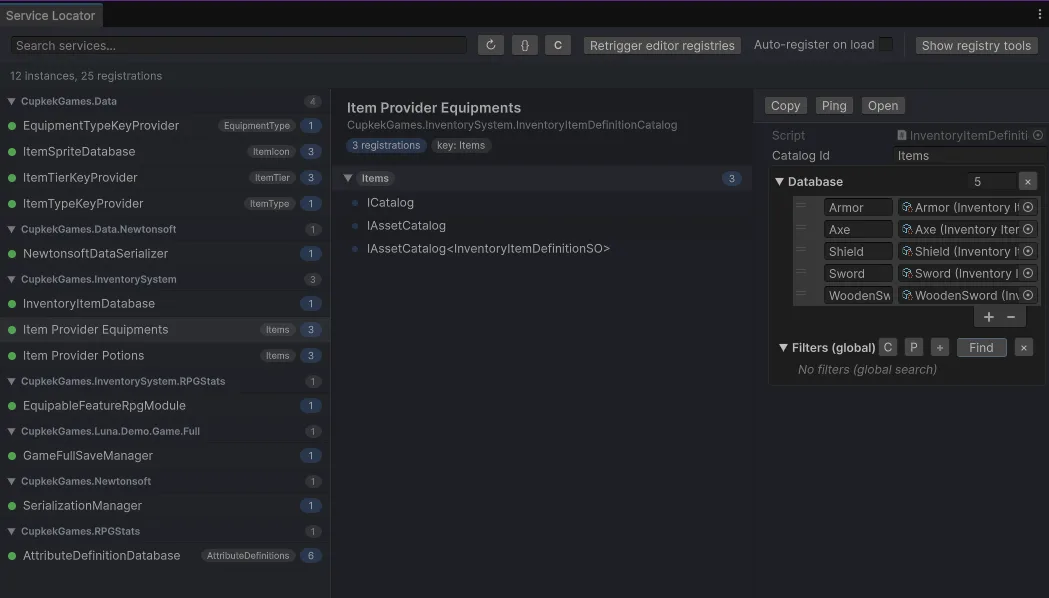
It supports:
- registration by service type
- optional keyed registration (
string key) - multiple registrations for the same type/key
- lookup APIs like
Get<T>()andGetAll<T>(key)
Typical Use
Register services at startup (usually through registries/providers and sequencer startup flow), then resolve from runtime systems.
ServiceLocator.Register(myService, typeof(IMyService));
IMyService service = ServiceLocator.Get<IMyService>();
Replacing ServiceLocatorRegisterMono (removed)
Older samples used a ServiceLocatorRegisterMono-style base class; that type is not part of the current stack.
Preferred: implement ServiceProvider and register in RegisterServices, unregister in UnregisterServices (Awake/OnDestroy call these when _autoRegister is left on):
public class CinemachineManager : ServiceProvider
{
  public override void RegisterServices()
  {
    ServiceLocator.Register(this, typeof(CinemachineManager)); // or typeof(IMyCameraService)
  }

  public override void UnregisterServices()
  {
    ServiceLocator.Remove(this);
  }
}
Alternatively: add the component to a scene ServiceRegistry (see Service Registry) under plain components or providers, so registration is centralized.
Keyed Services
Keyed registration is used heavily by data catalogs:
ServiceLocator.Register(catalog, typeof(ICatalog), "ItemIcon", append: true);
var catalogs = ServiceLocator.GetAll<ICatalog>("ItemIcon");
Debug Window (Editor)
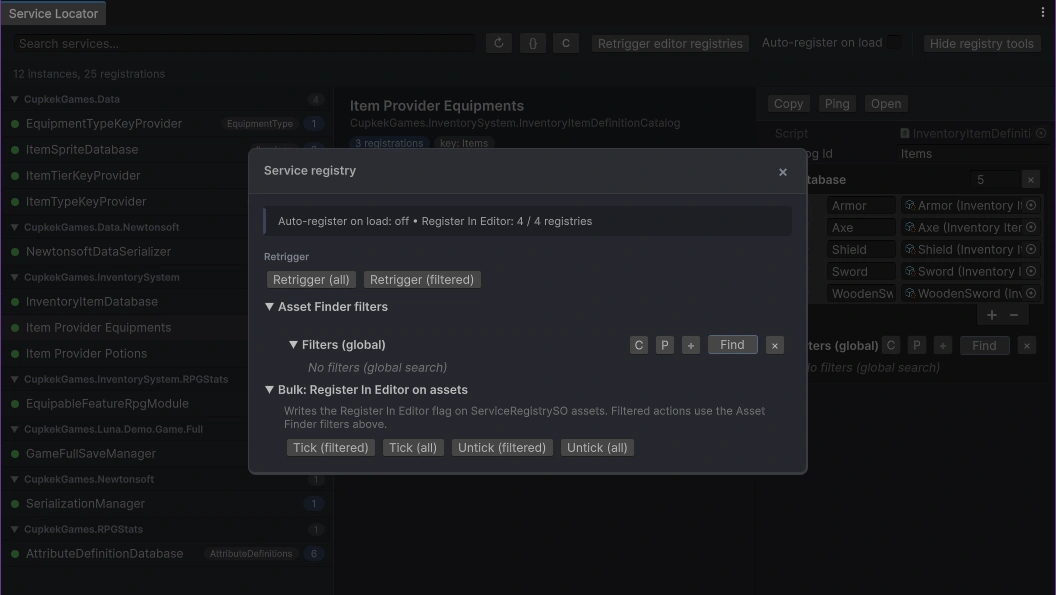
There is a built-in editor tool to inspect what’s currently registered:
- Menu:
Tools > CupkekGames > Debug > Service Locator(window title: Service Locator)
What it’s good for:
- confirm your services are registered (and under which keys)
- debug catalog lookups (
ICatalog,IAssetCatalog,IAssetCatalog<T>,IValueCatalog,IValueCatalog<T>) - see lazy registrations (type known, instance not created yet)
- search/filter and group by namespace
Notable features:
- “Catalog types” filter to focus on catalog-related services
- instance list grouped by registration key (shows
(default)vs keyed entries) - Ping/Open buttons to locate UnityEngine.Object instances
Register In Editor (ServiceRegistrySO)
Register In Editor on a ServiceRegistrySO asset pushes that registry’s services into the global ServiceLocator while you are in the Editor (Edit Mode), not only in Play Mode. That affects the whole Unity session: any code or tooling that resolves services in Edit Mode will see those registrations.
Because the locator is shared project-wide, sample registries could accidentally “pollute” consumer projects (demo items, serializer setup, etc.) as soon as samples are imported. Luna sample ServiceRegistrySO assets therefore ship with Register In Editor turned off. Runtime registration from scenes, ServiceRegistry, sequencers, and other play-mode flows is unchanged; only automatic Edit Mode bootstrap from those assets is suppressed by default.
To work on samples in Edit Mode when you need those services:
- Open Tools → CupkekGames → Debug → Service Locator.
- Optionally expand Registry filters (Asset Finder) and narrow which
ServiceRegistrySOassets you care about. - Use Tick (filtered) or Tick (all) to set Register In Editor on those assets (this writes the assets).
- Use Retrigger (filtered) or Retrigger (all) to run the editor pipeline:
UnregisterAll, thenRegisterAllon each registry where Register In Editor is enabled.
Clear locator calls ServiceLocator.ClearAll() and resets the global locator.
Bulk: Register In Editor on assets includes Untick (filtered) / Untick (all), which clears the flag and calls UnregisterAll on each affected asset so stale entries are not left behind.
Auto-register on load (Editor preference, off by default) controls whether Luna reapplies Register In Editor registries automatically after a domain reload or when returning from Play Mode. Leave it off in normal game projects; turn it on only when you intentionally want editor sessions to keep mirroring those registrations without using Retrigger. There is no backward-compatibility guarantee for the old “always auto-register on load” behavior.
Related Pages
Settings
Theme
Light
Contrast
Material
Dark
Dim
Material Dark
System
Sidebar(Light & Contrast only)
Font Family
DM Sans
Wix
Inclusive Sans
AR One Sans
Direction