
Key Value Database
Serialized key–value data for the inspector, with optional AssetFinder tooling on lists. Handy for large dictionaries (items, icons, quests, etc.).
Example from Hero Manager
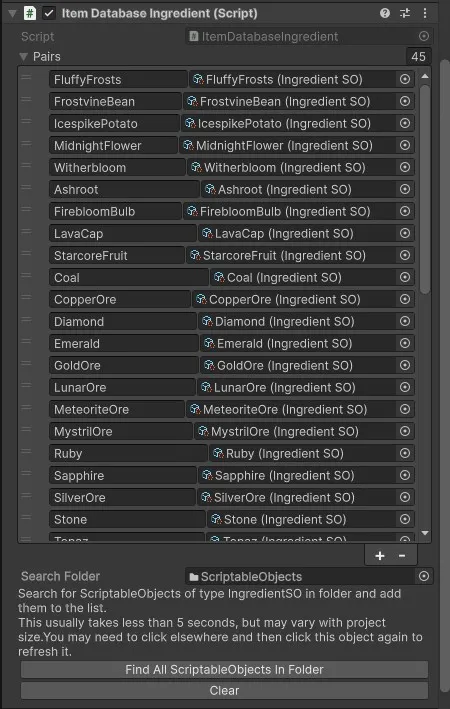
using CupkekGames.KeyValueDatabases;
using CupkekGames.Luna;
using UnityEngine;

namespace CupkekGames.HeroManager
{
  public class ItemDatabaseIngredient : KeyValueDatabaseMonoSO<string, IngredientSO>
  {
    public InventoryItemDefinition GetItemDefinition(string key)
    {
      if (string.IsNullOrEmpty(key))
      {
        Debug.Log("Null key");
        return null;
      }

      if (!ContainsKey(key))
      {
        Debug.Log("Ingredient doesnt exist: " + key);
        return null;
      }

      return GetValue(key).ItemDefinition;
    }
  }
}
Inspector (no custom editor needed)
The KeyValueDatabase<,> field uses a custom PropertyDrawer (KeyValueDatabaseDrawer). You normally do not add a CustomEditor just to draw the map—inherit KeyValueDatabaseMonoSO<TKey, TValue> (or use the database on a ScriptableObject / MonoBehaviour) and Unity shows the foldout list automatically.
If you need extra inspector UI (buttons, validation, etc.), use a normal CustomEditor and call DrawDefaultInspector() so the database field still uses the built-in drawer.
Removed in recent Luna / CupkekGamesCore: KeyValueDatabaseMonoSOEditor<,> — maintaining a generic editor subclass per database type was not worth it; the drawer replaces that workflow.
Note (2026-04-28): KeyValueDatabase moved out of the dissolved
com.cupkekgames.coreinto its own packagecom.cupkekgames.keyvaluedatabases. The namespace changed fromCupkekGames.CoretoCupkekGames.KeyValueDatabases. The drawer now ships inCupkekGames.KeyValueDatabases.Editor. See Architecture and Release Notes.
Settings
Theme
Light
Contrast
Material
Dark
Dim
Material Dark
System
Sidebar(Light & Contrast only)
Font Family
DM Sans
Wix
Inclusive Sans
AR One Sans
Direction