
USS Setup
Setting up a theme file
As always, you can refer to Game sample for an example setup.
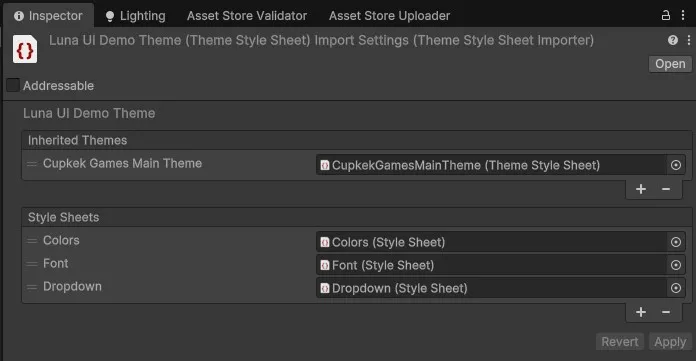
1 - Theme File
If you want to be able to use LunaUI's style files along with your custom styles, you need to inherit from "CupkekGamesMainTheme".
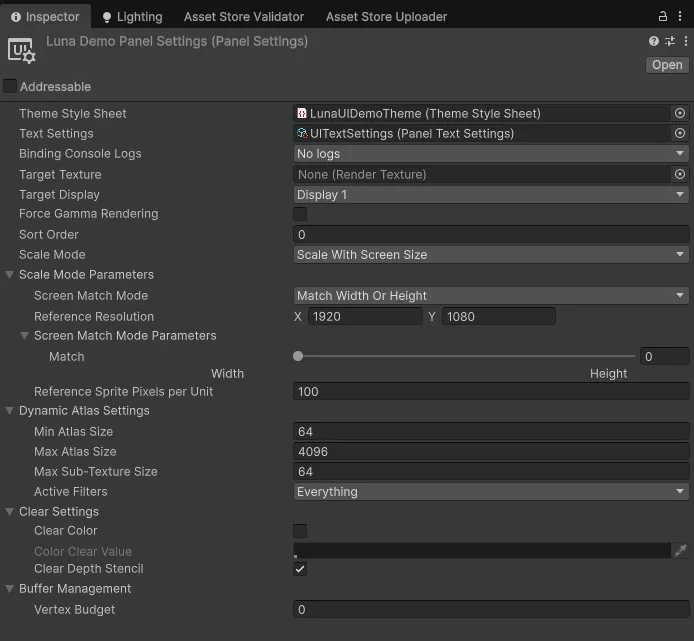
2 - Panel Settings
Make sure your panel settings are using the correct Theme Style Sheet.
3 - Overriding or expanding global styles
As shown in the image in step 1, colors, fonts, and dropdown style sheets have been added. These style sheets override the styles from the CupkekGamesMainTheme.
Text & font
For example, to style text and fonts, refer to Text.
Override dropdown colors
css
:root {
	--color-dropdown-bg: var(--color-slate-600);
	--color-dropdown-hover: var(--color-slate-400);
	--color-dropdown-active: var(--color-primary-400);
}
Define the base, primary and secondary colors
css
:root {
	--color-base-50: #f8fafc;
	--color-base-100: #f1f5f9;
	--color-base-200: #e2e8f0;
	--color-base-300: #cbd5e1;
	--color-base-400: #94a3b8;
	--color-base-500: #64748b;
	--color-base-600: #475569;
	--color-base-700: #334155;
	--color-base-800: #1e293b;
	--color-base-900: #0f172a;
	--color-base-950: #020617;

	--color-primary-50: #faf5ff;
	--color-primary-100: #f3e8ff;
	--color-primary-200: #e9d5ff;
	--color-primary-300: #d8b4fe;
	--color-primary-400: #c084fc;
	--color-primary-500: #a855f7;
	--color-primary-600: #9333ea;
	--color-primary-700: #7e22ce;
	--color-primary-800: #6b21a8;
	--color-primary-900: #581c87;
	--color-primary-950: #3b0764;

	--color-secondary-50: #f0fdfa;
	--color-secondary-100: #ccfbf1;
	--color-secondary-200: #99f6e4;
	--color-secondary-300: #5eead4;
	--color-secondary-400: #2dd4bf;
	--color-secondary-500: #14b8a6;
	--color-secondary-600: #0d9488;
	--color-secondary-700: #0f766e;
	--color-secondary-800: #115e59;
	--color-secondary-900: #134e4a;
	--color-secondary-950: #042f2e;
}Settings
Theme
Light
Contrast
Material
Dark
Dim
Material Dark
System
Sidebar(Light & Contrast only)
Font Family
DM Sans
Wix
Inclusive Sans
AR One Sans
Direction
Left to RightLTR
Right to LeftRTL