
Data Package
The Data package is the foundation for data-driven workflows across systems.
It is broader than catalogs. Catalogs are one part of it.
What It Covers
- data contracts (for example
IData) - cloning/validation lifecycle expectations
DataSOworkflows (default vs actual data for play mode)- JSON copy/paste authoring workflows in inspector (via
IDataSerializer) - key-based references (
CatalogKey) - catalog interfaces and providers (
ICatalog,IAssetCatalog,AssetCatalog<T>) - editor integrations for safer authoring and better inspector UX
Design Goals
- keep runtime data simple and serializable
- avoid hard scene/asset coupling in gameplay models
- make data authoring friendly in inspector
- support future import pipelines (local JSON, remote JSON/web content)
Why Teams Use It
- Cleaner saves and diffs: mostly primitives and strings in serialized data
- Flexible providers: you can swap where values come from without changing data schema
- Better authoring flow: key fields can still provide preview and picker UX
- Scalable content: external data pipelines can target stable key formats
Typical Stack
- Data model stores ids/keys.
- Catalog/provider services register at startup.
- Runtime and editor resolve keys to actual values.
- UI/gameplay consume resolved values.
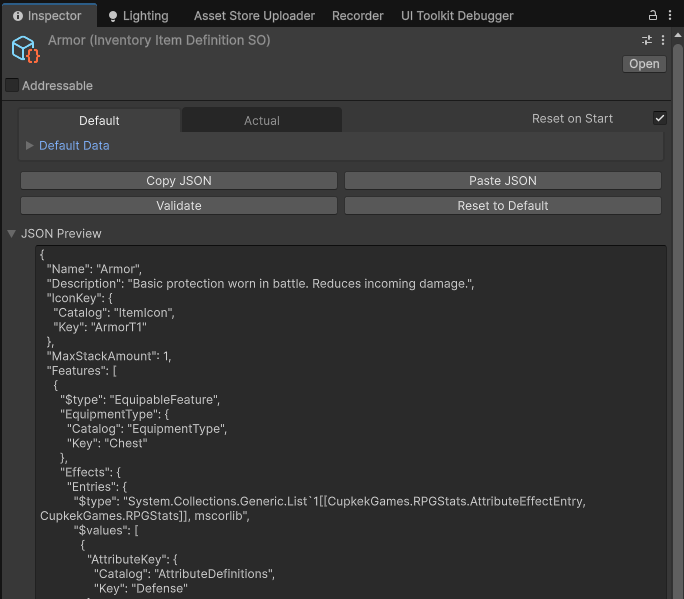
DataSO: Default vs Actual (Play Mode Friendly)
DataSO<T> maintains two copies of the same data:
- Default: the authoring baseline (what you ship / want to reset to)
- Actual: the runtime working copy (what gameplay mutates)
This gives you a clean workflow:
- tweak defaults in edit mode
- freely mutate actual values during play mode
- optionally reset actual values on each play session start
Reset-on-start behavior
If Reset on Start is enabled, entering play mode clones:
default -> actual
This is done via IData.CloneData() to avoid shared references.
Why this matters
- avoids “play mode polluted my asset” problems
- supports rapid iteration (play, test, reset)
- keeps runtime state isolated from the authored baseline
JSON Copy/Paste + Preview (Inspector Tooling)
The DataSO inspector supports:
- Copy JSON (default or actual tab)
- Paste JSON (into default or actual)
- JSON Preview foldout
This workflow is powered by IDataSerializer, resolved via ServiceLocator.
Practical uses
- bulk edit data using external tools
- quickly diff / review data changes
- import data from web/remote JSON by pasting payloads during development
If
IDataSerializerisn’t registered yet, the JSON preview/buttons will warn instead of throwing.
Related Pages
Settings
Theme
Light
Contrast
Material
Dark
Dim
Material Dark
System
Sidebar(Light & Contrast only)
Font Family
DM Sans
Wix
Inclusive Sans
AR One Sans
Direction
Left to RightLTR
Right to LeftRTL