
Prefab Loader
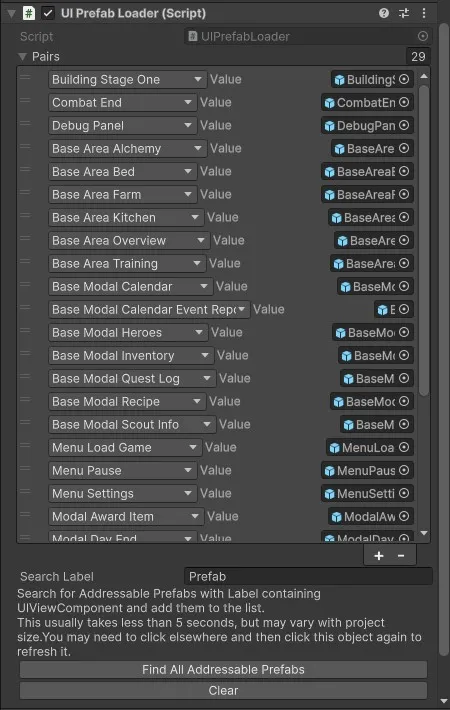
Load and track prefabs. Has normal and addressable version. With minimal scripting, you can add some useful inspector buttons to search and find all prefabs at once.
Addressable Example from Hero Manager
csharp
using CupkekGames.Systems.UI;

namespace CupkekGames.HeroManager
{
  public class UIPrefabLoader : UIPrefabLoaderAddressable<UIPrefabType>
  {
    private static UIPrefabLoader _instance;

    public static UIPrefabLoader Instance
    {
      get
      {
        return _instance;
      }
    }

    protected override void Awake()
    {
      if (_instance == null)
      {
        _instance = this;
        DontDestroyOnLoad(gameObject); // Optional: keep this instance across scenes
      }
      else
      {
        Destroy(gameObject); // Destroy duplicate instances
        return;
      }

      base.Awake();
    }

    private void OnDestroy()
    {
      if (_instance == this)
      {
        _instance = null;
      }
    }
  }
}
csharp
#if UNITY_EDITOR
using UnityEditor;
using CupkekGames.Systems.Editor;
using CupkekGames.Luna;
using System;

namespace CupkekGames.HeroManager.Editor
{
    [CustomEditor(typeof(UIPrefabLoader), true)]
    public class UIPrefabLoaderEditor : PrefabLoaderAddressableEditor<UIPrefabType, UIViewComponent>
    {
        public override UIPrefabType GetKeyFromFileName(string name)
        {
            if (Enum.TryParse(name, out UIPrefabType enumValue))
            {
                // Conversion succeeded
                return enumValue;
            }
            else
            {
                // Handle the case where conversion failed
                throw new Exception("Invalid enum string: " + name);
            }
        }
    }
}
#endifSettings
Theme
Light
Contrast
Material
Dark
Dim
Material Dark
System
Sidebar(Light & Contrast only)
Font Family
DM Sans
Wix
Inclusive Sans
AR One Sans
Direction
Left to RightLTR
Right to LeftRTL